X 归档 2026-05-30

New Opus 4.8 crashed Opus 4.7 at physics on canvas!
We gave both models the same three prompts: simulate a real physics phenomenon on raw HTML5 canvas.
Prompt 1: "A triple pendulum swings into chaos and paints glowing trails with its tip"
Prompt 2: "A 1 kg block bounces…
We gave both models the same three prompts: simulate a real physics phenomenon on raw HTML5 canvas.
Prompt 1: "A triple pendulum swings into chaos and paints glowing trails with its tip"
Prompt 2: "A 1 kg block bounces…
新的 Opus 4.8 在 canvas 物理模拟上碾压了 Opus 4.7!
我们给两个模型同样的三个提示词:在原生 HTML5 canvas 上模拟一个真实的物理现象。
提示词 1:「一个三重摆荡入混沌,摆锤尖端画出发光的轨迹」
提示词 2:「一个 1 kg 的方块弹跳…
我们给两个模型同样的三个提示词:在原生 HTML5 canvas 上模拟一个真实的物理现象。
提示词 1:「一个三重摆荡入混沌,摆锤尖端画出发光的轨迹」
提示词 2:「一个 1 kg 的方块弹跳…

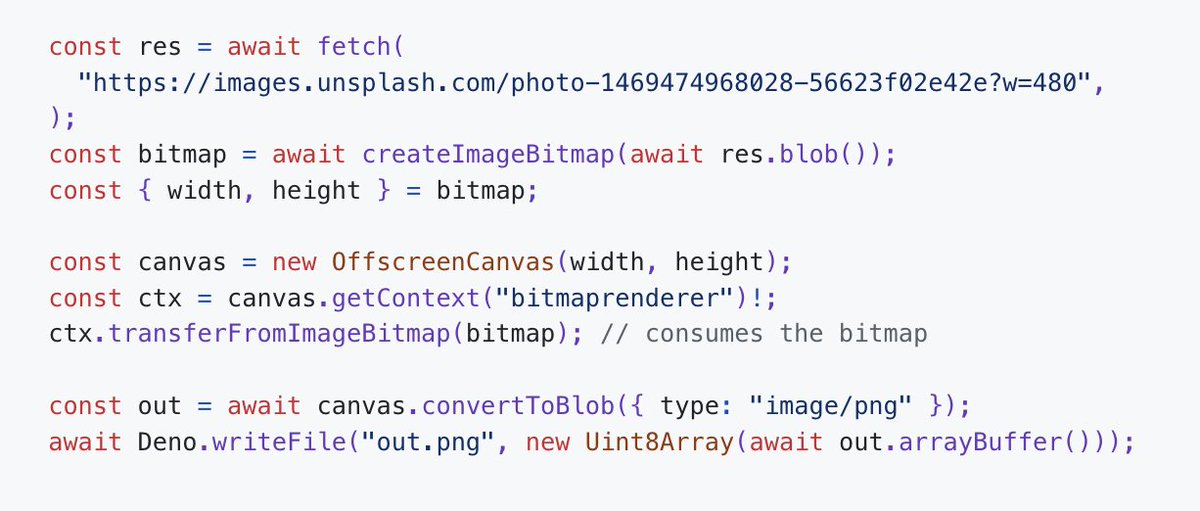

browsers mostly skip updating hover state while you scroll
so I made super-hover, a tiny utility library that checks what's under your cursor every frame!
`pnpm add super-hover`
so I made super-hover, a tiny utility library that checks what's under your cursor every frame!
`pnpm add super-hover`
浏览器在滚动时大多不会更新 hover 状态
所以我做了 super-hover,一个每帧检查光标下面是什么的小工具库!
`pnpm add super-hover`
所以我做了 super-hover,一个每帧检查光标下面是什么的小工具库!
`pnpm add super-hover`

take this a step further: interpolate proximity through easing curves
same distance input, better-feeling output 🧑🍳
p.s. avoid calling getBoundingClientRect() inside pointermove. cache your measurements where possible and reuse https://t.co/YjIKEzyEie
same distance input, better-feeling output 🧑🍳
p.s. avoid calling getBoundingClientRect() inside pointermove. cache your measurements where possible and reuse https://t.co/YjIKEzyEie
再进一步:用缓动曲线对邻近度做插值
同样的距离输入,手感更好的输出 🧑🍳
p.s. 避免在 pointermove 里调用 getBoundingClientRect()。尽可能缓存测量结果并复用 https://t.co/YjIKEzyEie
同样的距离输入,手感更好的输出 🧑🍳
p.s. 避免在 pointermove 里调用 getBoundingClientRect()。尽可能缓存测量结果并复用 https://t.co/YjIKEzyEie
if you’re dynamically masking a scroll container with css, consider leaving room for the scrollbar instead of masking it too 🧑🍳
mask-repeat: no-repeat;
mask-size: calc(100% - 10px) 100px; https://t.co/4BaLOEW3Ks
mask-repeat: no-repeat;
mask-size: calc(100% - 10px) 100px; https://t.co/4BaLOEW3Ks
如果你在用 CSS 给滚动容器做动态遮罩,考虑给滚动条留出位置,而不是把它也一起遮掉 🧑🍳
mask-repeat: no-repeat;
mask-size: calc(100% - 10px) 100px; https://t.co/4BaLOEW3Ks
mask-repeat: no-repeat;
mask-size: calc(100% - 10px) 100px; https://t.co/4BaLOEW3Ks

you can create a sticky navbar that morphs when you scroll with pure CSS, no JS or animation libraries required
𝚑𝚎𝚊𝚍𝚎𝚛 {
𝚌𝚘𝚗𝚝𝚊𝚒𝚗𝚎𝚛-𝚝𝚢𝚙𝚎: 𝚜𝚌𝚛𝚘𝚕𝚕-𝚜𝚝𝚊𝚝𝚎;
𝚙𝚘𝚜𝚒𝚝𝚒𝚘𝚗: 𝚜𝚝𝚒𝚌𝚔𝚢;
𝚝𝚘𝚙: 𝟶;
}
@𝚌𝚘𝚗𝚝𝚊𝚒𝚗𝚎𝚛
𝚑𝚎𝚊𝚍𝚎𝚛 {
𝚌𝚘𝚗𝚝𝚊𝚒𝚗𝚎𝚛-𝚝𝚢𝚙𝚎: 𝚜𝚌𝚛𝚘𝚕𝚕-𝚜𝚝𝚊𝚝𝚎;
𝚙𝚘𝚜𝚒𝚝𝚒𝚘𝚗: 𝚜𝚝𝚒𝚌𝚔𝚢;
𝚝𝚘𝚙: 𝟶;
}
@𝚌𝚘𝚗𝚝𝚊𝚒𝚗𝚎𝚛
用纯 CSS 就能做一个滚动时会形变的吸顶导航栏,不需要任何 JS 或动画库
𝚑𝚎𝚊𝚍𝚎𝚛 {
𝚌𝚘𝚗𝚝𝚊𝚒𝚗𝚎𝚛-𝚝𝚢𝚙𝚎: 𝚜𝚌𝚛𝚘𝚕𝚕-𝚜𝚝𝚊𝚝𝚎;
𝚙𝚘𝚜𝚒𝚝𝚒𝚘𝚗: 𝚜𝚝𝚒𝚌𝚔𝚢;
𝚝𝚘𝚙: 𝟶;
}
@𝚌𝚘𝚗𝚝𝚊𝚒𝚗𝚎𝚛
𝚑𝚎𝚊𝚍𝚎𝚛 {
𝚌𝚘𝚗𝚝𝚊𝚒𝚗𝚎𝚛-𝚝𝚢𝚙𝚎: 𝚜𝚌𝚛𝚘𝚕𝚕-𝚜𝚝𝚊𝚝𝚎;
𝚙𝚘𝚜𝚒𝚝𝚒𝚘𝚗: 𝚜𝚝𝚒𝚌𝚔𝚢;
𝚝𝚘𝚙: 𝟶;
}
@𝚌𝚘𝚗𝚝𝚊𝚒𝚗𝚎𝚛
Scroll masking with CSS scroll animation as a progressive enhancement ⭐️
.scroller {
animation: mask-up;
animation-timeline: scroll(self);
animation-range: 0 1rem;
mask-composite: exclude;
}
@keyframes mask-up {
to { mask-size: 100% 120px, 100% 100%; }
}
.scroller {
animation: mask-up;
animation-timeline: scroll(self);
animation-range: 0 1rem;
mask-composite: exclude;
}
@keyframes mask-up {
to { mask-size: 100% 120px, 100% 100%; }
}
用 CSS 滚动动画做滚动遮罩,作为一种渐进增强 ⭐️
.scroller {
animation: mask-up;
animation-timeline: scroll(self);
animation-range: 0 1rem;
mask-composite: exclude;
}
@keyframes mask-up {
to { mask-size: 100% 120px, 100% 100%; }
}
.scroller {
animation: mask-up;
animation-timeline: scroll(self);
animation-range: 0 1rem;
mask-composite: exclude;
}
@keyframes mask-up {
to { mask-size: 100% 120px, 100% 100%; }
}

@SumitM_X You should store a timestamp and leave yourself a safe deletion window. After a week or a month, you can then perform the actual deletion or transfer.
@SumitM_X 你应该保存一个时间戳,给自己留一个安全的删除窗口。过上一周或一个月,再执行真正的删除或转移。

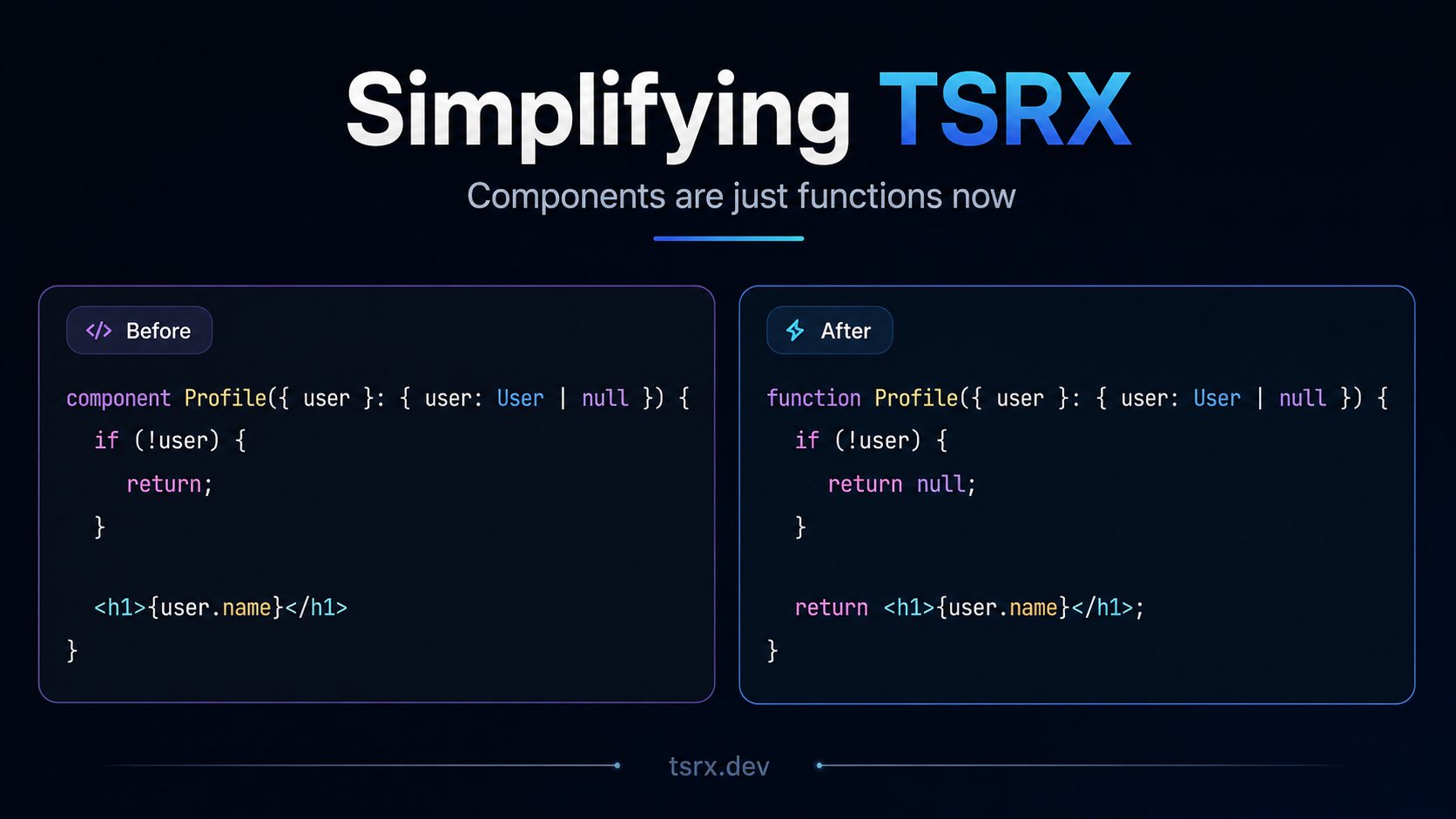
The TSRX team has listened to feedback and made some important design changes.
We’ve removed the component keyword, cut back on parts that felt too magical, and aligned TSRX more closely with JSX in how components are consumed. ⤵️
We’ve removed the component keyword, cut back on parts that felt too magical, and aligned TSRX more closely with JSX in how components are consumed. ⤵️
TSRX 团队听取了反馈,做了一些重要的设计调整。
我们移除了 component 关键字,砍掉了那些感觉过于「魔法」的部分,并让 TSRX 在组件的使用方式上更贴近 JSX。 ⤵️
我们移除了 component 关键字,砍掉了那些感觉过于「魔法」的部分,并让 TSRX 在组件的使用方式上更贴近 JSX。 ⤵️
extra little details™
animate a CSS custom property to sync scrollbar-color with the active item ✨
html {
scrollbar-color: oklch(65% 0.3 var(--p)) #0000;
animation: sync;
animation-timeline: --ul;
animation-range: entry 50% exit 50%
}
@keyframes sync { to { --p: 320; } }
scrollbar-color:
var(--thumb, canvasText) var(--track, #0000);
lose the vanilla track
you can even get dynamic with it 👇
animate a CSS custom property to sync scrollbar-color with the active item ✨
html {
scrollbar-color: oklch(65% 0.3 var(--p)) #0000;
animation: sync;
animation-timeline: --ul;
animation-range: entry 50% exit 50%
}
@keyframes sync { to { --p: 320; } }
⤵
css scrollbar-color lets you style the thumb and track of a scrollbar 🧑🍳scrollbar-color:
var(--thumb, canvasText) var(--track, #0000);
lose the vanilla track
you can even get dynamic with it 👇
css 的 scrollbar-color 可以让你自定义滚动条滑块和轨道的样式 🧑🍳
scrollbar-color:
var(--thumb, canvasText) var(--track, #0000);
告别原生默认轨道
你甚至可以把它玩出动态效果 👇
https://t.co/q6gSD2OfJl
scrollbar-color:
var(--thumb, canvasText) var(--track, #0000);
告别原生默认轨道
你甚至可以把它玩出动态效果 👇
https://t.co/q6gSD2OfJl