
X 日报:2026-10-22

Eleven v4 Turbo is live. ~150ms to first speech, REST + streaming + SDKs, one model_id to switch between v4 and v4 Turbo.
Eleven v4 Turbo 上线。约 150ms 首字出声,REST + 流式 + SDK,一个 model_id 即可在 v4 与 v4 Turbo 之间切换。

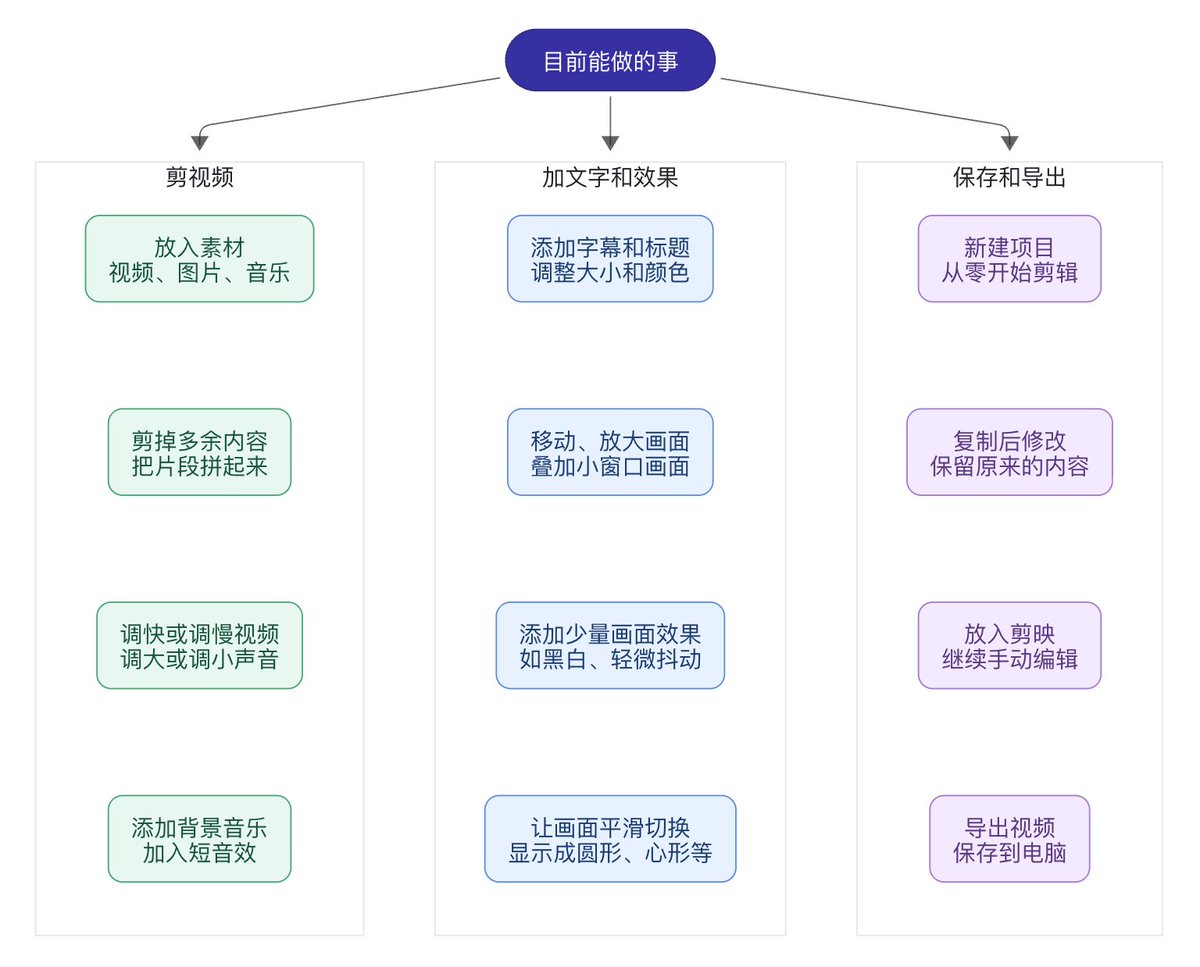
无头剪映和剪映Skill大升级!这次我把安装包分享给大家了,一定要保存!一定要保存!大家别再老是和我说版本不适配的问题了。。。😅
1、适配剪映 11.6.0:现在默认使用新版剪映,原来的 11.5、11.4.2 也继续兼容。
2、接入Openverse:超过520万个音频文件!免费使用!音效直接解放!每次使用联网获取即可(配置好的)
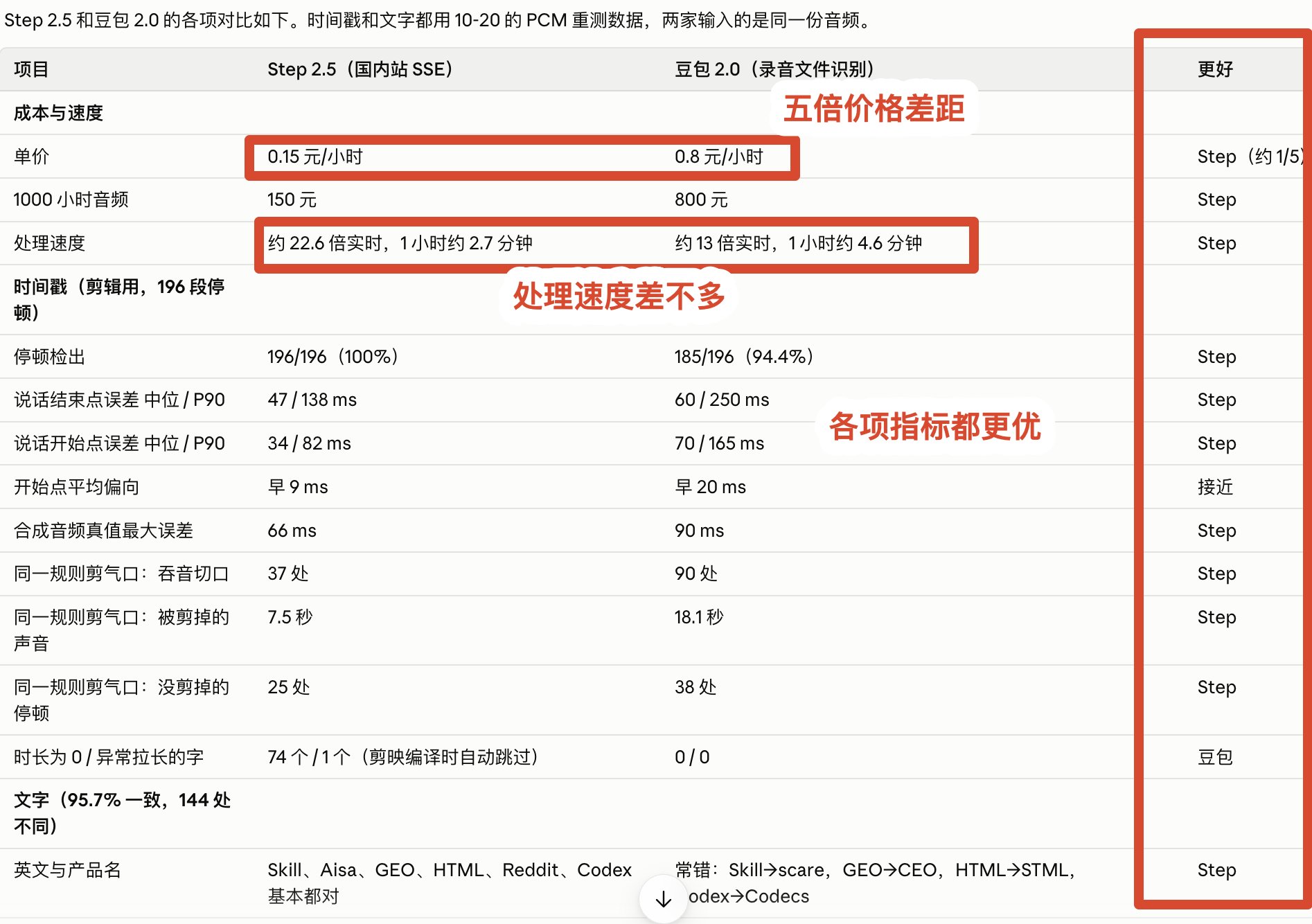
3、ASR模型成本降低五倍:从豆包ASR改为Step 2.5 ASR 首发,剪辑视频效果和各项指标更优,成本是0.15元/h(对比豆包0.8元/h),同样支持毫秒级输出。
11.6.0永久安装包地址:
https://
pan.quark.cn/s/2595af66ee0b
无头剪映GitHub地址:
https://
github.com/mcncarl/jianyi
ng-headless
…
配套剪辑Skill地址:
https://
github.com/mcncarl/yichen
-skills/tree/main/yichen-jianying-edit
…
Step 2.5 ASR中国站地址:
https://
platform.stepfun.com
把我珍藏已久的好东西分享给家人们,剪映11.4.2开源!!!🥳🥳🥳
https://
github.com/mcncarl/jianyi
ng-headless
…
配套神级Skill:
https://
github.com/mcncarl/yichen
-skills/tree/main/yichen-jianying-edit
…
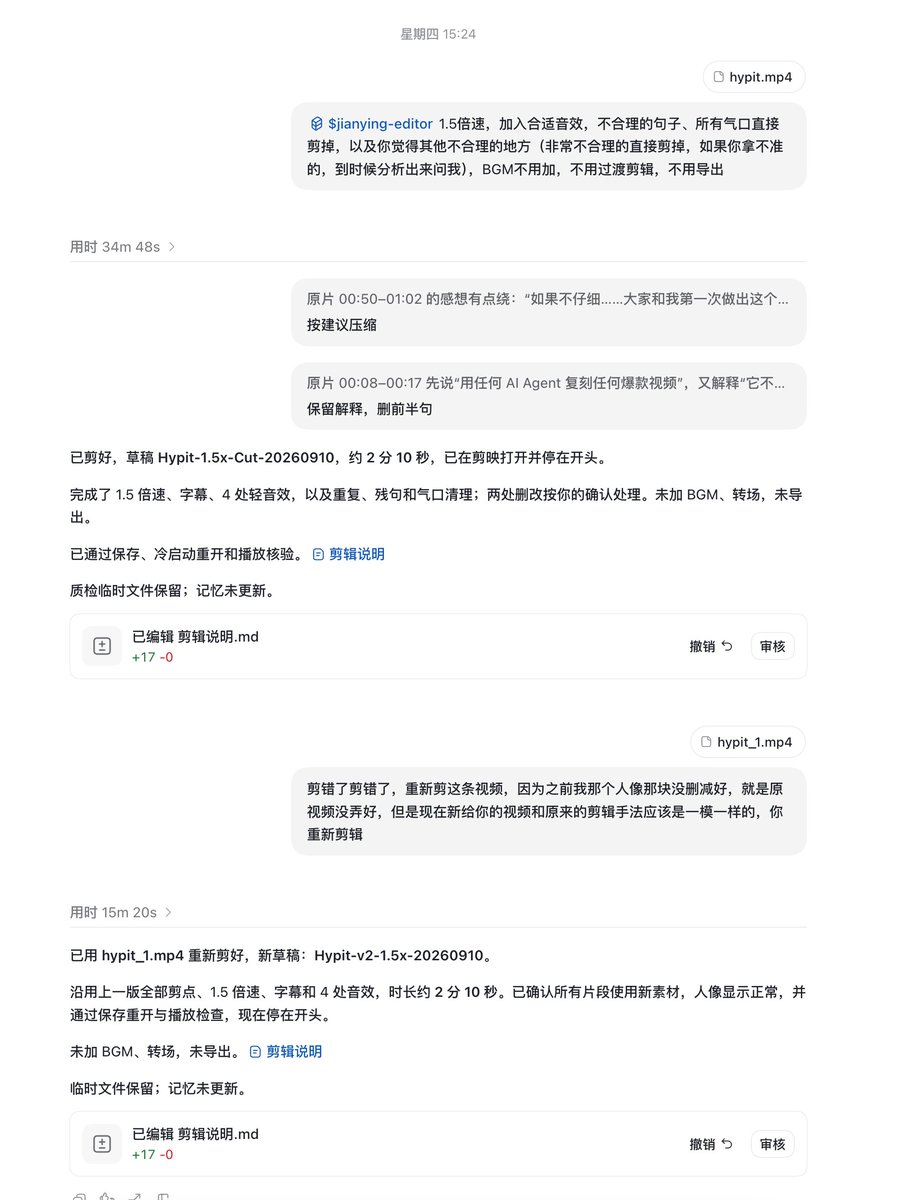
只需要简单提示词,口播类视频,全程托管给Codex,不需要任何人类操作。
即使略微失误,由于调用豆包ASR,片段被切割到毫秒级别,导入剪映草稿也可以人工丝滑调整😋
https://
github.com/mcncarl/jianyi
ng-headless
…
配套神级Skill:
https://
github.com/mcncarl/yichen
-skills/tree/main/yichen-jianying-edit
…
只需要简单提示词,口播类视频,全程托管给Codex,不需要任何人类操作。
即使略微失误,由于调用豆包ASR,片段被切割到毫秒级别,导入剪映草稿也可以人工丝滑调整😋

Parallels Desktop的商业价值要趋于0了。https://github.com/utmapp/UTM/releases/tag/v5.0.8

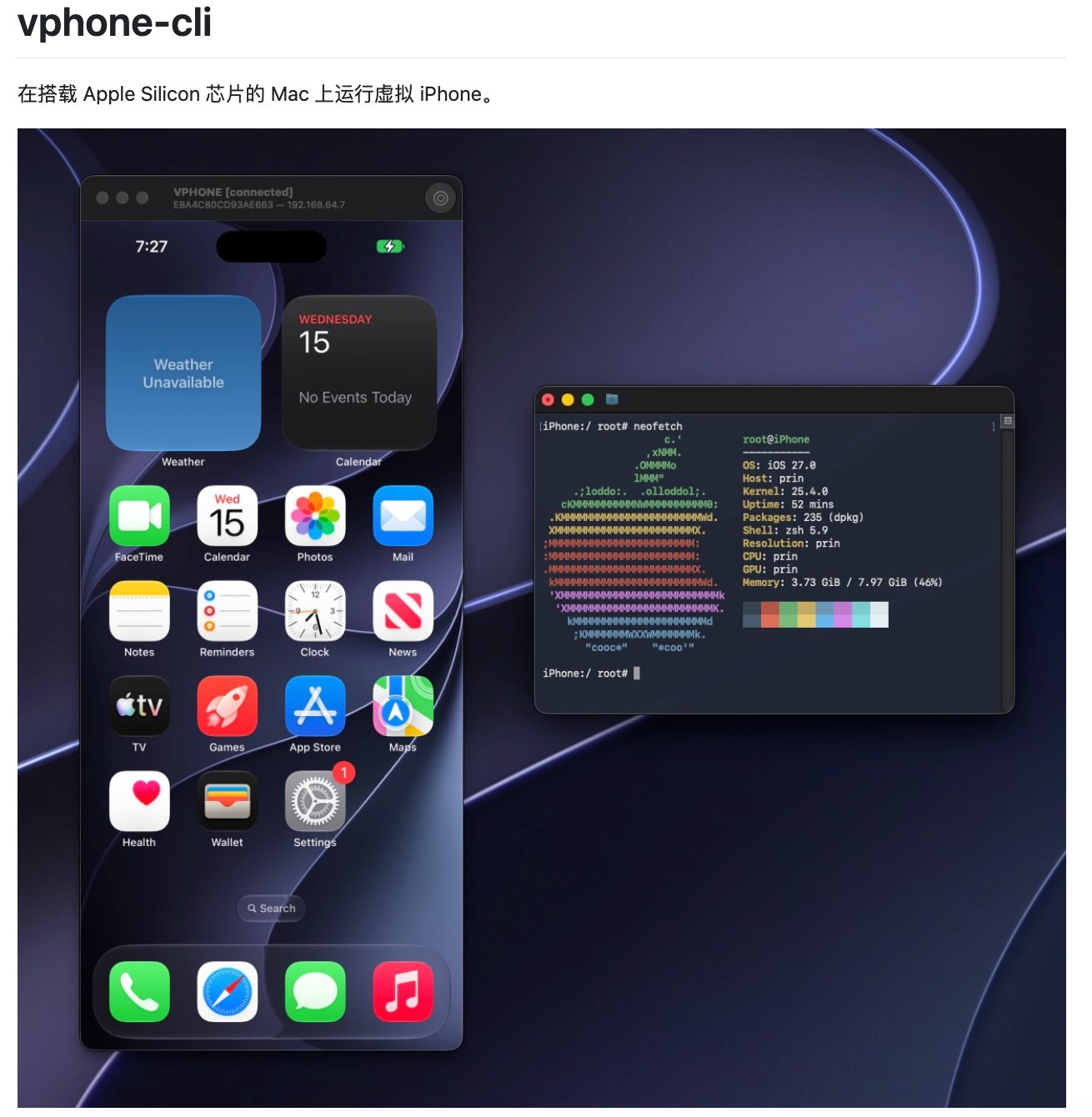
PC 上跑 iOS 虚拟机,还是越狱版、bootstrap 都装好了——这个开源项目我翻了一圈,不是玩票性质,是能实打实跑起来的。
作者自己留了话:想要更新更勤、支持更好的,去用 vphone-cli 那个仓库,现在 iOS 27 都支持上了。
作者自己留了话:想要更新更勤、支持更好的,去用 vphone-cli 那个仓库,现在 iOS 27 都支持上了。

家人们,发现个宝藏,搬运圈的天要变了。
最近在 GitHub 上扒到一个真正闷声搞事的自动化神器——Y2A-Auto。这不是那种花里胡哨的半成品,而是一条完整的无人流水线:从 YouTube 扒视频、AI 翻译加字幕、再到一键发布 B 站和 AcFun,全程不用你动手。关键人家还全开源、免费用,这波羊毛不薅血亏。
🚀
最近在 GitHub 上扒到一个真正闷声搞事的自动化神器——Y2A-Auto。这不是那种花里胡哨的半成品,而是一条完整的无人流水线:从 YouTube 扒视频、AI 翻译加字幕、再到一键发布 B 站和 AcFun,全程不用你动手。关键人家还全开源、免费用,这波羊毛不薅血亏。
🚀

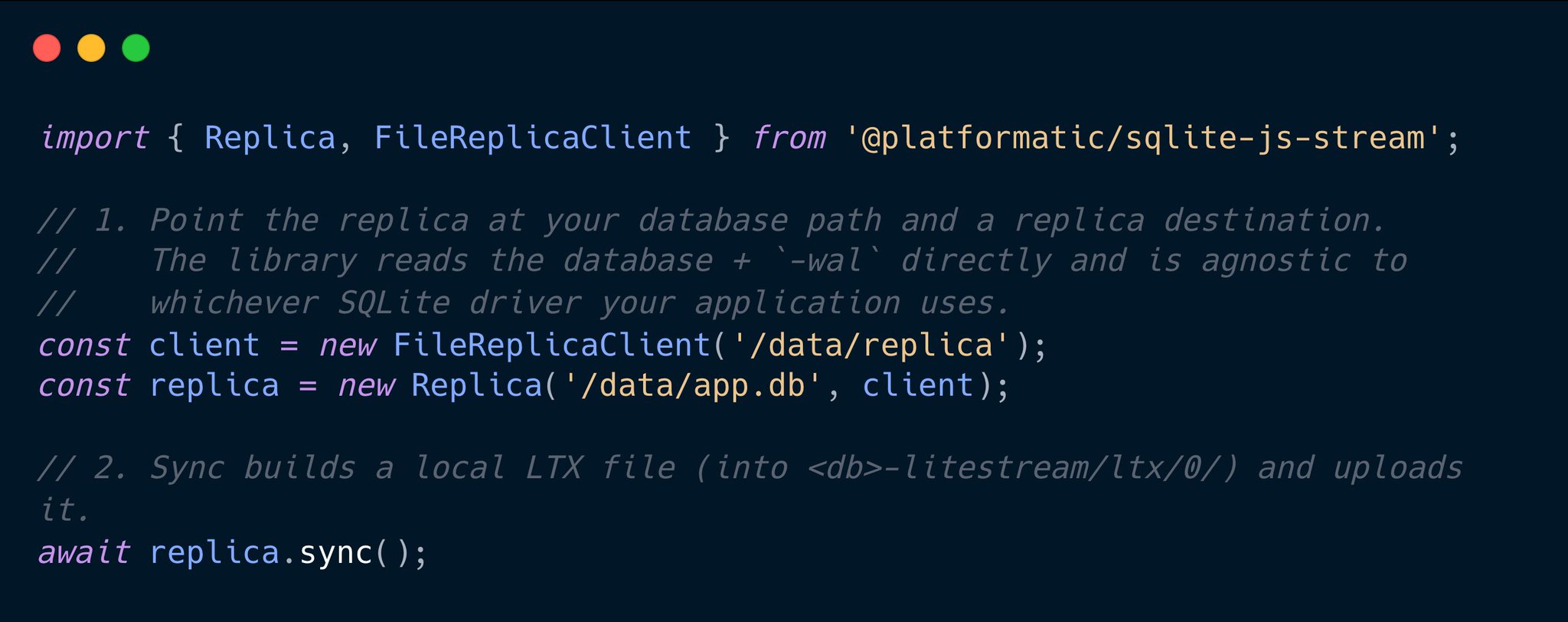
SQLite is the most used database in the world, and its biggest weakness has always been the same: it runs on one machine, and if that machine dies, your data is gone. The usual fix is Litestream, but that's a Go binary you have to babysit.
So we (
@platformatic
) rewrote it in TypeScript.
So we (
@platformatic
) rewrote it in TypeScript.
SQLite 是世界上使用最广泛的数据库,它最大的弱点一直都是同一个:它运行在一台机器上,如果那台机器坏了,你的数据就没了。常见的解决办法是 Litestream,但那是一个需要你亲自照看的 Go 二进制文件。
所以我们(
@platformatic
)用 TypeScript 重写了它。
所以我们(
@platformatic
)用 TypeScript 重写了它。

给 Claude 一套更好的 Markdown 组件审美 ⏎ https://mdxcn.dev

playin' with stickers again 🕹️
different materials, sounds, wear marks
via css or webgl 🧑🍳
different materials, sounds, wear marks
via css or webgl 🧑🍳
又玩起贴纸了 🕹️ ⏎ 不同材质、音效、磨损痕迹 ⏎ 用 css 或 webgl 实现 🧑🍳

听说了吗,闲鱼上一堆卖家都跑这儿来进货了!
FMHY,全网规模最大的免费资源聚合站,某鱼上卖资源的那些货,全是从这儿搬走的,你每花一分钱基本都白扔。
它到底强在哪?
1️⃣ 流媒体、音乐、游戏、电子书、AI 工具,分类理得明明白白,想拿啥直接拎走
2️⃣ 近 3
FMHY,全网规模最大的免费资源聚合站,某鱼上卖资源的那些货,全是从这儿搬走的,你每花一分钱基本都白扔。
它到底强在哪?
1️⃣ 流媒体、音乐、游戏、电子书、AI 工具,分类理得明明白白,想拿啥直接拎走
2️⃣ 近 3


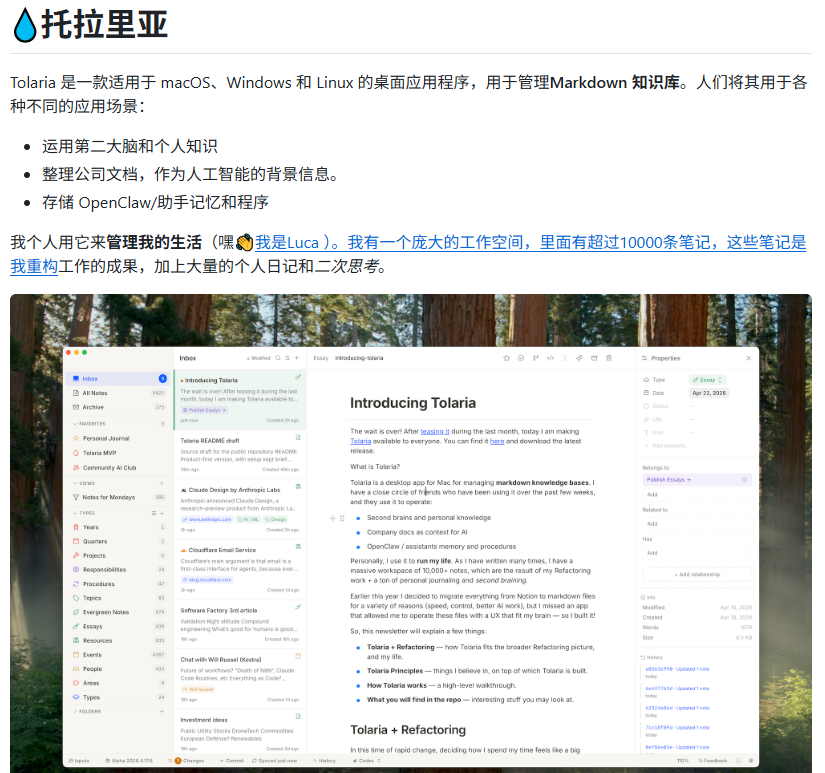
笔记党这回真能乐一乐了。
Obsidian总算有了个开源平替,Tauri+React+TypeScript三件套硬扛,专治Markdown知识库这摊活儿。
往后不用再被订阅和闭源卡着脖子,知识库还是攥在自己手里才踏实。
🔗 https://github.com/refactoringhq/tolaria
Obsidian总算有了个开源平替,Tauri+React+TypeScript三件套硬扛,专治Markdown知识库这摊活儿。
往后不用再被订阅和闭源卡着脖子,知识库还是攥在自己手里才踏实。
🔗 https://github.com/refactoringhq/tolaria

30 个看起来违规实际合法的 AI 网站,个个都能省钱。
1.
https://
raphael.ai — 免费无限生图,质量逼近 Midjourney
2.
https://
krea.ai — 实时生图,边画边出
3.
https://
magnific.ai — AI 无限放大图片,细节自动补
4.
https://
clipdrop.co — 一键去背景、补光、擦除
5.
1.
https://
raphael.ai — 免费无限生图,质量逼近 Midjourney
2.
https://
krea.ai — 实时生图,边画边出
3.
https://
magnific.ai — AI 无限放大图片,细节自动补
4.
https://
clipdrop.co — 一键去背景、补光、擦除
5.

Bun v1.4.4
- Fixes 271 issues, addressing 544 👍
- `bun fmt` is a fast Prettier-compatible code formatter
- `bun check` gets 1.4x - 7.8x faster
- New in Bun.SQL & WebSocket
- Security fixes, including for Brotli, TLS certs, HTTP/3, and more
https://bun.com/blog/bun-v1.4.4
- Fixes 271 issues, addressing 544 👍
- `bun fmt` is a fast Prettier-compatible code formatter
- `bun check` gets 1.4x - 7.8x faster
- New in Bun.SQL & WebSocket
- Security fixes, including for Brotli, TLS certs, HTTP/3, and more
https://bun.com/blog/bun-v1.4.4
Bun v1.4.4 ⏎ - 修复 271 个 issue,关账 544 个 👍 ⏎ - `bun fmt`:与 Prettier 兼容的快速代码格式化器 ⏎ - `bun check` 提速 1.4~7.8 倍 ⏎ - Bun.SQL 与 WebSocket 新特性 ⏎ - 安全修复:Brotli、TLS 证书、HTTP/3 等 ⏎ https://bun.com/blog/bun-v1.4.4

Claude 最好用的 UI 库 ⏎ https://hextaui.com

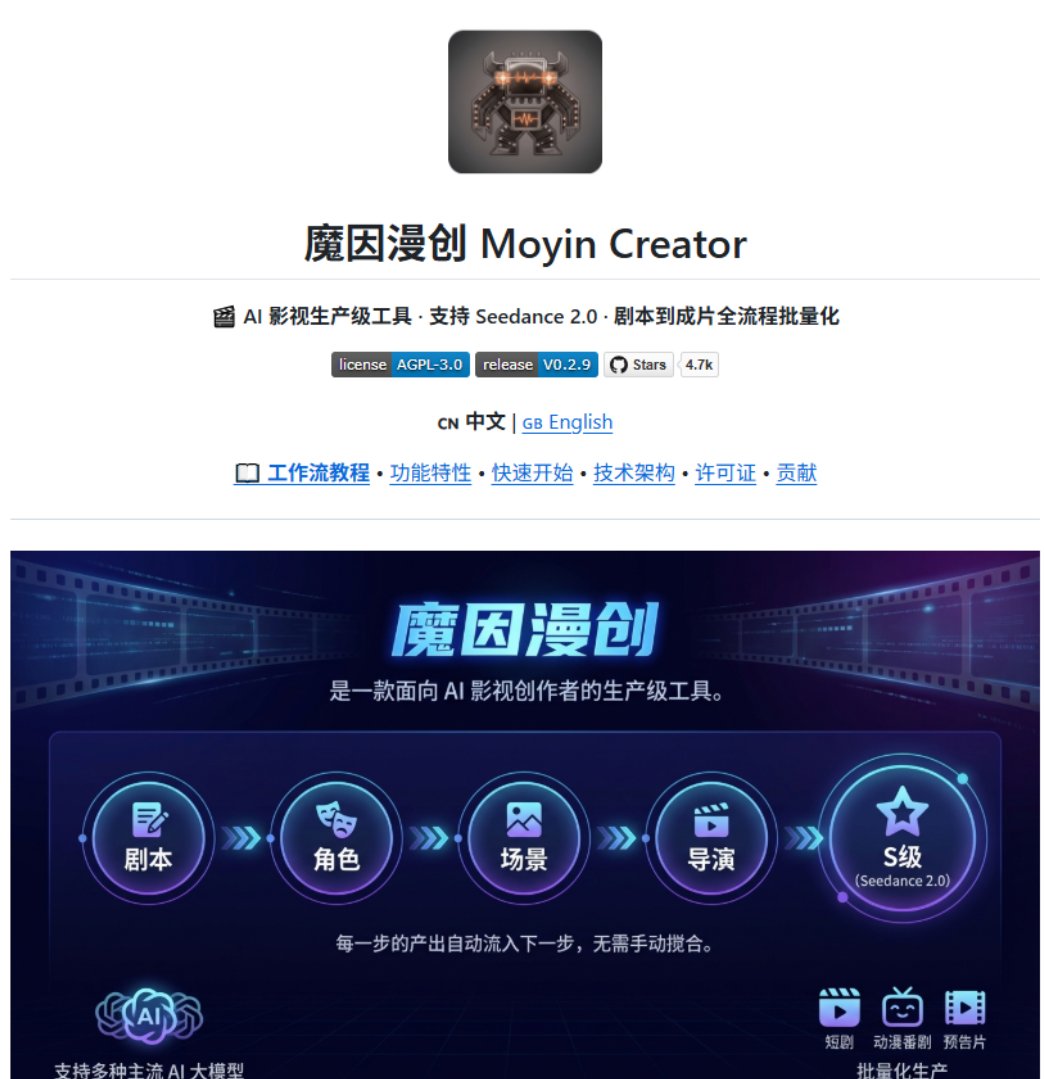
AI 短剧这波是真卷起来了,你还打算在旁边当观众?
想早点入场的,先把这三个 GitHub 项目收藏好,别等风口过了才后悔。
1️⃣ 魔因漫创 Moyin Creator:桌面端软件,和 Seedance 2.0 配合得相当紧密,从剧本到成片一条龙批量产出,偏爱多镜头、追求角色连贯的盯它。
🔗 https://github.com/MemeCalculate/moyin-creator
2️⃣
想早点入场的,先把这三个 GitHub 项目收藏好,别等风口过了才后悔。
1️⃣ 魔因漫创 Moyin Creator:桌面端软件,和 Seedance 2.0 配合得相当紧密,从剧本到成片一条龙批量产出,偏爱多镜头、追求角色连贯的盯它。
🔗 https://github.com/MemeCalculate/moyin-creator
2️⃣

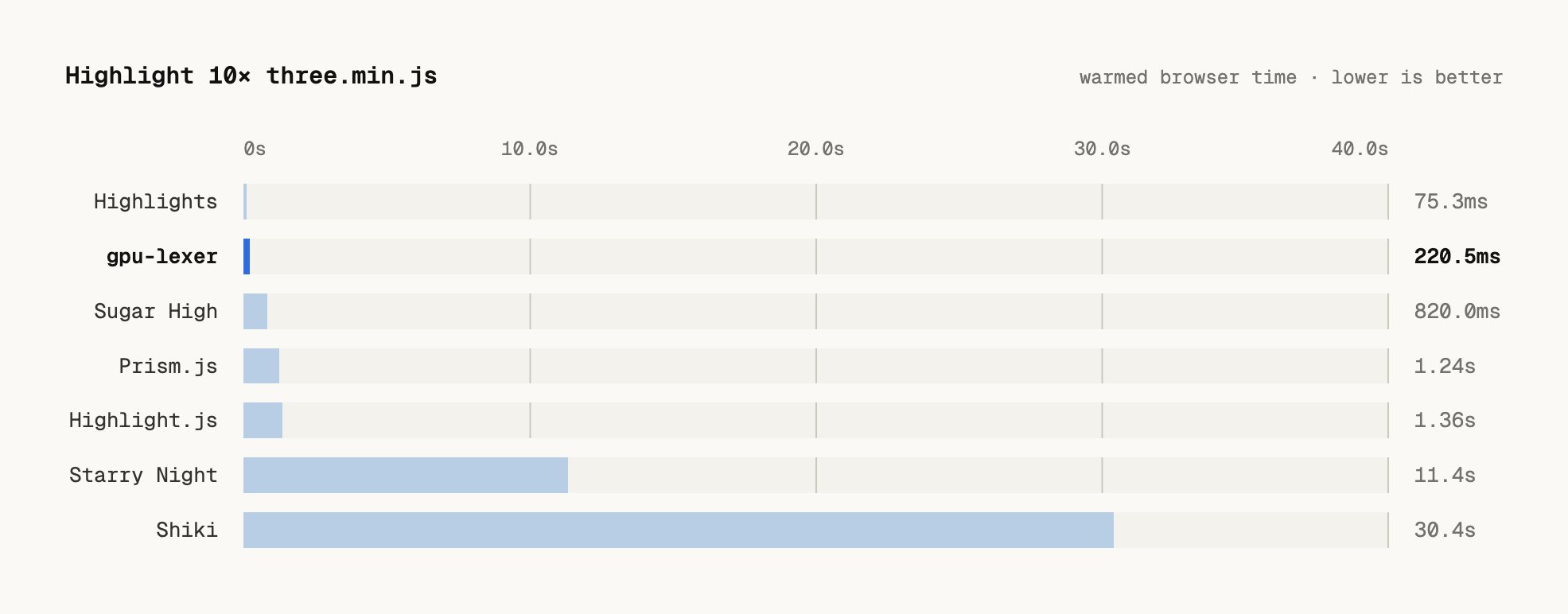
Optimized
https://
gpu-lexer.vercel.app to be 3.8x faster: 850ms → 221ms. It's still far behind
@pierrecomputer
's
https://
diffs.com/highlights (incredible work!)
Also wrote down some thoughts on
https://
shud.in/thoughts/ideas
-behind-gpu-lexer
…
https://
gpu-lexer.vercel.app to be 3.8x faster: 850ms → 221ms. It's still far behind
@pierrecomputer
's
https://
diffs.com/highlights (incredible work!)
Also wrote down some thoughts on
https://
shud.in/thoughts/ideas
-behind-gpu-lexer
…
优化了
https://
gpu-lexer.vercel.app,使其速度提升 3.8 倍:850ms → 221ms。它仍然远远落后于
@pierrecomputer
's
https://
diffs.com/highlights(令人难以置信的工作!)
另外还写下了一些关于
https://
shud.in/thoughts/ideas
-behind-gpu-lexer
… 的想法
https://
gpu-lexer.vercel.app,使其速度提升 3.8 倍:850ms → 221ms。它仍然远远落后于
@pierrecomputer
's
https://
diffs.com/highlights(令人难以置信的工作!)
另外还写下了一些关于
https://
shud.in/thoughts/ideas
-behind-gpu-lexer
… 的想法

Today, we’re introducing Ideogram's first vector model.
Generate clean, editable SVGs with smooth gradients and sharp typography from a text prompt, or turn any image into a detailed, scalable vector.
Live in Ideogram and the API: https://ideogram.ai/models/vector
Generate clean, editable SVGs with smooth gradients and sharp typography from a text prompt, or turn any image into a detailed, scalable vector.
Live in Ideogram and the API: https://ideogram.ai/models/vector
今天,我们推出 Ideogram 的首个矢量模型。
通过文本提示生成干净、可编辑的 SVG,带有平滑渐变和清晰字体,或将任何图像转换为详细、可缩放的矢量图。
现已在 Ideogram 和 API 中上线:
https://
ideogram.ai/models/vector
通过文本提示生成干净、可编辑的 SVG,带有平滑渐变和清晰字体,或将任何图像转换为详细、可缩放的矢量图。
现已在 Ideogram 和 API 中上线:
https://
ideogram.ai/models/vector