---
title: "X 归档 2019-09-20"
date: "2019-09-20"
tags:
  - x-archive
  - frontend
---

<div class="x-arch-meta">3 条动态 · 图 2 · 视频 1</div>
<div class="x-arch-day">
  <div class="x-arch-item">
    <input type="radio" name="xl-1174775953316294658" id="xl-1174775953316294658-zh" class="x-arch-lang-input x-arch-lang-input-zh" checked aria-label="显示译文" /><input type="radio" name="xl-1174775953316294658" id="xl-1174775953316294658-orig" class="x-arch-lang-input x-arch-lang-input-orig" aria-label="显示原文" /><div class="x-arch-head"><img class="x-arch-avatar" src="https://twimg.tweb.xin/twimg/profile_images/993497398247817216/PpsNkCpU_bigger.jpg" alt="" loading="lazy" referrerpolicy="no-referrer" /><span class="x-arch-kind x-arch-kind-liked" aria-label="赞" title="赞"><svg viewBox="0 0 24 24" fill="none" stroke="currentColor" stroke-width="2.5" stroke-linecap="round" stroke-linejoin="round" aria-hidden="true"><path d="M19 14c1.49-1.46 3-3.21 3-5.5A5.5 5.5 0 0 0 16.5 3c-1.76 0-3 .5-4.5 2-1.5-1.5-2.74-2-4.5-2A5.5 5.5 0 0 0 2 8.5c0 2.3 1.5 4.05 3 5.5l7 7Z" /></svg></span><a class="x-arch-author" href="https://x.com/programmingart" target="_blank" rel="nofollow noopener" data-name="Robin Marx" data-avatar="https://twimg.tweb.xin/twimg/profile_images/993497398247817216/PpsNkCpU_bigger.jpg">@programmingart</a><span class="x-arch-time">04:03</span><span class="x-arch-lang-switch" role="group" aria-label="切换原文/译文"><label for="xl-1174775953316294658-zh" class="x-arch-lang-opt x-arch-lang-zh">译</label><label for="xl-1174775953316294658-orig" class="x-arch-lang-opt x-arch-lang-orig">原</label></span><a class="x-arch-link" href="https://x.com/programmingart/status/1174775953316294658" target="_blank" rel="noopener">原推文<svg class="x-arch-ext" viewBox="0 0 24 24" fill="none" stroke="currentColor" stroke-width="2.5" stroke-linecap="round" stroke-linejoin="round" aria-hidden="true"><path d="M7 7h10v10" /><path d="M7 17 17 7" /></svg></a></div>
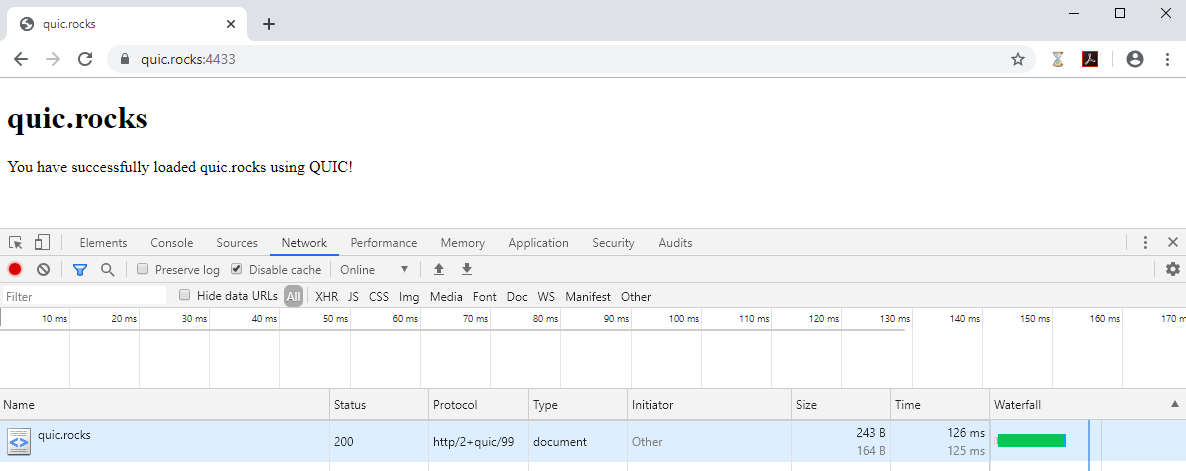
    <div class="x-arch-text x-arch-orig">Google Chrome Canary just became the first (available) browser to integrate (very) experimental #QUIC and HTTP/3 support! <br /><br />Add flags &quot;--enable-quic --quic-version=h3-23&quot; and you should see &quot;http/2+quic/99&quot; show up in the devtools, which is actually http3 in disguise!</div>
    <div class="x-arch-text x-arch-trans">Google Chrome Canary 刚刚成为第一个集成（非常）实验性 #QUIC 和 HTTP/3 支持的（可用）浏览器！<br /><br />加上启动参数 &quot;--enable-quic --quic-version=h3-23&quot;，你应该能在 devtools 里看到 &quot;http/2+quic/99&quot;——那其实是 http3 的马甲！</div>
    <div class="x-arch-media">
      <a href="/cdn-media/x/2026-10/1174775953316294658-1.png" target="_blank" rel="noopener"><img class="x-arch-img" src="/cdn-media/x/2026-10/1174775953316294658-1.png" alt="@programmingart 的配图 1/1" loading="lazy" decoding="async" width="1186" height="471" /></a>
    </div>
  </div>
  <div class="x-arch-item">
    <input type="radio" name="xl-1174816097608097792" id="xl-1174816097608097792-zh" class="x-arch-lang-input x-arch-lang-input-zh" checked aria-label="显示译文" /><input type="radio" name="xl-1174816097608097792" id="xl-1174816097608097792-orig" class="x-arch-lang-input x-arch-lang-input-orig" aria-label="显示原文" /><div class="x-arch-head"><img class="x-arch-avatar" src="https://twimg.tweb.xin/twimg/profile_images/2042749771337564160/AgOFPEL3_bigger.jpg" alt="" loading="lazy" referrerpolicy="no-referrer" /><span class="x-arch-kind x-arch-kind-liked" aria-label="赞" title="赞"><svg viewBox="0 0 24 24" fill="none" stroke="currentColor" stroke-width="2.5" stroke-linecap="round" stroke-linejoin="round" aria-hidden="true"><path d="M19 14c1.49-1.46 3-3.21 3-5.5A5.5 5.5 0 0 0 16.5 3c-1.76 0-3 .5-4.5 2-1.5-1.5-2.74-2-4.5-2A5.5 5.5 0 0 0 2 8.5c0 2.3 1.5 4.05 3 5.5l7 7Z" /></svg></span><a class="x-arch-author" href="https://x.com/Google" target="_blank" rel="nofollow noopener" data-name="Google" data-avatar="https://twimg.tweb.xin/twimg/profile_images/2042749771337564160/AgOFPEL3_bigger.jpg">@Google</a><span class="x-arch-time">06:42</span><span class="x-arch-lang-switch" role="group" aria-label="切换原文/译文"><label for="xl-1174816097608097792-zh" class="x-arch-lang-opt x-arch-lang-zh">译</label><label for="xl-1174816097608097792-orig" class="x-arch-lang-opt x-arch-lang-orig">原</label></span><a class="x-arch-link" href="https://x.com/Google/status/1174816097608097792" target="_blank" rel="noopener">原推文<svg class="x-arch-ext" viewBox="0 0 24 24" fill="none" stroke="currentColor" stroke-width="2.5" stroke-linecap="round" stroke-linejoin="round" aria-hidden="true"><path d="M7 7h10v10" /><path d="M7 17 17 7" /></svg></a></div>
    <div class="x-arch-text x-arch-orig">Raise your hand if you’ve lost track of how many tabs you have open right now ✋Stay organized while browsing with new improvements to Chrome, coming soon → <a href="http://goo.gle/2lZEiRo" target="_blank" rel="noopener">http://goo.gle/2lZEiRo</a></div>
    <div class="x-arch-text x-arch-trans">如果你已经数不清自己现在开着多少个标签页，请举手 ✋Chrome 即将推出的新改进，让你浏览时井井有条 →</div>
    <video class="x-arch-video" preload="none" playsinline poster="/cdn-media/x/2019-09/1174816097608097792-poster.jpg" src="/cdn-media/x/2026-10/1174816097608097792-video.mp4" width="1280" height="720" data-duration="6" aria-label="@Google 的视频"></video>
  </div>
  <div class="x-arch-item">
    <input type="radio" name="xl-1174980342094028800" id="xl-1174980342094028800-zh" class="x-arch-lang-input x-arch-lang-input-zh" checked aria-label="显示译文" /><input type="radio" name="xl-1174980342094028800" id="xl-1174980342094028800-orig" class="x-arch-lang-input x-arch-lang-input-orig" aria-label="显示原文" /><div class="x-arch-head"><img class="x-arch-avatar" src="https://twimg.tweb.xin/twimg/profile_images/993497398247817216/PpsNkCpU_bigger.jpg" alt="" loading="lazy" referrerpolicy="no-referrer" /><span class="x-arch-kind x-arch-kind-posted" aria-label="发" title="发"><svg viewBox="0 0 24 24" fill="none" stroke="currentColor" stroke-width="2.5" stroke-linecap="round" stroke-linejoin="round" aria-hidden="true"><path d="M21.174 6.812a1 1 0 0 0-3.986-3.987L3.842 16.174a2 2 0 0 0-.5.83l-1.321 4.352a.5.5 0 0 0 .623.622l4.353-1.32a2 2 0 0 0 .83-.497z" /><path d="m15 5 4 4" /></svg></span><a class="x-arch-author" href="https://x.com/programmingart" target="_blank" rel="nofollow noopener" data-name="Robin Marx" data-avatar="https://twimg.tweb.xin/twimg/profile_images/993497398247817216/PpsNkCpU_bigger.jpg">@programmingart</a><span class="x-arch-time">17:35</span><span class="x-arch-lang-switch" role="group" aria-label="切换原文/译文"><label for="xl-1174980342094028800-zh" class="x-arch-lang-opt x-arch-lang-zh">译</label><label for="xl-1174980342094028800-orig" class="x-arch-lang-opt x-arch-lang-orig">原</label></span><a class="x-arch-link" href="https://x.com/programmingart/status/1174980342094028800" target="_blank" rel="noopener">原推文<svg class="x-arch-ext" viewBox="0 0 24 24" fill="none" stroke="currentColor" stroke-width="2.5" stroke-linecap="round" stroke-linejoin="round" aria-hidden="true"><path d="M7 7h10v10" /><path d="M7 17 17 7" /></svg></a></div>
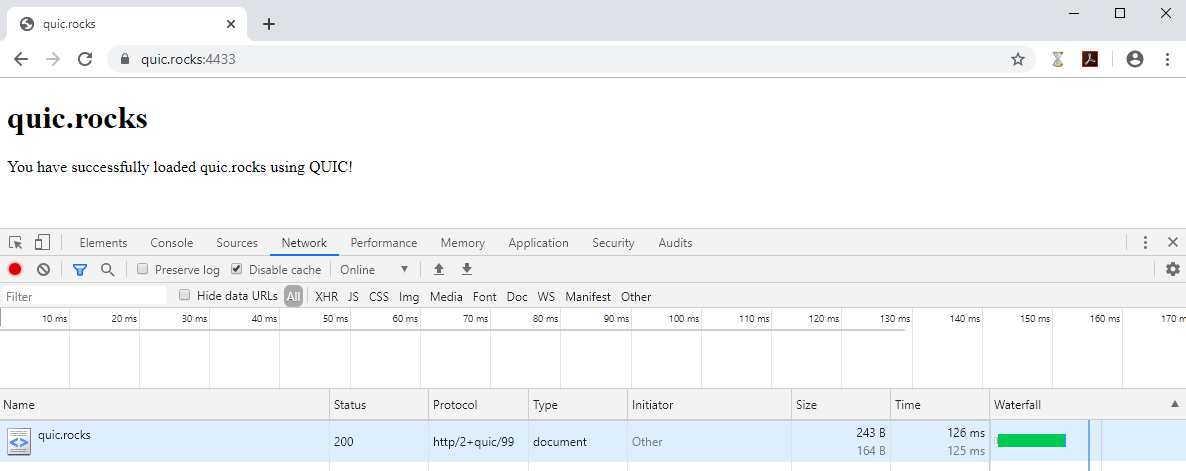
    <div class="x-arch-text x-arch-orig">Google Chrome Canary just became the first (available) browser to integrate (very) experimental #QUIC and HTTP/3 support! <br /><br />Add flags &quot;--enable-quic --quic-version=h3-23&quot; and you should see &quot;http/2+quic/99&quot; show up in the devtools, which is actually http3 in disguise!</div>
    <div class="x-arch-text x-arch-trans">Google Chrome Canary 刚刚成为第一个集成（非常）实验性 #QUIC 和 HTTP/3 支持的（可用）浏览器！<br /><br />加上启动参数 &quot;--enable-quic --quic-version=h3-23&quot;，你应该能在 devtools 里看到 &quot;http/2+quic/99&quot;——那其实是 http3 的马甲！</div>
    <div class="x-arch-media">
      <a href="/cdn-media/x/2019-09/1174980342094028800-1.png" target="_blank" rel="noopener"><img class="x-arch-img" src="/cdn-media/x/2019-09/1174980342094028800-1.png" alt="@programmingart 的配图 1/1" loading="lazy" decoding="async" width="1186" height="471" /></a>
    </div>
  </div>
</div>