---
title: "X 归档 2020-02-24"
date: "2020-02-24"
tags:
  - x-archive
---

<div class="x-arch-meta">3 条动态 · 图 2 · 视频 0</div>
<div class="x-arch-day">
  <div class="x-arch-item">
    <input type="radio" name="xl-1231919208738385920" id="xl-1231919208738385920-zh" class="x-arch-lang-input x-arch-lang-input-zh" checked aria-label="显示译文" /><input type="radio" name="xl-1231919208738385920" id="xl-1231919208738385920-orig" class="x-arch-lang-input x-arch-lang-input-orig" aria-label="显示原文" /><div class="x-arch-head"><img class="x-arch-avatar" src="https://twimg.tweb.xin/twimg/profile_images/1695239906/me_bigger.jpg" alt="" loading="lazy" referrerpolicy="no-referrer" /><span class="x-arch-kind x-arch-kind-posted" aria-label="发" title="发"><svg viewBox="0 0 24 24" fill="none" stroke="currentColor" stroke-width="2.5" stroke-linecap="round" stroke-linejoin="round" aria-hidden="true"><path d="M21.174 6.812a1 1 0 0 0-3.986-3.987L3.842 16.174a2 2 0 0 0-.5.83l-1.321 4.352a.5.5 0 0 0 .623.622l4.353-1.32a2 2 0 0 0 .83-.497z" /><path d="m15 5 4 4" /></svg></span><a class="x-arch-author" href="https://x.com/jaffathecake" target="_blank" rel="nofollow noopener" data-name="Jake Archibald" data-avatar="https://twimg.tweb.xin/twimg/profile_images/1695239906/me_bigger.jpg">@jaffathecake</a><span class="x-arch-time">20:30</span><span class="x-arch-lang-switch" role="group" aria-label="切换原文/译文"><label for="xl-1231919208738385920-zh" class="x-arch-lang-opt x-arch-lang-zh">译</label><label for="xl-1231919208738385920-orig" class="x-arch-lang-opt x-arch-lang-orig">原</label></span><a class="x-arch-link" href="https://x.com/jaffathecake/status/1231919208738385920" target="_blank" rel="noopener">原推文<svg class="x-arch-ext" viewBox="0 0 24 24" fill="none" stroke="currentColor" stroke-width="2.5" stroke-linecap="round" stroke-linejoin="round" aria-hidden="true"><path d="M7 7h10v10" /><path d="M7 17 17 7" /></svg></a></div>
    <div class="x-arch-text x-arch-orig">Some sources of random data are better than others. Eg:<br /><br />🥉 Math.random()<br />🥈 crypto.getRandomValues(array)<br />🥇 The compass on any Android device</div>
    <div class="x-arch-text x-arch-trans">有些随机数据来源比其他的更靠谱。比如：<br /><br />🥉 Math.random()<br />🥈 crypto.getRandomValues(array)<br />🥇 任何 Android 设备上的指南针</div>
  </div>
  <div class="x-arch-item">
    <input type="radio" name="xl-1231919408085266432" id="xl-1231919408085266432-zh" class="x-arch-lang-input x-arch-lang-input-zh" checked aria-label="显示译文" /><input type="radio" name="xl-1231919408085266432" id="xl-1231919408085266432-orig" class="x-arch-lang-input x-arch-lang-input-orig" aria-label="显示原文" /><div class="x-arch-head"><img class="x-arch-avatar" src="https://twimg.tweb.xin/twimg/profile_images/2090232066021769216/IwGLjoSy_bigger.jpg" alt="" loading="lazy" referrerpolicy="no-referrer" /><span class="x-arch-kind x-arch-kind-posted" aria-label="发" title="发"><svg viewBox="0 0 24 24" fill="none" stroke="currentColor" stroke-width="2.5" stroke-linecap="round" stroke-linejoin="round" aria-hidden="true"><path d="M21.174 6.812a1 1 0 0 0-3.986-3.987L3.842 16.174a2 2 0 0 0-.5.83l-1.321 4.352a.5.5 0 0 0 .623.622l4.353-1.32a2 2 0 0 0 .83-.497z" /><path d="m15 5 4 4" /></svg></span><a class="x-arch-author" href="https://x.com/addyosmani" target="_blank" rel="nofollow noopener" data-name="Addy Osmani" data-avatar="https://twimg.tweb.xin/twimg/profile_images/2090232066021769216/IwGLjoSy_bigger.jpg">@addyosmani</a><span class="x-arch-time">20:30</span><span class="x-arch-lang-switch" role="group" aria-label="切换原文/译文"><label for="xl-1231919408085266432-zh" class="x-arch-lang-opt x-arch-lang-zh">译</label><label for="xl-1231919408085266432-orig" class="x-arch-lang-opt x-arch-lang-orig">原</label></span><a class="x-arch-link" href="https://x.com/addyosmani/status/1231919408085266432" target="_blank" rel="noopener">原推文<svg class="x-arch-ext" viewBox="0 0 24 24" fill="none" stroke="currentColor" stroke-width="2.5" stroke-linecap="round" stroke-linejoin="round" aria-hidden="true"><path d="M7 7h10v10" /><path d="M7 17 17 7" /></svg></a></div>
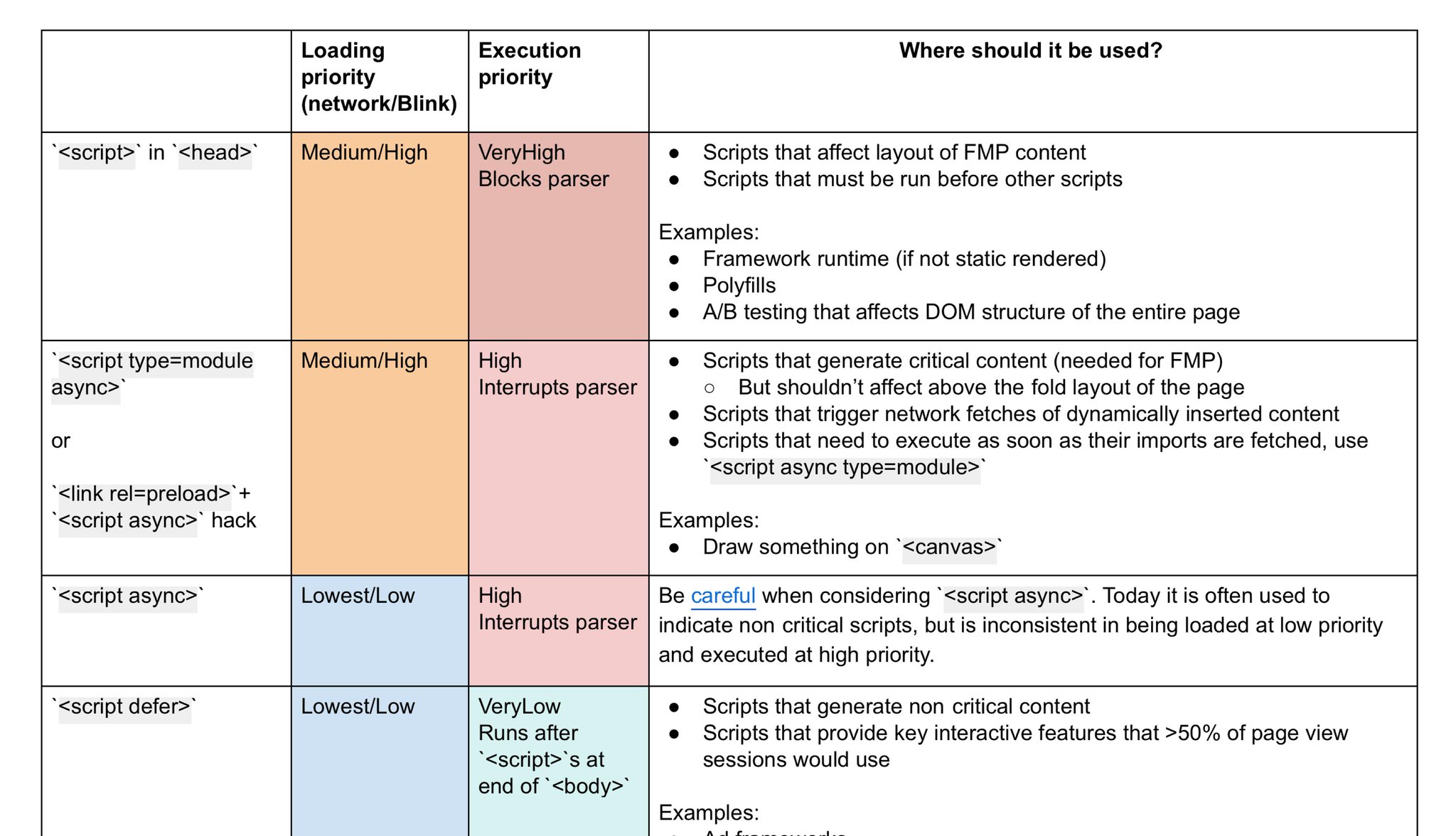
    <div class="x-arch-text x-arch-orig">JavaScript loading priorities in Chrome: <a href="http://bit.ly/loading-priorities" target="_blank" rel="noopener">http://bit.ly/loading-priorities</a> ~ how do &lt;script&gt;, &lt;script defer&gt;, &lt;link rel=preload&gt; + &lt;script async&gt; &amp; friends load then execute? Useful table.</div>
    <div class="x-arch-text x-arch-trans">Chrome 中 JavaScript 的加载优先级：<a href="http://bit.ly/loading-priorities" target="_blank" rel="noopener">http://bit.ly/loading-priorities</a> ~ &lt;script&gt;、&lt;script defer&gt;、&lt;link rel=preload&gt; + &lt;script async&gt; 之类是怎么先加载再执行的？很实用的一张表。</div>
    <div class="x-arch-media">
      <a href="/cdn-media/x/2020-02/1231919408085266432-1.jpg" target="_blank" rel="noopener"><img class="x-arch-img" src="/cdn-media/x/2020-02/1231919408085266432-1.jpg" alt="@addyosmani 的配图 1/1" loading="lazy" decoding="async" width="2048" height="1176" /></a>
    </div>
  </div>
  <div class="x-arch-item">
    <input type="radio" name="xl-1231920387824312321" id="xl-1231920387824312321-zh" class="x-arch-lang-input x-arch-lang-input-zh" checked aria-label="显示译文" /><input type="radio" name="xl-1231920387824312321" id="xl-1231920387824312321-orig" class="x-arch-lang-input x-arch-lang-input-orig" aria-label="显示原文" /><div class="x-arch-head"><img class="x-arch-avatar" src="https://twimg.tweb.xin/twimg/profile_images/952797845534453760/HRhT4f_5_bigger.jpg" alt="" loading="lazy" referrerpolicy="no-referrer" /><span class="x-arch-kind x-arch-kind-posted" aria-label="发" title="发"><svg viewBox="0 0 24 24" fill="none" stroke="currentColor" stroke-width="2.5" stroke-linecap="round" stroke-linejoin="round" aria-hidden="true"><path d="M21.174 6.812a1 1 0 0 0-3.986-3.987L3.842 16.174a2 2 0 0 0-.5.83l-1.321 4.352a.5.5 0 0 0 .623.622l4.353-1.32a2 2 0 0 0 .83-.497z" /><path d="m15 5 4 4" /></svg></span><a class="x-arch-author" href="https://x.com/mathias" target="_blank" rel="nofollow noopener" data-name="Mathias Bynens" data-avatar="https://twimg.tweb.xin/twimg/profile_images/952797845534453760/HRhT4f_5_bigger.jpg">@mathias</a><span class="x-arch-time">20:34</span><span class="x-arch-lang-switch" role="group" aria-label="切换原文/译文"><label for="xl-1231920387824312321-zh" class="x-arch-lang-opt x-arch-lang-zh">译</label><label for="xl-1231920387824312321-orig" class="x-arch-lang-opt x-arch-lang-orig">原</label></span><a class="x-arch-link" href="https://x.com/mathias/status/1231920387824312321" target="_blank" rel="noopener">原推文<svg class="x-arch-ext" viewBox="0 0 24 24" fill="none" stroke="currentColor" stroke-width="2.5" stroke-linecap="round" stroke-linejoin="round" aria-hidden="true"><path d="M7 7h10v10" /><path d="M7 17 17 7" /></svg></a></div>
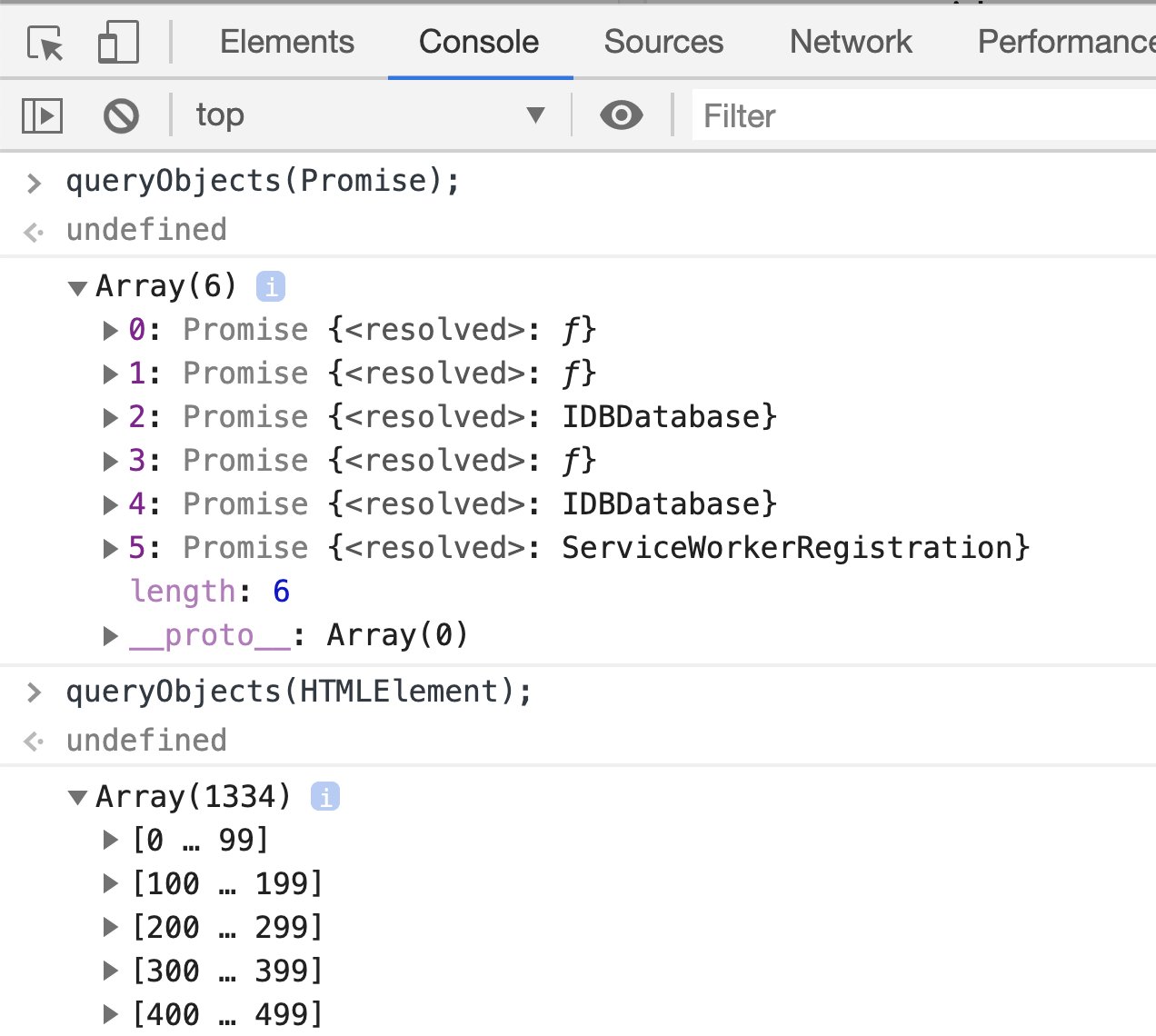
    <div class="x-arch-text x-arch-orig">Another useful tip for memory debugging (not mentioned in the article) is `queryObjects(SomeConstructor)`, which can be used from the DevTools Console: <a href="https://developers.google.com/web/updates/2017/08/devtools-release-notes#query-objects" target="_blank" rel="noopener">https://developers.google.com/web/updates/2017/08/devtools-release-notes#query-objects</a></div>
    <div class="x-arch-text x-arch-trans">另一个好用的内存调试技巧（文章里没提到）是 `queryObjects(SomeConstructor)`，可以在 DevTools 控制台里用：<a href="https://developers.google.com/web/updates/2017/08/devtools-release-notes#query-objects" target="_blank" rel="noopener">https://developers.google.com/web/updates/2017/08/devtools-release-notes#query-objects</a></div>
    <div class="x-arch-media">
      <a href="/cdn-media/x/2020-02/1231920387824312321-1.jpg" target="_blank" rel="noopener"><img class="x-arch-img" src="/cdn-media/x/2020-02/1231920387824312321-1.jpg" alt="@mathias 的配图 1/1" loading="lazy" decoding="async" width="1272" height="1140" /></a>
    </div>
  </div>
</div>