
---
title: "X 归档 2023-01-10"
date: "2023-01-10"
tags:
  - x-archive
  - frontend
---

<div class="x-arch-meta">3 条动态 · 图 5 · 视频 1</div>
<div class="x-arch-day">
  <div class="x-arch-item">
    <input type="radio" name="xl-1612678697584103426" id="xl-1612678697584103426-zh" class="x-arch-lang-input x-arch-lang-input-zh" checked aria-label="显示译文" /><input type="radio" name="xl-1612678697584103426" id="xl-1612678697584103426-orig" class="x-arch-lang-input x-arch-lang-input-orig" aria-label="显示原文" /><div class="x-arch-head"><img class="x-arch-avatar" src="https://twimg.tweb.xin/twimg/profile_images/1623753178792460291/XVVNwqv-_bigger.jpg" alt="" loading="lazy" referrerpolicy="no-referrer" /><span class="x-arch-kind x-arch-kind-posted" aria-label="发" title="发"><svg viewBox="0 0 24 24" fill="none" stroke="currentColor" stroke-width="2.5" stroke-linecap="round" stroke-linejoin="round" aria-hidden="true"><path d="M21.174 6.812a1 1 0 0 0-3.986-3.987L3.842 16.174a2 2 0 0 0-.5.83l-1.321 4.352a.5.5 0 0 0 .623.622l4.353-1.32a2 2 0 0 0 .83-.497z" /><path d="m15 5 4 4" /></svg></span><a class="x-arch-author" href="https://x.com/partykit_io" target="_blank" rel="nofollow noopener" data-name="PartyKit" data-avatar="https://twimg.tweb.xin/twimg/profile_images/1623753178792460291/XVVNwqv-_bigger.jpg">@partykit_io</a><span class="x-arch-time">13:12</span><span class="x-arch-lang-switch" role="group" aria-label="切换原文/译文"><label for="xl-1612678697584103426-zh" class="x-arch-lang-opt x-arch-lang-zh">译</label><label for="xl-1612678697584103426-orig" class="x-arch-lang-opt x-arch-lang-orig">原</label></span><a class="x-arch-link" href="https://x.com/partykit_io/status/1612678697584103426" target="_blank" rel="noopener">原推文<svg class="x-arch-ext" viewBox="0 0 24 24" fill="none" stroke="currentColor" stroke-width="2.5" stroke-linecap="round" stroke-linejoin="round" aria-hidden="true"><path d="M7 7h10v10" /><path d="M7 17 17 7" /></svg></a></div>
    <div class="x-arch-text x-arch-orig">🤫</div>
    <div class="x-arch-text x-arch-trans">🤫</div>
    <div class="x-arch-media">
      <a href="/cdn-media/x/2023-01/1612678697584103426-1.jpg" target="_blank" rel="noopener"><img class="x-arch-img" src="/cdn-media/x/2023-01/1612678697584103426-1.jpg" alt="@partykit_io 的配图 1/4" loading="lazy" decoding="async" width="828" height="1792" /></a>
      <a href="/cdn-media/x/2023-01/1612678697584103426-2.jpg" target="_blank" rel="noopener"><img class="x-arch-img" src="/cdn-media/x/2023-01/1612678697584103426-2.jpg" alt="@partykit_io 的配图 2/4" loading="lazy" decoding="async" width="828" height="1792" /></a>
      <a href="/cdn-media/x/2023-01/1612678697584103426-3.jpg" target="_blank" rel="noopener"><img class="x-arch-img" src="/cdn-media/x/2023-01/1612678697584103426-3.jpg" alt="@partykit_io 的配图 3/4" loading="lazy" decoding="async" width="828" height="1792" /></a>
      <a href="/cdn-media/x/2023-01/1612678697584103426-4.jpg" target="_blank" rel="noopener"><img class="x-arch-img" src="/cdn-media/x/2023-01/1612678697584103426-4.jpg" alt="@partykit_io 的配图 4/4" loading="lazy" decoding="async" width="828" height="1792" /></a>
    </div>
  </div>
  <div class="x-arch-item">
    <input type="radio" name="xl-1612755458774929408" id="xl-1612755458774929408-zh" class="x-arch-lang-input x-arch-lang-input-zh" checked aria-label="显示译文" /><input type="radio" name="xl-1612755458774929408" id="xl-1612755458774929408-orig" class="x-arch-lang-input x-arch-lang-input-orig" aria-label="显示原文" /><div class="x-arch-head"><img class="x-arch-avatar" src="https://twimg.tweb.xin/twimg/profile_images/1276240813333401600/brd0hSfW_bigger.jpg" alt="" loading="lazy" referrerpolicy="no-referrer" /><span class="x-arch-kind x-arch-kind-liked" aria-label="赞" title="赞"><svg viewBox="0 0 24 24" fill="none" stroke="currentColor" stroke-width="2.5" stroke-linecap="round" stroke-linejoin="round" aria-hidden="true"><path d="M19 14c1.49-1.46 3-3.21 3-5.5A5.5 5.5 0 0 0 16.5 3c-1.76 0-3 .5-4.5 2-1.5-1.5-2.74-2-4.5-2A5.5 5.5 0 0 0 2 8.5c0 2.3 1.5 4.05 3 5.5l7 7Z" /></svg></span><a class="x-arch-author" href="https://x.com/bramus" target="_blank" rel="nofollow noopener" data-name="Bramus" data-avatar="https://twimg.tweb.xin/twimg/profile_images/1276240813333401600/brd0hSfW_bigger.jpg">@bramus</a><span class="x-arch-time">18:17</span><span class="x-arch-lang-switch" role="group" aria-label="切换原文/译文"><label for="xl-1612755458774929408-zh" class="x-arch-lang-opt x-arch-lang-zh">译</label><label for="xl-1612755458774929408-orig" class="x-arch-lang-opt x-arch-lang-orig">原</label></span><a class="x-arch-link" href="https://x.com/bramus/status/1612755458774929408" target="_blank" rel="noopener">原推文<svg class="x-arch-ext" viewBox="0 0 24 24" fill="none" stroke="currentColor" stroke-width="2.5" stroke-linecap="round" stroke-linejoin="round" aria-hidden="true"><path d="M7 7h10v10" /><path d="M7 17 17 7" /></svg></a></div>
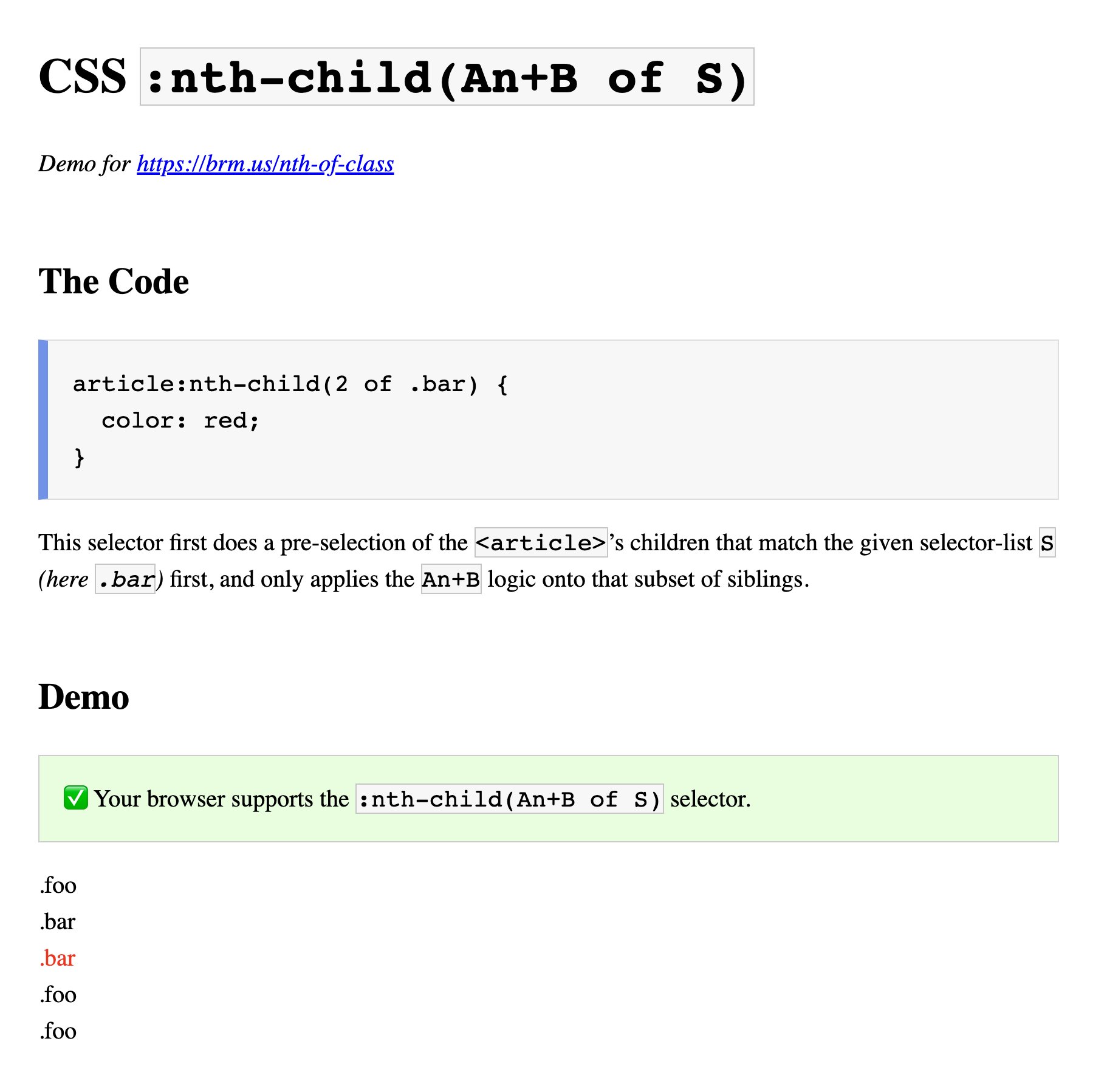
    <div class="x-arch-text x-arch-orig">🤩 Chrome Canary 111.0.5530.0 introduces support for complex `:nth-child` selections in CSS!<br /><br />By passing a selector-list into `:nth-child` you can select the nth child that matches that selector.<br /><br />Eg. you can select “the 2nd item with the class .bar” using `:nth-child(2 of .bar)`</div>
    <div class="x-arch-text x-arch-trans">🤩 Chrome Canary 111.0.5530.0 引入了对 CSS 中复杂 `:nth-child` 选择的支持！<br /><br />通过向 `:nth-child` 传入一个选择器列表，你可以选中匹配该选择器的第 n 个子元素。<br /><br />例如，可以用 `:nth-child(2 of .bar)` 选中“带 .bar 类的第 2 个元素”</div>
    <div class="x-arch-media">
      <a href="/cdn-media/x/2026-10/1612755458774929408-1.jpg" target="_blank" rel="noopener"><img class="x-arch-img" src="/cdn-media/x/2026-10/1612755458774929408-1.jpg" alt="@bramus 的配图 1/1" loading="lazy" decoding="async" width="1822" height="1798" /></a>
    </div>
  </div>
  <div class="x-arch-item">
    <input type="radio" name="xl-1612831829987590144" id="xl-1612831829987590144-zh" class="x-arch-lang-input x-arch-lang-input-zh" checked aria-label="显示译文" /><input type="radio" name="xl-1612831829987590144" id="xl-1612831829987590144-orig" class="x-arch-lang-input x-arch-lang-input-orig" aria-label="显示原文" /><div class="x-arch-head"><img class="x-arch-avatar" src="https://twimg.tweb.xin/twimg/profile_images/1371486708479393792/Nh3P90Ps_bigger.jpg" alt="" loading="lazy" referrerpolicy="no-referrer" /><span class="x-arch-kind x-arch-kind-liked" aria-label="赞" title="赞"><svg viewBox="0 0 24 24" fill="none" stroke="currentColor" stroke-width="2.5" stroke-linecap="round" stroke-linejoin="round" aria-hidden="true"><path d="M19 14c1.49-1.46 3-3.21 3-5.5A5.5 5.5 0 0 0 16.5 3c-1.76 0-3 .5-4.5 2-1.5-1.5-2.74-2-4.5-2A5.5 5.5 0 0 0 2 8.5c0 2.3 1.5 4.05 3 5.5l7 7Z" /></svg></span><a class="x-arch-author" href="https://x.com/surjithctly" target="_blank" rel="nofollow noopener" data-name="Surjith S M ✪" data-avatar="https://twimg.tweb.xin/twimg/profile_images/1371486708479393792/Nh3P90Ps_bigger.jpg">@surjithctly</a><span class="x-arch-time">23:20</span><span class="x-arch-lang-switch" role="group" aria-label="切换原文/译文"><label for="xl-1612831829987590144-zh" class="x-arch-lang-opt x-arch-lang-zh">译</label><label for="xl-1612831829987590144-orig" class="x-arch-lang-opt x-arch-lang-orig">原</label></span><a class="x-arch-link" href="https://x.com/surjithctly/status/1612831829987590144" target="_blank" rel="noopener">原推文<svg class="x-arch-ext" viewBox="0 0 24 24" fill="none" stroke="currentColor" stroke-width="2.5" stroke-linecap="round" stroke-linejoin="round" aria-hidden="true"><path d="M7 7h10v10" /><path d="M7 17 17 7" /></svg></a></div>
    <div class="x-arch-text x-arch-orig">✨ Tailwind CSS Tip ✨<br /><br />You can use peer/{name} to create a beautiful &quot;Pill Menu Animation&quot; like this.  <br /><br />× No javascript<br />× No custom styles<br /><br />Comment 👋 and I'll share the code.</div>
    <div class="x-arch-text x-arch-trans">✨ Tailwind CSS 技巧 ✨<br /><br />你可以用 peer/{name} 做出像这样漂亮的“胶囊菜单动画”。<br /><br />× 无需 JavaScript<br />× 无需自定义样式<br /><br />评论 👋 一下，我就把代码分享出来。</div>
    <video class="x-arch-video" preload="none" playsinline poster="/cdn-media/x/2023-01/1612831829987590144-poster.jpg" src="/cdn-media/x/2026-10/1612831829987590144-video.mp4" width="960" height="720" data-duration="27" aria-label="@surjithctly 的视频"></video>
  </div>
</div>