---
title: "X 归档 2023-06-24"
date: "2023-06-24"
tags:
  - x-archive
  - frontend
  - devops
---

<div class="x-arch-meta">4 条动态 · 图 3 · 视频 1</div>
<div class="x-arch-day">
  <div class="x-arch-item">
    <input type="radio" name="xl-1672616796317425665" id="xl-1672616796317425665-zh" class="x-arch-lang-input x-arch-lang-input-zh" checked aria-label="显示译文" /><input type="radio" name="xl-1672616796317425665" id="xl-1672616796317425665-orig" class="x-arch-lang-input x-arch-lang-input-orig" aria-label="显示原文" /><div class="x-arch-head"><img class="x-arch-avatar" src="https://twimg.tweb.xin/twimg/profile_images/1666460461884211204/SmBm505D_bigger.jpg" alt="" loading="lazy" referrerpolicy="no-referrer" /><span class="x-arch-kind x-arch-kind-posted" aria-label="发" title="发"><svg viewBox="0 0 24 24" fill="none" stroke="currentColor" stroke-width="2.5" stroke-linecap="round" stroke-linejoin="round" aria-hidden="true"><path d="M21.174 6.812a1 1 0 0 0-3.986-3.987L3.842 16.174a2 2 0 0 0-.5.83l-1.321 4.352a.5.5 0 0 0 .623.622l4.353-1.32a2 2 0 0 0 .83-.497z" /><path d="m15 5 4 4" /></svg></span><a class="x-arch-author" href="https://x.com/mattpocockuk" target="_blank" rel="nofollow noopener" data-name="Matt Pocock" data-avatar="https://twimg.tweb.xin/twimg/profile_images/1666460461884211204/SmBm505D_bigger.jpg">@mattpocockuk</a><span class="x-arch-time">22:44</span><span class="x-arch-lang-switch" role="group" aria-label="切换原文/译文"><label for="xl-1672616796317425665-zh" class="x-arch-lang-opt x-arch-lang-zh">译</label><label for="xl-1672616796317425665-orig" class="x-arch-lang-opt x-arch-lang-orig">原</label></span><a class="x-arch-link" href="https://x.com/mattpocockuk/status/1672616796317425665" target="_blank" rel="noopener">原推文<svg class="x-arch-ext" viewBox="0 0 24 24" fill="none" stroke="currentColor" stroke-width="2.5" stroke-linecap="round" stroke-linejoin="round" aria-hidden="true"><path d="M7 7h10v10" /><path d="M7 17 17 7" /></svg></a></div>
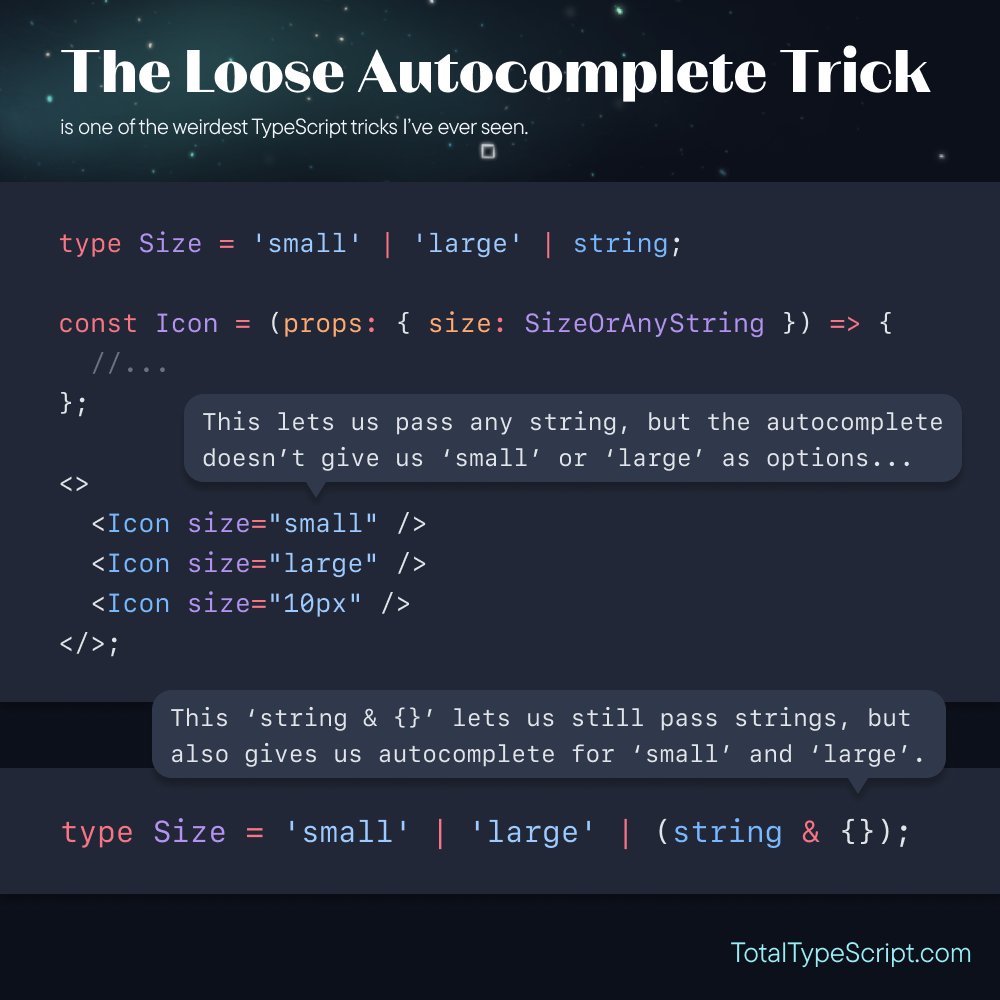
    <div class="x-arch-text x-arch-orig">By far the strangest TypeScript trick I've ever come across is the Loose Autocomplete trick.<br /><br />No idea who discovered this, but it's become widely used by OSS wizards.<br /><br />It's now even used by React's types to type attributes like aria-role.</div>
    <div class="x-arch-text x-arch-trans">我迄今见过最奇怪的 TypeScript 技巧，当属 Loose Autocomplete（宽松自动补全）技巧。<br /><br />不知道是谁发现的，但它已被 OSS 高手们广泛使用。<br /><br />现在连 React 的类型定义都用它来给 aria-role 这类属性做类型。</div>
    <div class="x-arch-media">
      <a href="/cdn-media/x/2023-06/1672616796317425665-1.jpg" target="_blank" rel="noopener"><img class="x-arch-img" src="/cdn-media/x/2023-06/1672616796317425665-1.jpg" alt="@mattpocockuk 的配图 1/1" loading="lazy" decoding="async" width="1000" height="1000" /></a>
    </div>
  </div>
  <div class="x-arch-item">
    <input type="radio" name="xl-1672618101144440833" id="xl-1672618101144440833-zh" class="x-arch-lang-input x-arch-lang-input-zh" checked aria-label="显示译文" /><input type="radio" name="xl-1672618101144440833" id="xl-1672618101144440833-orig" class="x-arch-lang-input x-arch-lang-input-orig" aria-label="显示原文" /><div class="x-arch-head"><img class="x-arch-avatar" src="https://twimg.tweb.xin/twimg/profile_images/1721593504118493184/UzPnGWvZ_bigger.jpg" alt="" loading="lazy" referrerpolicy="no-referrer" /><span class="x-arch-kind x-arch-kind-posted" aria-label="发" title="发"><svg viewBox="0 0 24 24" fill="none" stroke="currentColor" stroke-width="2.5" stroke-linecap="round" stroke-linejoin="round" aria-hidden="true"><path d="M21.174 6.812a1 1 0 0 0-3.986-3.987L3.842 16.174a2 2 0 0 0-.5.83l-1.321 4.352a.5.5 0 0 0 .623.622l4.353-1.32a2 2 0 0 0 .83-.497z" /><path d="m15 5 4 4" /></svg></span><a class="x-arch-author" href="https://x.com/angular" target="_blank" rel="nofollow noopener" data-name="Angular" data-avatar="https://twimg.tweb.xin/twimg/profile_images/1721593504118493184/UzPnGWvZ_bigger.jpg">@angular</a><span class="x-arch-time">22:50</span><span class="x-arch-lang-switch" role="group" aria-label="切换原文/译文"><label for="xl-1672618101144440833-zh" class="x-arch-lang-opt x-arch-lang-zh">译</label><label for="xl-1672618101144440833-orig" class="x-arch-lang-opt x-arch-lang-orig">原</label></span><a class="x-arch-link" href="https://x.com/angular/status/1672618101144440833" target="_blank" rel="noopener">原推文<svg class="x-arch-ext" viewBox="0 0 24 24" fill="none" stroke="currentColor" stroke-width="2.5" stroke-linecap="round" stroke-linejoin="round" aria-hidden="true"><path d="M7 7h10v10" /><path d="M7 17 17 7" /></svg></a></div>
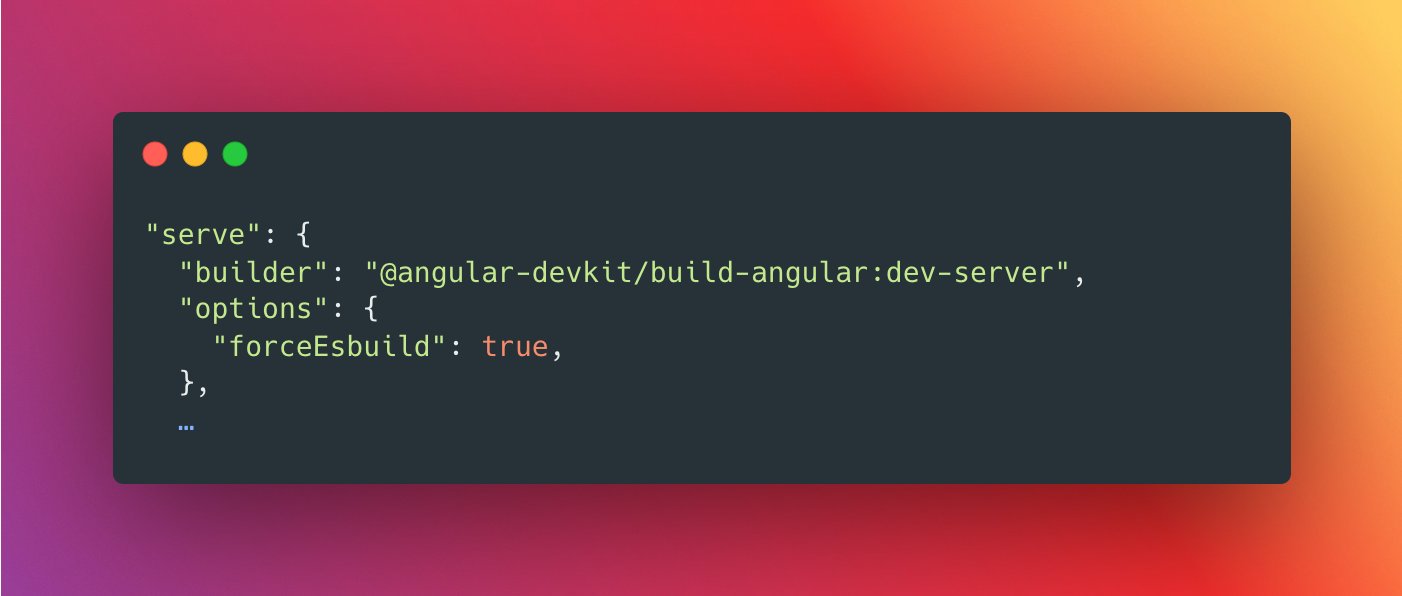
    <div class="x-arch-text x-arch-orig">In Angular 16.1, we've added a new development server option: forceEsbuild.<br /><br />When enabled, `ng serve` will use esbuild/Vite with the build target options!<br /><br />Note: you can continue to use default Webpack-based builder for builds (ng build) if you choose.</div>
    <div class="x-arch-text x-arch-trans">Angular 16.1 新增了一个开发服务器选项：forceEsbuild。<br /><br />启用后，`ng serve` 将使用带构建目标选项的 esbuild/Vite！<br /><br />注意：如果你愿意，构建（ng build）时仍可继续使用默认的基于 Webpack 的 builder。</div>
    <div class="x-arch-media">
      <a href="/cdn-media/x/2023-06/1672618101144440833-1.jpg" target="_blank" rel="noopener"><img class="x-arch-img" src="/cdn-media/x/2023-06/1672618101144440833-1.jpg" alt="@angular 的配图 1/1" loading="lazy" decoding="async" width="1402" height="596" /></a>
    </div>
  </div>
  <div class="x-arch-item">
    <input type="radio" name="xl-1672625182551478272" id="xl-1672625182551478272-zh" class="x-arch-lang-input x-arch-lang-input-zh" checked aria-label="显示译文" /><input type="radio" name="xl-1672625182551478272" id="xl-1672625182551478272-orig" class="x-arch-lang-input x-arch-lang-input-orig" aria-label="显示原文" /><div class="x-arch-head"><img class="x-arch-avatar" src="https://twimg.tweb.xin/twimg/profile_images/1980306076479201281/0WC7AqxQ_bigger.jpg" alt="" loading="lazy" referrerpolicy="no-referrer" /><span class="x-arch-kind x-arch-kind-posted" aria-label="发" title="发"><svg viewBox="0 0 24 24" fill="none" stroke="currentColor" stroke-width="2.5" stroke-linecap="round" stroke-linejoin="round" aria-hidden="true"><path d="M21.174 6.812a1 1 0 0 0-3.986-3.987L3.842 16.174a2 2 0 0 0-.5.83l-1.321 4.352a.5.5 0 0 0 .623.622l4.353-1.32a2 2 0 0 0 .83-.497z" /><path d="m15 5 4 4" /></svg></span><a class="x-arch-author" href="https://x.com/antfu7" target="_blank" rel="nofollow noopener" data-name="Anthony Fu 🦋 @antfu.me" data-avatar="https://twimg.tweb.xin/twimg/profile_images/1980306076479201281/0WC7AqxQ_bigger.jpg">@antfu7</a><span class="x-arch-time">23:18</span><span class="x-arch-lang-switch" role="group" aria-label="切换原文/译文"><label for="xl-1672625182551478272-zh" class="x-arch-lang-opt x-arch-lang-zh">译</label><label for="xl-1672625182551478272-orig" class="x-arch-lang-opt x-arch-lang-orig">原</label></span><a class="x-arch-link" href="https://x.com/antfu7/status/1672625182551478272" target="_blank" rel="noopener">原推文<svg class="x-arch-ext" viewBox="0 0 24 24" fill="none" stroke="currentColor" stroke-width="2.5" stroke-linecap="round" stroke-linejoin="round" aria-hidden="true"><path d="M7 7h10v10" /><path d="M7 17 17 7" /></svg></a></div>
    <div class="x-arch-text x-arch-orig">The upcoming Picture-in-Picture API that @googlechrome is pushing is soo promising! 🤩<br />@nuxt_js DevTools will be able to pop up as a separate window soon!</div>
    <div class="x-arch-text x-arch-trans">@googlechrome 力推的 Picture-in-Picture API 前景太可期了！🤩<br />@nuxt_js DevTools 很快就能以独立窗口弹出了！</div>
    <video class="x-arch-video" preload="none" playsinline poster="/cdn-media/x/2023-06/1672625182551478272-poster.jpg" src="/cdn-media/x/2023-06/1672625182551478272-video.mp4" width="1272" height="720" data-duration="20" aria-label="@antfu7 的视频"></video>
  </div>
  <div class="x-arch-item">
    <input type="radio" name="xl-1672631087523315712" id="xl-1672631087523315712-zh" class="x-arch-lang-input x-arch-lang-input-zh" checked aria-label="显示译文" /><input type="radio" name="xl-1672631087523315712" id="xl-1672631087523315712-orig" class="x-arch-lang-input x-arch-lang-input-orig" aria-label="显示原文" /><div class="x-arch-head"><img class="x-arch-avatar" src="https://twimg.tweb.xin/twimg/profile_images/1746461554302722048/svOF2HG7_bigger.jpg" alt="" loading="lazy" referrerpolicy="no-referrer" /><span class="x-arch-kind x-arch-kind-posted" aria-label="发" title="发"><svg viewBox="0 0 24 24" fill="none" stroke="currentColor" stroke-width="2.5" stroke-linecap="round" stroke-linejoin="round" aria-hidden="true"><path d="M21.174 6.812a1 1 0 0 0-3.986-3.987L3.842 16.174a2 2 0 0 0-.5.83l-1.321 4.352a.5.5 0 0 0 .623.622l4.353-1.32a2 2 0 0 0 .83-.497z" /><path d="m15 5 4 4" /></svg></span><a class="x-arch-author" href="https://x.com/pie6k" target="_blank" rel="nofollow noopener" data-name="Adam Pietrasiak" data-avatar="https://twimg.tweb.xin/twimg/profile_images/1746461554302722048/svOF2HG7_bigger.jpg">@pie6k</a><span class="x-arch-time">23:41</span><span class="x-arch-lang-switch" role="group" aria-label="切换原文/译文"><label for="xl-1672631087523315712-zh" class="x-arch-lang-opt x-arch-lang-zh">译</label><label for="xl-1672631087523315712-orig" class="x-arch-lang-opt x-arch-lang-orig">原</label></span><a class="x-arch-link" href="https://x.com/pie6k/status/1672631087523315712" target="_blank" rel="noopener">原推文<svg class="x-arch-ext" viewBox="0 0 24 24" fill="none" stroke="currentColor" stroke-width="2.5" stroke-linecap="round" stroke-linejoin="round" aria-hidden="true"><path d="M7 7h10v10" /><path d="M7 17 17 7" /></svg></a></div>
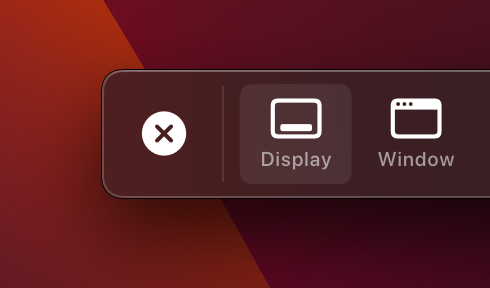
    <div class="x-arch-text x-arch-orig">Example button: 😅<br /><br />You can see it, right lol?<br /><br />ps. Thanks to <a href="https://www.figma.com/blog/desperately-seeking-squircles/" target="_blank" rel="noopener">https://www.figma.com/blog/desperately-seeking-squircles/</a> for absolutely stunning research on it!<br /><br />And to <a href="https://figma-squircle.vercel.app/" target="_blank" rel="noopener">https://figma-squircle.vercel.app/</a> for implementing the algorithm.</div>
    <div class="x-arch-text x-arch-trans">示例按钮：😅<br /><br />能看出来区别吧，哈哈？<br /><br />ps. 感谢 <a href="https://www.figma.com/blog/desperately-seeking-squircles/" target="_blank" rel="noopener">https://www.figma.com/blog/desperately-seeking-squircles/</a> 在这方面做的超赞研究！<br /><br />也感谢 <a href="https://figma-squircle.vercel.app/" target="_blank" rel="noopener">https://figma-squircle.vercel.app/</a> 实现了这个算法。</div>
    <div class="x-arch-media">
      <a href="/cdn-media/x/2023-06/1672631087523315712-1.png" target="_blank" rel="noopener"><img class="x-arch-img" src="/cdn-media/x/2023-06/1672631087523315712-1.png" alt="@pie6k 的配图 1/1" loading="lazy" decoding="async" width="490" height="288" /></a>
    </div>
  </div>
</div>