---
title: "X 归档 2023-07-15"
date: "2023-07-15"
tags:
  - x-archive
  - design
  - frontend
---

<div class="x-arch-meta">2 条动态 · 图 1 · 视频 0</div>
<div class="x-arch-day">
  <div class="x-arch-item">
    <input type="radio" name="xl-1679976049717936131" id="xl-1679976049717936131-zh" class="x-arch-lang-input x-arch-lang-input-zh" checked aria-label="显示译文" /><input type="radio" name="xl-1679976049717936131" id="xl-1679976049717936131-orig" class="x-arch-lang-input x-arch-lang-input-orig" aria-label="显示原文" /><div class="x-arch-head"><img class="x-arch-avatar" src="https://twimg.tweb.xin/twimg/profile_images/1100804485616566273/sOct-Txm_bigger.png" alt="" loading="lazy" referrerpolicy="no-referrer" /><span class="x-arch-kind x-arch-kind-posted" aria-label="发" title="发"><svg viewBox="0 0 24 24" fill="none" stroke="currentColor" stroke-width="2.5" stroke-linecap="round" stroke-linejoin="round" aria-hidden="true"><path d="M21.174 6.812a1 1 0 0 0-3.986-3.987L3.842 16.174a2 2 0 0 0-.5.83l-1.321 4.352a.5.5 0 0 0 .623.622l4.353-1.32a2 2 0 0 0 .83-.497z" /><path d="m15 5 4 4" /></svg></span><a class="x-arch-author" href="https://x.com/storybookjs" target="_blank" rel="nofollow noopener" data-name="Storybook" data-avatar="https://twimg.tweb.xin/twimg/profile_images/1100804485616566273/sOct-Txm_bigger.png">@storybookjs</a><span class="x-arch-time">06:07</span><span class="x-arch-lang-switch" role="group" aria-label="切换原文/译文"><label for="xl-1679976049717936131-zh" class="x-arch-lang-opt x-arch-lang-zh">译</label><label for="xl-1679976049717936131-orig" class="x-arch-lang-opt x-arch-lang-orig">原</label></span><a class="x-arch-link" href="https://x.com/storybookjs/status/1679976049717936131" target="_blank" rel="noopener">原推文<svg class="x-arch-ext" viewBox="0 0 24 24" fill="none" stroke="currentColor" stroke-width="2.5" stroke-linecap="round" stroke-linejoin="round" aria-hidden="true"><path d="M7 7h10v10" /><path d="M7 17 17 7" /></svg></a></div>
    <div class="x-arch-text x-arch-orig">Connecting Storybook and @figma via Dev Mode is the perfect way to bridge dev and design! It brings your design and implementation into one interface – creating a single, final source of truth!<br /><br />Find out more from Storybook maintainer @winkerVSbecks ~<br /><br /><a href="https://youtu.be/3hTyU3h1i6E" target="_blank" rel="noopener">https://youtu.be/3hTyU3h1i6E</a></div>
    <div class="x-arch-text x-arch-trans">通过 Dev Mode 连接 Storybook 和 @figma，是打通开发与设计的完美方式！它把设计和实现汇聚到一个界面——打造唯一的最终事实来源！<br /><br />欲知详情，请听 Storybook 维护者 @winkerVSbecks 道来 ~<br /><br /><a href="https://youtu.be/3hTyU3h1i6E" target="_blank" rel="noopener">https://youtu.be/3hTyU3h1i6E</a></div>
  </div>
  <div class="x-arch-item">
    <input type="radio" name="xl-1680207094702637058" id="xl-1680207094702637058-zh" class="x-arch-lang-input x-arch-lang-input-zh" checked aria-label="显示译文" /><input type="radio" name="xl-1680207094702637058" id="xl-1680207094702637058-orig" class="x-arch-lang-input x-arch-lang-input-orig" aria-label="显示原文" /><div class="x-arch-head"><img class="x-arch-avatar" src="https://twimg.tweb.xin/twimg/profile_images/943190142210191360/dP2tm8WE_bigger.jpg" alt="" loading="lazy" referrerpolicy="no-referrer" /><span class="x-arch-kind x-arch-kind-liked" aria-label="赞" title="赞"><svg viewBox="0 0 24 24" fill="none" stroke="currentColor" stroke-width="2.5" stroke-linecap="round" stroke-linejoin="round" aria-hidden="true"><path d="M19 14c1.49-1.46 3-3.21 3-5.5A5.5 5.5 0 0 0 16.5 3c-1.76 0-3 .5-4.5 2-1.5-1.5-2.74-2-4.5-2A5.5 5.5 0 0 0 2 8.5c0 2.3 1.5 4.05 3 5.5l7 7Z" /></svg></span><a class="x-arch-author" href="https://x.com/anatudor" target="_blank" rel="nofollow noopener" data-name="Ana Tudor 🐯" data-avatar="https://twimg.tweb.xin/twimg/profile_images/943190142210191360/dP2tm8WE_bigger.jpg">@anatudor</a><span class="x-arch-time">21:26</span><span class="x-arch-lang-switch" role="group" aria-label="切换原文/译文"><label for="xl-1680207094702637058-zh" class="x-arch-lang-opt x-arch-lang-zh">译</label><label for="xl-1680207094702637058-orig" class="x-arch-lang-opt x-arch-lang-orig">原</label></span><a class="x-arch-link" href="https://x.com/anatudor/status/1680207094702637058" target="_blank" rel="noopener">原推文<svg class="x-arch-ext" viewBox="0 0 24 24" fill="none" stroke="currentColor" stroke-width="2.5" stroke-linecap="round" stroke-linejoin="round" aria-hidden="true"><path d="M7 7h10v10" /><path d="M7 17 17 7" /></svg></a></div>
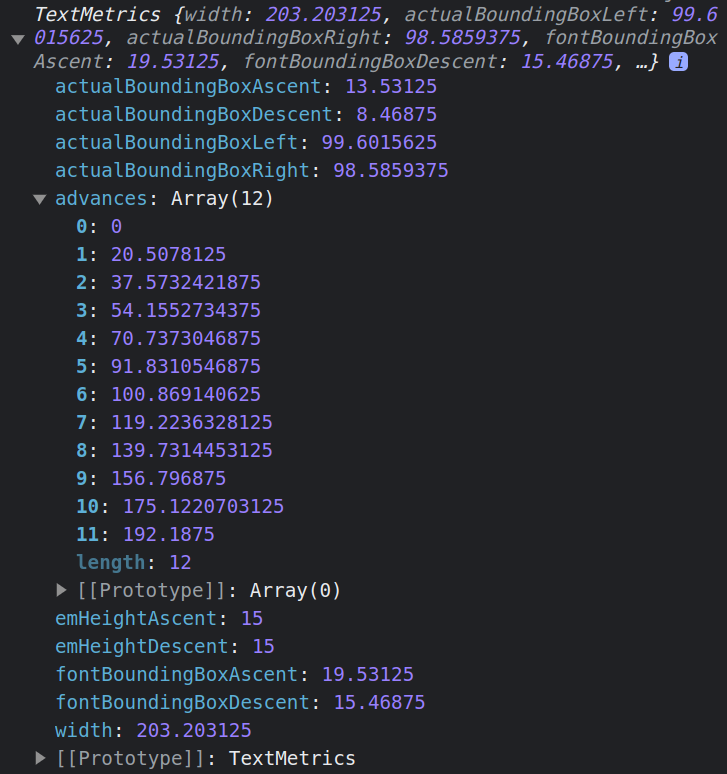
    <div class="x-arch-text x-arch-orig">#tinyJStip<br />Did you know that you can get the relative position of every letter of your canvas text with:<br /><br />context.measureText('hello there!').advances</div>
    <div class="x-arch-text x-arch-trans">#tinyJStip<br />你知道吗？用下面的代码就能拿到 canvas 文本中每个字母的相对位置：<br /><br />context.measureText('hello there!').advances</div>
    <div class="x-arch-media">
      <a href="/cdn-media/x/2026-10/1680207094702637058-1.png" target="_blank" rel="noopener"><img class="x-arch-img" src="/cdn-media/x/2026-10/1680207094702637058-1.png" alt="@anatudor 的配图 1/1" loading="lazy" decoding="async" width="727" height="774" /></a>
    </div>
  </div>
</div>