---
title: "X 归档 2024-06-06"
date: "2024-06-06"
tags:
  - x-archive
  - frontend
---

<div class="x-arch-meta">3 条动态 · 图 1 · 视频 1</div>
<div class="x-arch-day">
  <div class="x-arch-item">
    <input type="radio" name="xl-1798404312265289963" id="xl-1798404312265289963-zh" class="x-arch-lang-input x-arch-lang-input-zh" checked aria-label="显示译文" /><input type="radio" name="xl-1798404312265289963" id="xl-1798404312265289963-orig" class="x-arch-lang-input x-arch-lang-input-orig" aria-label="显示原文" /><div class="x-arch-head"><img class="x-arch-avatar" src="https://twimg.tweb.xin/twimg/profile_images/1566948725624344576/7QR6OuRz_bigger.jpg" alt="" loading="lazy" referrerpolicy="no-referrer" /><span class="x-arch-kind x-arch-kind-posted" aria-label="发" title="发"><svg viewBox="0 0 24 24" fill="none" stroke="currentColor" stroke-width="2.5" stroke-linecap="round" stroke-linejoin="round" aria-hidden="true"><path d="M21.174 6.812a1 1 0 0 0-3.986-3.987L3.842 16.174a2 2 0 0 0-.5.83l-1.321 4.352a.5.5 0 0 0 .623.622l4.353-1.32a2 2 0 0 0 .83-.497z" /><path d="m15 5 4 4" /></svg></span><a class="x-arch-author" href="https://x.com/Waterplea" target="_blank" rel="nofollow noopener" data-name="Alex Inkin" data-avatar="https://twimg.tweb.xin/twimg/profile_images/1566948725624344576/7QR6OuRz_bigger.jpg">@Waterplea</a><span class="x-arch-time">01:19</span><span class="x-arch-lang-switch" role="group" aria-label="切换原文/译文"><label for="xl-1798404312265289963-zh" class="x-arch-lang-opt x-arch-lang-zh">译</label><label for="xl-1798404312265289963-orig" class="x-arch-lang-opt x-arch-lang-orig">原</label></span><a class="x-arch-link" href="https://x.com/Waterplea/status/1798404312265289963" target="_blank" rel="noopener">原推文<svg class="x-arch-ext" viewBox="0 0 24 24" fill="none" stroke="currentColor" stroke-width="2.5" stroke-linecap="round" stroke-linejoin="round" aria-hidden="true"><path d="M7 7h10v10" /><path d="M7 17 17 7" /></svg></a></div>
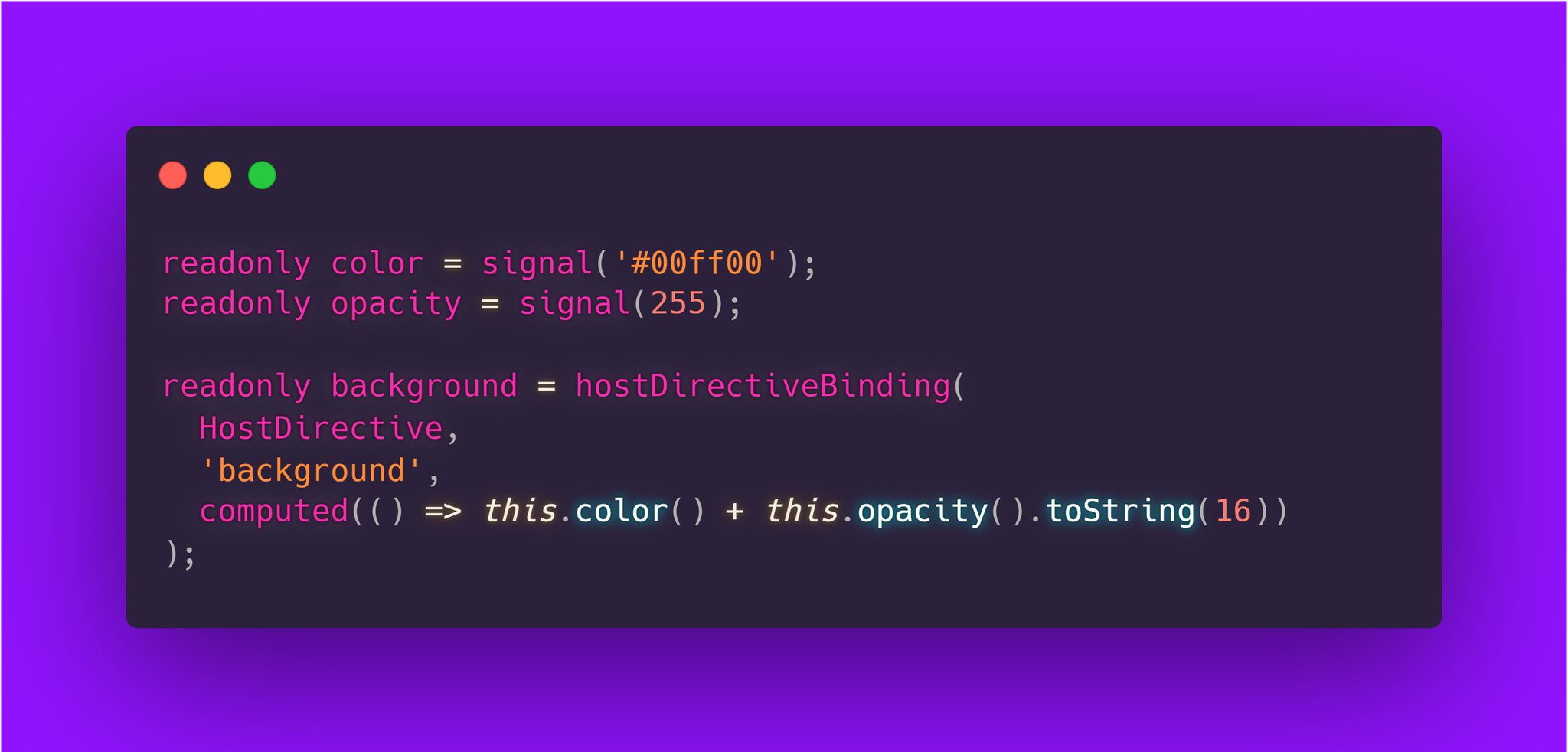
    <div class="x-arch-text x-arch-orig">Ok, let's improve on that. What we really want is to use `@HostBinding` on getters to control host directives. We can now do this with `computed`, updated the example:<br /><a href="https://stackblitz.com/edit/host-directive-binding" target="_blank" rel="noopener">https://stackblitz.com/edit/host-directive-binding</a><br />Signals are unlocking so much great patterns in #Angular!</div>
    <div class="x-arch-text x-arch-trans">好，我们来改进一下。我们真正想要的是在 getter 上使用 `@HostBinding` 来控制宿主指令。现在可以用 `computed` 做到了，示例已更新：<br /><a href="https://stackblitz.com/edit/host-directive-binding" target="_blank" rel="noopener">https://stackblitz.com/edit/host-directive-binding</a><br />Signals 正在为 #Angular 解锁超多优秀的模式！</div>
    <div class="x-arch-media">
      <a href="/cdn-media/x/2024-06/1798404312265289963-1.jpg" target="_blank" rel="noopener"><img class="x-arch-img" src="/cdn-media/x/2024-06/1798404312265289963-1.jpg" alt="@Waterplea 的配图 1/1" loading="lazy" decoding="async" width="2048" height="982" /></a>
    </div>
  </div>
  <div class="x-arch-item">
    <input type="radio" name="xl-1798544113689821467" id="xl-1798544113689821467-zh" class="x-arch-lang-input x-arch-lang-input-zh" checked aria-label="显示译文" /><input type="radio" name="xl-1798544113689821467" id="xl-1798544113689821467-orig" class="x-arch-lang-input x-arch-lang-input-orig" aria-label="显示原文" /><div class="x-arch-head"><img class="x-arch-avatar" src="https://twimg.tweb.xin/twimg/profile_images/1844040231697121280/LOml3yw9_bigger.jpg" alt="" loading="lazy" referrerpolicy="no-referrer" /><span class="x-arch-kind x-arch-kind-liked" aria-label="赞" title="赞"><svg viewBox="0 0 24 24" fill="none" stroke="currentColor" stroke-width="2.5" stroke-linecap="round" stroke-linejoin="round" aria-hidden="true"><path d="M19 14c1.49-1.46 3-3.21 3-5.5A5.5 5.5 0 0 0 16.5 3c-1.76 0-3 .5-4.5 2-1.5-1.5-2.74-2-4.5-2A5.5 5.5 0 0 0 2 8.5c0 2.3 1.5 4.05 3 5.5l7 7Z" /></svg></span><a class="x-arch-author" href="https://x.com/deno_land" target="_blank" rel="nofollow noopener" data-name="Deno" data-avatar="https://twimg.tweb.xin/twimg/profile_images/1844040231697121280/LOml3yw9_bigger.jpg">@deno_land</a><span class="x-arch-time">10:35</span><span class="x-arch-lang-switch" role="group" aria-label="切换原文/译文"><label for="xl-1798544113689821467-zh" class="x-arch-lang-opt x-arch-lang-zh">译</label><label for="xl-1798544113689821467-orig" class="x-arch-lang-opt x-arch-lang-orig">原</label></span><a class="x-arch-link" href="https://x.com/deno_land/status/1798544113689821467" target="_blank" rel="noopener">原推文<svg class="x-arch-ext" viewBox="0 0 24 24" fill="none" stroke="currentColor" stroke-width="2.5" stroke-linecap="round" stroke-linejoin="round" aria-hidden="true"><path d="M7 7h10v10" /><path d="M7 17 17 7" /></svg></a></div>
    <div class="x-arch-text x-arch-orig">Astral is a high-level puppeteer/playwright-like library that allows for control over a web browser (primarily for automation and testing). It is written from scratch with Deno in mind. <a href="https://jsr.io/@astral/astral" target="_blank" rel="noopener">https://jsr.io/@astral/astral</a></div>
    <div class="x-arch-text x-arch-trans">Astral 是一个类似 puppeteer/playwright 的高级库，可以控制 web 浏览器（主要用于自动化和测试）。它是从零开始、以 Deno 为目标编写的。 <a href="https://jsr.io/@astral/astral" target="_blank" rel="noopener">https://jsr.io/@astral/astral</a></div>
  </div>
  <div class="x-arch-item">
    <input type="radio" name="xl-1798728699459563905" id="xl-1798728699459563905-zh" class="x-arch-lang-input x-arch-lang-input-zh" checked aria-label="显示译文" /><input type="radio" name="xl-1798728699459563905" id="xl-1798728699459563905-orig" class="x-arch-lang-input x-arch-lang-input-orig" aria-label="显示原文" /><div class="x-arch-head"><img class="x-arch-avatar" src="https://twimg.tweb.xin/twimg/profile_images/1534700564810018816/anAuSfkp_bigger.jpg" alt="" loading="lazy" referrerpolicy="no-referrer" /><span class="x-arch-kind x-arch-kind-liked" aria-label="赞" title="赞"><svg viewBox="0 0 24 24" fill="none" stroke="currentColor" stroke-width="2.5" stroke-linecap="round" stroke-linejoin="round" aria-hidden="true"><path d="M19 14c1.49-1.46 3-3.21 3-5.5A5.5 5.5 0 0 0 16.5 3c-1.76 0-3 .5-4.5 2-1.5-1.5-2.74-2-4.5-2A5.5 5.5 0 0 0 2 8.5c0 2.3 1.5 4.05 3 5.5l7 7Z" /></svg></span><a class="x-arch-author" href="https://x.com/jh3yy" target="_blank" rel="nofollow noopener" data-name="jhey ʕ•ᴥ•ʔ" data-avatar="https://twimg.tweb.xin/twimg/profile_images/1534700564810018816/anAuSfkp_bigger.jpg">@jh3yy</a><span class="x-arch-time">22:48</span><span class="x-arch-lang-switch" role="group" aria-label="切换原文/译文"><label for="xl-1798728699459563905-zh" class="x-arch-lang-opt x-arch-lang-zh">译</label><label for="xl-1798728699459563905-orig" class="x-arch-lang-opt x-arch-lang-orig">原</label></span><a class="x-arch-link" href="https://x.com/jh3yy/status/1798728699459563905" target="_blank" rel="noopener">原推文<svg class="x-arch-ext" viewBox="0 0 24 24" fill="none" stroke="currentColor" stroke-width="2.5" stroke-linecap="round" stroke-linejoin="round" aria-hidden="true"><path d="M7 7h10v10" /><path d="M7 17 17 7" /></svg></a></div>
    <div class="x-arch-text x-arch-orig">Fade elements in and out on scroll in a window with CSS? ✅<br /><br />ul { scroll-padding-inline: 200px; }<br />article {<br />animation: highlight;<br />animation-timeline: view(inline);<br />}<br />@​keyframes highlight {<br />entry 0%, exit 100% { opacity: 0; }<br />entry 100%, exit 0% { opacity: 1; }<br />}<br /><br />cc @adamwathan <a href="https://t.co/5bumSDcAbs" target="_blank" rel="noopener">https://t.co/5bumSDcAbs</a></div>
    <div class="x-arch-text x-arch-trans">用 CSS 让元素在窗口中随滚动淡入淡出？✅<br /><br />ul { scroll-padding-inline: 200px; }<br />article {<br />animation: highlight;<br />animation-timeline: view(inline);<br />}<br />@keyframes highlight {<br />entry 0%, exit 100% { opacity: 0; }<br />entry 100%, exit 0% { opacity: 1; }<br />}<br /><br />cc @adamwathan <a href="https://t.co/5bumSDcAbs" target="_blank" rel="noopener">https://t.co/5bumSDcAbs</a></div>
    <video class="x-arch-video" preload="none" playsinline poster="/cdn-media/x/2024-06/1798728699459563905-poster.jpg" src="/cdn-media/x/2026-10/1798728699459563905-video.mp4" width="720" height="720" data-duration="36" aria-label="@jh3yy 的视频"></video>
  </div>
</div>