---
title: "X 归档 2025-01-19"
date: "2025-01-19"
tags:
  - x-archive
  - frontend
  - ai
  - media
---

<div class="x-arch-meta">5 条动态 · 图 1 · 视频 5</div>
<div class="x-arch-day">
  <div class="x-arch-item">
    <input type="radio" name="xl-1880695046858826159" id="xl-1880695046858826159-zh" class="x-arch-lang-input x-arch-lang-input-zh" checked aria-label="显示译文" /><input type="radio" name="xl-1880695046858826159" id="xl-1880695046858826159-orig" class="x-arch-lang-input x-arch-lang-input-orig" aria-label="显示原文" /><div class="x-arch-head"><img class="x-arch-avatar" src="https://twimg.tweb.xin/twimg/profile_images/1793460098867838976/hoeoWt9M_bigger.jpg" alt="" loading="lazy" referrerpolicy="no-referrer" /><span class="x-arch-kind x-arch-kind-liked" aria-label="赞" title="赞"><svg viewBox="0 0 24 24" fill="none" stroke="currentColor" stroke-width="2.5" stroke-linecap="round" stroke-linejoin="round" aria-hidden="true"><path d="M19 14c1.49-1.46 3-3.21 3-5.5A5.5 5.5 0 0 0 16.5 3c-1.76 0-3 .5-4.5 2-1.5-1.5-2.74-2-4.5-2A5.5 5.5 0 0 0 2 8.5c0 2.3 1.5 4.05 3 5.5l7 7Z" /></svg></span><a class="x-arch-author" href="https://x.com/EHuanglu" target="_blank" rel="nofollow noopener" data-name="el.cine" data-avatar="https://twimg.tweb.xin/twimg/profile_images/1793460098867838976/hoeoWt9M_bigger.jpg">@EHuanglu</a><span class="x-arch-time">03:13</span><span class="x-arch-lang-switch" role="group" aria-label="切换原文/译文"><label for="xl-1880695046858826159-zh" class="x-arch-lang-opt x-arch-lang-zh">译</label><label for="xl-1880695046858826159-orig" class="x-arch-lang-opt x-arch-lang-orig">原</label></span><a class="x-arch-link" href="https://x.com/EHuanglu/status/1880695046858826159" target="_blank" rel="noopener">原推文<svg class="x-arch-ext" viewBox="0 0 24 24" fill="none" stroke="currentColor" stroke-width="2.5" stroke-linecap="round" stroke-linejoin="round" aria-hidden="true"><path d="M7 7h10v10" /><path d="M7 17 17 7" /></svg></a></div>
    <div class="x-arch-text x-arch-orig">this is unbelievable..<br /><br />Hunyuan AI’s video-to-video model can now replace actors in any film scene, and capture even the subtle expressions..</div>
    <div class="x-arch-text x-arch-trans">这简直难以置信……<br /><br />Hunyuan AI 的 video-to-video 模型现在可以替换任何电影场景中的演员，连细微的表情都能捕捉……</div>
    <video class="x-arch-video" preload="none" playsinline poster="/cdn-media/x/2025-01/1880695046858826159-poster.jpg" src="/cdn-media/x/2025-01/1880695046858826159.m3u8" width="720" height="814" data-duration="17" aria-label="@EHuanglu 的视频"></video>
  </div>
  <div class="x-arch-item">
    <input type="radio" name="xl-1880854664385827250" id="xl-1880854664385827250-zh" class="x-arch-lang-input x-arch-lang-input-zh" checked aria-label="显示译文" /><input type="radio" name="xl-1880854664385827250" id="xl-1880854664385827250-orig" class="x-arch-lang-input x-arch-lang-input-orig" aria-label="显示原文" /><div class="x-arch-head"><img class="x-arch-avatar" src="https://twimg.tweb.xin/twimg/profile_images/725179208528322560/TPjU7qop_bigger.jpg" alt="" loading="lazy" referrerpolicy="no-referrer" /><span class="x-arch-kind x-arch-kind-liked" aria-label="赞" title="赞"><svg viewBox="0 0 24 24" fill="none" stroke="currentColor" stroke-width="2.5" stroke-linecap="round" stroke-linejoin="round" aria-hidden="true"><path d="M19 14c1.49-1.46 3-3.21 3-5.5A5.5 5.5 0 0 0 16.5 3c-1.76 0-3 .5-4.5 2-1.5-1.5-2.74-2-4.5-2A5.5 5.5 0 0 0 2 8.5c0 2.3 1.5 4.05 3 5.5l7 7Z" /></svg></span><a class="x-arch-author" href="https://x.com/vikingmute" target="_blank" rel="nofollow noopener" data-name="Viking" data-avatar="https://twimg.tweb.xin/twimg/profile_images/725179208528322560/TPjU7qop_bigger.jpg">@vikingmute</a><span class="x-arch-time">13:47</span><span class="x-arch-lang-switch" role="group" aria-label="切换原文/译文"><label for="xl-1880854664385827250-zh" class="x-arch-lang-opt x-arch-lang-zh">译</label><label for="xl-1880854664385827250-orig" class="x-arch-lang-opt x-arch-lang-orig">原</label></span><a class="x-arch-link" href="https://x.com/vikingmute/status/1880854664385827250" target="_blank" rel="noopener">原推文<svg class="x-arch-ext" viewBox="0 0 24 24" fill="none" stroke="currentColor" stroke-width="2.5" stroke-linecap="round" stroke-linejoin="round" aria-hidden="true"><path d="M7 7h10v10" /><path d="M7 17 17 7" /></svg></a></div>
    <div class="x-arch-text x-arch-orig">今年我认为最佳的网页设计：<a href="https://oxide.computer/" target="_blank" rel="noopener">https://oxide.computer/</a><br />太漂亮了，完全不像别的一样千篇一律的模版，几个渐变字体加几个淡入淡出的动画。<br /><br />各种精致的动画（动画居然都是用 DOM…</div>
    <div class="x-arch-text x-arch-trans">今年我认为最佳的网页设计：<br />太漂亮了，完全不像别的一样千篇一律的模版，几个渐变字体加几个淡入淡出的动画。<br /><br />各种精致的动画（动画居然都是用 DOM…</div>
    <video class="x-arch-video" preload="none" playsinline poster="/cdn-media/x/2025-01/1880854664385827250-poster.jpg" src="/cdn-media/x/2026-10/1880854664385827250-video.mp4" width="1150" height="720" data-duration="18" aria-label="@vikingmute 的视频"></video>
  </div>
  <div class="x-arch-item">
    <input type="radio" name="xl-1880924433772315080" id="xl-1880924433772315080-zh" class="x-arch-lang-input x-arch-lang-input-zh" checked aria-label="显示译文" /><input type="radio" name="xl-1880924433772315080" id="xl-1880924433772315080-orig" class="x-arch-lang-input x-arch-lang-input-orig" aria-label="显示原文" /><div class="x-arch-head"><img class="x-arch-avatar" src="https://twimg.tweb.xin/twimg/profile_images/725179208528322560/TPjU7qop_bigger.jpg" alt="" loading="lazy" referrerpolicy="no-referrer" /><span class="x-arch-kind x-arch-kind-posted" aria-label="发" title="发"><svg viewBox="0 0 24 24" fill="none" stroke="currentColor" stroke-width="2.5" stroke-linecap="round" stroke-linejoin="round" aria-hidden="true"><path d="M21.174 6.812a1 1 0 0 0-3.986-3.987L3.842 16.174a2 2 0 0 0-.5.83l-1.321 4.352a.5.5 0 0 0 .623.622l4.353-1.32a2 2 0 0 0 .83-.497z" /><path d="m15 5 4 4" /></svg></span><a class="x-arch-author" href="https://x.com/vikingmute" target="_blank" rel="nofollow noopener" data-name="Viking" data-avatar="https://twimg.tweb.xin/twimg/profile_images/725179208528322560/TPjU7qop_bigger.jpg">@vikingmute</a><span class="x-arch-time">18:25</span><span class="x-arch-lang-switch" role="group" aria-label="切换原文/译文"><label for="xl-1880924433772315080-zh" class="x-arch-lang-opt x-arch-lang-zh">译</label><label for="xl-1880924433772315080-orig" class="x-arch-lang-opt x-arch-lang-orig">原</label></span><a class="x-arch-link" href="https://x.com/vikingmute/status/1880924433772315080" target="_blank" rel="noopener">原推文<svg class="x-arch-ext" viewBox="0 0 24 24" fill="none" stroke="currentColor" stroke-width="2.5" stroke-linecap="round" stroke-linejoin="round" aria-hidden="true"><path d="M7 7h10v10" /><path d="M7 17 17 7" /></svg></a></div>
    <div class="x-arch-text x-arch-orig">今年我认为最佳的网页设计：<a href="https://oxide.computer/" target="_blank" rel="noopener">https://oxide.computer/</a><br />太漂亮了，完全不像别的一样千篇一律的模版，几个渐变字体加几个淡入淡出的动画。<br /><br />各种精致的动画（动画居然都是用 DOM</div>
    <div class="x-arch-text x-arch-trans">今年我认为最佳的网页设计：<a href="https://oxide.computer/" target="_blank" rel="noopener">https://oxide.computer/</a><br />太漂亮了，完全不像别的一样千篇一律的模版，几个渐变字体加几个淡入淡出的动画。<br /><br />各种精致的动画（动画居然都是用 DOM</div>
    <video class="x-arch-video" preload="none" playsinline poster="/cdn-media/x/2025-01/1880924433772315080-poster.jpg" src="/cdn-media/x/2025-01/1880924433772315080-video.mp4" width="1150" height="720" data-duration="18" aria-label="@vikingmute 的视频"></video>
  </div>
  <div class="x-arch-item">
    <input type="radio" name="xl-1880924670242992529" id="xl-1880924670242992529-zh" class="x-arch-lang-input x-arch-lang-input-zh" checked aria-label="显示译文" /><input type="radio" name="xl-1880924670242992529" id="xl-1880924670242992529-orig" class="x-arch-lang-input x-arch-lang-input-orig" aria-label="显示原文" /><div class="x-arch-head"><img class="x-arch-avatar" src="https://twimg.tweb.xin/twimg/profile_images/1534700564810018816/anAuSfkp_bigger.jpg" alt="" loading="lazy" referrerpolicy="no-referrer" /><span class="x-arch-kind x-arch-kind-posted" aria-label="发" title="发"><svg viewBox="0 0 24 24" fill="none" stroke="currentColor" stroke-width="2.5" stroke-linecap="round" stroke-linejoin="round" aria-hidden="true"><path d="M21.174 6.812a1 1 0 0 0-3.986-3.987L3.842 16.174a2 2 0 0 0-.5.83l-1.321 4.352a.5.5 0 0 0 .623.622l4.353-1.32a2 2 0 0 0 .83-.497z" /><path d="m15 5 4 4" /></svg></span><a class="x-arch-author" href="https://x.com/jh3yy" target="_blank" rel="nofollow noopener" data-name="jhey ʕ•ᴥ•ʔ" data-avatar="https://twimg.tweb.xin/twimg/profile_images/1534700564810018816/anAuSfkp_bigger.jpg">@jh3yy</a><span class="x-arch-time">18:26</span><span class="x-arch-lang-switch" role="group" aria-label="切换原文/译文"><label for="xl-1880924670242992529-zh" class="x-arch-lang-opt x-arch-lang-zh">译</label><label for="xl-1880924670242992529-orig" class="x-arch-lang-opt x-arch-lang-orig">原</label></span><a class="x-arch-link" href="https://x.com/jh3yy/status/1880924670242992529" target="_blank" rel="noopener">原推文<svg class="x-arch-ext" viewBox="0 0 24 24" fill="none" stroke="currentColor" stroke-width="2.5" stroke-linecap="round" stroke-linejoin="round" aria-hidden="true"><path d="M7 7h10v10" /><path d="M7 17 17 7" /></svg></a></div>
    <div class="x-arch-text x-arch-orig">extra detail: animate a CSS custom property from 0 to 100 on scroll and use that for a counter()<br /><br />label::after { content: counter(complete) '% complete'; }<br /><br />translate the label using container query units ✨<br /><br />translate: 0 calc(var(--p) * 1cqh);</div>
    <div class="x-arch-text x-arch-trans">额外细节：滚动时把一个 CSS 自定义属性从 0 动画到 100，再喂给 counter() 使用<br /><br />label::after { content: counter(complete) '% complete'; }<br /><br />用容器查询单位平移标签 ✨<br /><br />translate: 0 calc(var(--p) * 1cqh);</div>
    <video class="x-arch-video" preload="none" playsinline poster="/cdn-media/x/2025-01/1880924670242992529-poster.jpg" src="/cdn-media/x/2025-01/1880924670242992529-video.mp4" width="720" height="720" data-duration="10" aria-label="@jh3yy 的视频"></video>
  </div>
  <div class="x-arch-item">
    <input type="radio" name="xl-1880926834369741280" id="xl-1880926834369741280-zh" class="x-arch-lang-input x-arch-lang-input-zh" checked aria-label="显示译文" /><input type="radio" name="xl-1880926834369741280" id="xl-1880926834369741280-orig" class="x-arch-lang-input x-arch-lang-input-orig" aria-label="显示原文" /><div class="x-arch-head"><img class="x-arch-avatar" src="https://twimg.tweb.xin/twimg/profile_images/943190142210191360/dP2tm8WE_bigger.jpg" alt="" loading="lazy" referrerpolicy="no-referrer" /><span class="x-arch-kind x-arch-kind-posted" aria-label="发" title="发"><svg viewBox="0 0 24 24" fill="none" stroke="currentColor" stroke-width="2.5" stroke-linecap="round" stroke-linejoin="round" aria-hidden="true"><path d="M21.174 6.812a1 1 0 0 0-3.986-3.987L3.842 16.174a2 2 0 0 0-.5.83l-1.321 4.352a.5.5 0 0 0 .623.622l4.353-1.32a2 2 0 0 0 .83-.497z" /><path d="m15 5 4 4" /></svg></span><a class="x-arch-author" href="https://x.com/anatudor" target="_blank" rel="nofollow noopener" data-name="Ana Tudor 🐯" data-avatar="https://twimg.tweb.xin/twimg/profile_images/943190142210191360/dP2tm8WE_bigger.jpg">@anatudor</a><span class="x-arch-time">18:34</span><span class="x-arch-lang-switch" role="group" aria-label="切换原文/译文"><label for="xl-1880926834369741280-zh" class="x-arch-lang-opt x-arch-lang-zh">译</label><label for="xl-1880926834369741280-orig" class="x-arch-lang-opt x-arch-lang-orig">原</label></span><a class="x-arch-link" href="https://x.com/anatudor/status/1880926834369741280" target="_blank" rel="noopener">原推文<svg class="x-arch-ext" viewBox="0 0 24 24" fill="none" stroke="currentColor" stroke-width="2.5" stroke-linecap="round" stroke-linejoin="round" aria-hidden="true"><path d="M7 7h10v10" /><path d="M7 17 17 7" /></svg></a></div>
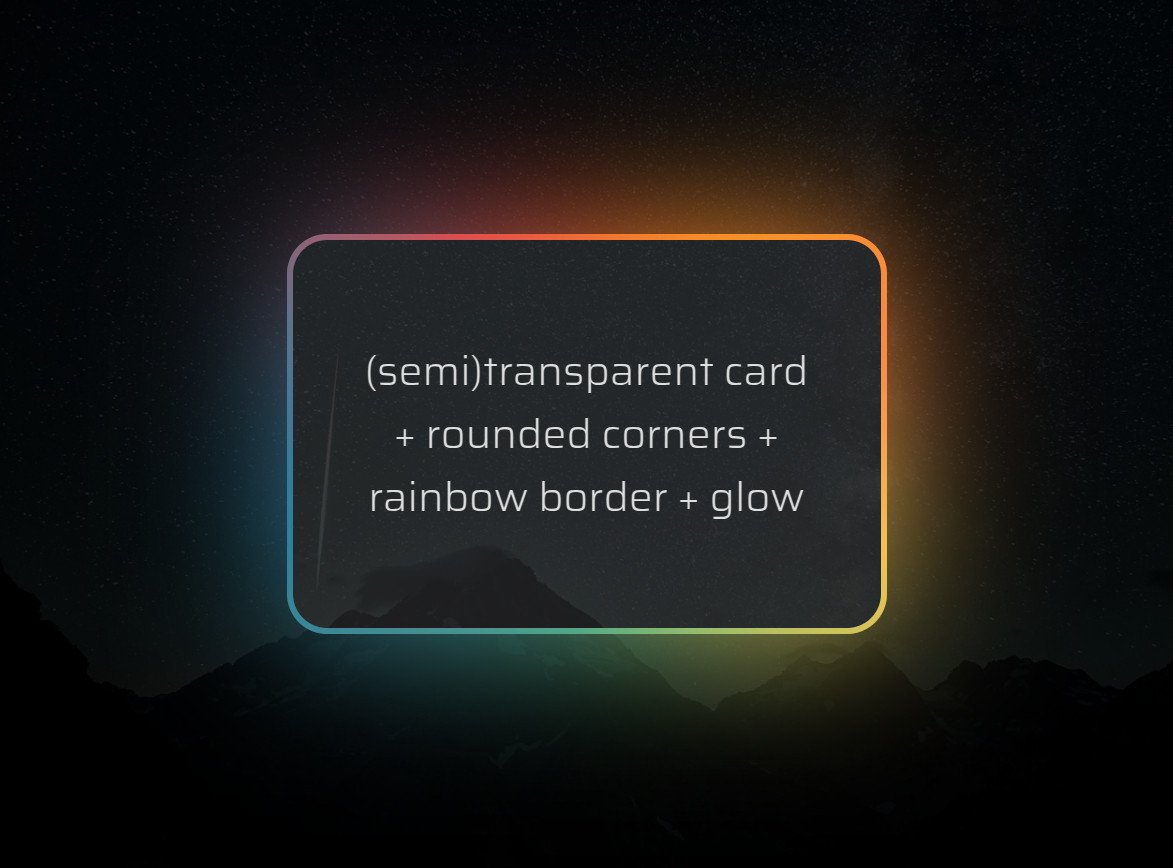
    <div class="x-arch-text x-arch-orig">Know the animated 🌈 border + glow effect that's all the rage? It's normally done by adding an opaque cover on top of two 🌈 layers.<br /><br />But what if we wanted a (semi)transparent background within the border? It's possible with pure #CSS!<br /><br />Heavily commented: <a href="https://codepen.io/thebabydino/pen/KwPBvzo" target="_blank" rel="noopener">https://codepen.io/thebabydino/pen/KwPBvzo</a></div>
    <div class="x-arch-text x-arch-trans">知道那个火遍全网的 🌈 流动边框 + 发光效果吗？通常做法是在两层 🌈 上面盖一层不透明的遮罩。<br /><br />但如果我们想要边框内是（半）透明的背景呢？纯 #CSS 也能做到！<br /><br />注释写得非常全： <a href="https://codepen.io/thebabydino/pen/KwPBvzo" target="_blank" rel="noopener">https://codepen.io/thebabydino/pen/KwPBvzo</a></div>
    <div class="x-arch-media">
      <a href="/cdn-media/x/2025-01/1880926834369741280-1.jpg" target="_blank" rel="noopener"><img class="x-arch-img" src="/cdn-media/x/2025-01/1880926834369741280-1.jpg" alt="@anatudor 的配图 1/1" loading="lazy" decoding="async" width="1173" height="868" /></a>
    </div>
    <video class="x-arch-video" preload="none" playsinline poster="/cdn-media/x/2025-01/1880926834369741280-poster.jpg" src="/cdn-media/x/2025-01/1880926834369741280-video.mp4" width="964" height="720" data-duration="4" aria-label="@anatudor 的视频"></video>
  </div>
</div>