---
title: "X 归档 2025-12-24"
date: "2025-12-24"
tags:
  - x-archive
  - ai
  - frontend
  - python
---

<div class="x-arch-meta">3 条动态 · 图 1 · 视频 1</div>
<div class="x-arch-day">
  <div class="x-arch-item">
    <input type="radio" name="xl-2003511047425302640" id="xl-2003511047425302640-zh" class="x-arch-lang-input x-arch-lang-input-zh" checked aria-label="显示译文" /><input type="radio" name="xl-2003511047425302640" id="xl-2003511047425302640-orig" class="x-arch-lang-input x-arch-lang-input-orig" aria-label="显示原文" /><div class="x-arch-head"><img class="x-arch-avatar" src="https://twimg.tweb.xin/twimg/profile_images/1765404718959095808/BX7VN1hS_bigger.jpg" alt="" loading="lazy" referrerpolicy="no-referrer" /><span class="x-arch-kind x-arch-kind-posted" aria-label="发" title="发"><svg viewBox="0 0 24 24" fill="none" stroke="currentColor" stroke-width="2.5" stroke-linecap="round" stroke-linejoin="round" aria-hidden="true"><path d="M21.174 6.812a1 1 0 0 0-3.986-3.987L3.842 16.174a2 2 0 0 0-.5.83l-1.321 4.352a.5.5 0 0 0 .623.622l4.353-1.32a2 2 0 0 0 .83-.497z" /><path d="m15 5 4 4" /></svg></span><a class="x-arch-author" href="https://x.com/xiaohu" target="_blank" rel="nofollow noopener" data-name="小互" data-avatar="https://twimg.tweb.xin/twimg/profile_images/1765404718959095808/BX7VN1hS_bigger.jpg">@xiaohu</a><span class="x-arch-time">01:00</span><span class="x-arch-lang-switch" role="group" aria-label="切换原文/译文"><label for="xl-2003511047425302640-zh" class="x-arch-lang-opt x-arch-lang-zh">译</label><label for="xl-2003511047425302640-orig" class="x-arch-lang-opt x-arch-lang-orig">原</label></span><a class="x-arch-link" href="https://x.com/xiaohu/status/2003511047425302640" target="_blank" rel="noopener">原推文<svg class="x-arch-ext" viewBox="0 0 24 24" fill="none" stroke="currentColor" stroke-width="2.5" stroke-linecap="round" stroke-linejoin="round" aria-hidden="true"><path d="M7 7h10v10" /><path d="M7 17 17 7" /></svg></a></div>
    <div class="x-arch-text x-arch-orig">兄弟们，这个有点牛P啊<br /><br />阿里巴巴发布 Photoshop 级别的图像分层模型：<br /><br />Qwen-Image-Layered<br /><br />它可以将将单张图像自动分解为多个独立的 RGBA 图层<br /><br />让你像在 Photoshop 里一样编辑图片，但不需要自己动手抠图。<br /><br />由于各图层在物理上相互独立，分解完成后，你可以对每一层都进行编辑。😅</div>
    <div class="x-arch-text x-arch-trans">兄弟们，这个有点牛P啊<br /><br />阿里巴巴发布 Photoshop 级别的图像分层模型：<br /><br />Qwen-Image-Layered<br /><br />它可以将将单张图像自动分解为多个独立的 RGBA 图层<br /><br />让你像在 Photoshop 里一样编辑图片，但不需要自己动手抠图。<br /><br />由于各图层在物理上相互独立，分解完成后，你可以对每一层都进行编辑。😅</div>
    <video class="x-arch-video" preload="none" playsinline poster="/cdn-media/x/2025-12/2003511047425302640-poster.jpg" src="/cdn-media/x/2025-12/2003511047425302640-video.mp4" width="1280" height="720" data-duration="51" aria-label="@xiaohu 的视频"></video>
  </div>
  <div class="x-arch-item">
    <input type="radio" name="xl-2003511207240827196" id="xl-2003511207240827196-zh" class="x-arch-lang-input x-arch-lang-input-zh" checked aria-label="显示译文" /><input type="radio" name="xl-2003511207240827196" id="xl-2003511207240827196-orig" class="x-arch-lang-input x-arch-lang-input-orig" aria-label="显示原文" /><div class="x-arch-head"><img class="x-arch-avatar" src="https://twimg.tweb.xin/twimg/profile_images/1729450995850027008/gllXr6bh_bigger.jpg" alt="" loading="lazy" referrerpolicy="no-referrer" /><span class="x-arch-kind x-arch-kind-posted" aria-label="发" title="发"><svg viewBox="0 0 24 24" fill="none" stroke="currentColor" stroke-width="2.5" stroke-linecap="round" stroke-linejoin="round" aria-hidden="true"><path d="M21.174 6.812a1 1 0 0 0-3.986-3.987L3.842 16.174a2 2 0 0 0-.5.83l-1.321 4.352a.5.5 0 0 0 .623.622l4.353-1.32a2 2 0 0 0 .83-.497z" /><path d="m15 5 4 4" /></svg></span><a class="x-arch-author" href="https://x.com/aigclink" target="_blank" rel="nofollow noopener" data-name="AIGCLINK" data-avatar="https://twimg.tweb.xin/twimg/profile_images/1729450995850027008/gllXr6bh_bigger.jpg">@aigclink</a><span class="x-arch-time">01:01</span><span class="x-arch-lang-switch" role="group" aria-label="切换原文/译文"><label for="xl-2003511207240827196-zh" class="x-arch-lang-opt x-arch-lang-zh">译</label><label for="xl-2003511207240827196-orig" class="x-arch-lang-opt x-arch-lang-orig">原</label></span><a class="x-arch-link" href="https://x.com/aigclink/status/2003511207240827196" target="_blank" rel="noopener">原推文<svg class="x-arch-ext" viewBox="0 0 24 24" fill="none" stroke="currentColor" stroke-width="2.5" stroke-linecap="round" stroke-linejoin="round" aria-hidden="true"><path d="M7 7h10v10" /><path d="M7 17 17 7" /></svg></a></div>
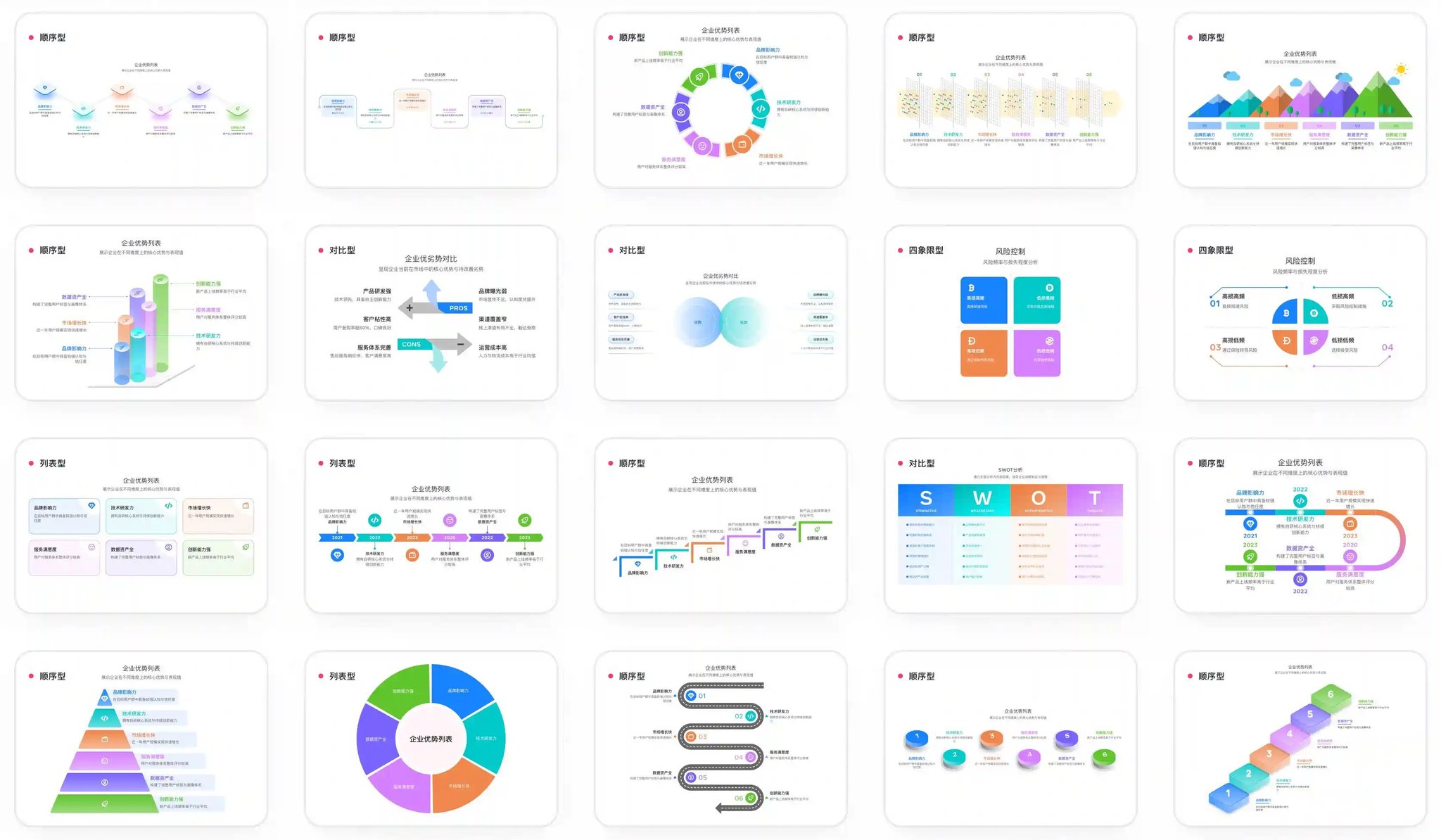
    <div class="x-arch-text x-arch-orig">蚂蚁集团AntV团队新开源了一款声明式信息图可视化框架：Infographic，使AI能生成复杂可编辑的SVG信息图<br /><br />支持AI流式输出和渲染，边写边画<br />内置200套模板，覆盖了常见的图表类型和布局<br />手绘、渐变、图案等主题，也可以自定义<br />自带编辑器，AI 生成后可二次编辑<br /><br />#AI生成信息图 #Infographic</div>
    <div class="x-arch-text x-arch-trans">蚂蚁集团AntV团队新开源了一款声明式信息图可视化框架：Infographic，使AI能生成复杂可编辑的SVG信息图<br /><br />支持AI流式输出和渲染，边写边画<br />内置200套模板，覆盖了常见的图表类型和布局<br />手绘、渐变、图案等主题，也可以自定义<br />自带编辑器，AI 生成后可二次编辑<br /><br />#AI生成信息图 #Infographic</div>
    <div class="x-arch-media">
      <a href="/cdn-media/x/2025-12/2003511207240827196-1.jpg" target="_blank" rel="noopener"><img class="x-arch-img" src="/cdn-media/x/2025-12/2003511207240827196-1.jpg" alt="@aigclink 的配图 1/1" loading="lazy" decoding="async" width="2048" height="1194" /></a>
    </div>
  </div>
  <div class="x-arch-item">
    <input type="radio" name="xl-2003803470449787263" id="xl-2003803470449787263-zh" class="x-arch-lang-input x-arch-lang-input-zh" checked aria-label="显示译文" /><input type="radio" name="xl-2003803470449787263" id="xl-2003803470449787263-orig" class="x-arch-lang-input x-arch-lang-input-orig" aria-label="显示原文" /><div class="x-arch-head"><img class="x-arch-avatar" src="https://twimg.tweb.xin/twimg/profile_images/1960882043249942533/h4J39ERy_bigger.jpg" alt="" loading="lazy" referrerpolicy="no-referrer" /><span class="x-arch-kind x-arch-kind-liked" aria-label="赞" title="赞"><svg viewBox="0 0 24 24" fill="none" stroke="currentColor" stroke-width="2.5" stroke-linecap="round" stroke-linejoin="round" aria-hidden="true"><path d="M19 14c1.49-1.46 3-3.21 3-5.5A5.5 5.5 0 0 0 16.5 3c-1.76 0-3 .5-4.5 2-1.5-1.5-2.74-2-4.5-2A5.5 5.5 0 0 0 2 8.5c0 2.3 1.5 4.05 3 5.5l7 7Z" /></svg></span><a class="x-arch-author" href="https://x.com/vista8" target="_blank" rel="nofollow noopener" data-name="向阳乔木" data-avatar="https://twimg.tweb.xin/twimg/profile_images/1960882043249942533/h4J39ERy_bigger.jpg">@vista8</a><span class="x-arch-time">20:22</span><span class="x-arch-lang-switch" role="group" aria-label="切换原文/译文"><label for="xl-2003803470449787263-zh" class="x-arch-lang-opt x-arch-lang-zh">译</label><label for="xl-2003803470449787263-orig" class="x-arch-lang-opt x-arch-lang-orig">原</label></span><a class="x-arch-link" href="https://x.com/vista8/status/2003803470449787263" target="_blank" rel="noopener">原推文<svg class="x-arch-ext" viewBox="0 0 24 24" fill="none" stroke="currentColor" stroke-width="2.5" stroke-linecap="round" stroke-linejoin="round" aria-hidden="true"><path d="M7 7h10v10" /><path d="M7 17 17 7" /></svg></a></div>
    <div class="x-arch-text x-arch-orig">读到一篇思路很牛逼的文章！AI总结下。<br /><br />一个老外叫Simon，用大模型两年做了150个工具。<br /><br />这不奇怪，强的是他只用单页HTML做！<br /><br />把复杂的事情变简单，把简单的事情做到极致。<br /><br />比如：<br />- 想把 SVG 转成 PNG，但不想装软件<br />- 想看两个 Python 包版本之间改了什么<br />- 想更清楚地浏览 Bluesky 上的讨论…</div>
    <div class="x-arch-text x-arch-trans">读到一篇思路很牛逼的文章！AI总结下。<br /><br />一个老外叫Simon，用大模型两年做了150个工具。<br /><br />这不奇怪，强的是他只用单页HTML做！<br /><br />把复杂的事情变简单，把简单的事情做到极致。<br /><br />比如：<br />- 想把 SVG 转成 PNG，但不想装软件<br />- 想看两个 Python 包版本之间改了什么<br />- 想更清楚地浏览 Bluesky 上的讨论…</div>
  </div>
</div>