---
title: "X 归档 2019-12-05"
date: "2019-12-05"
tags:
  - x-archive
  - frontend
  - rust
---

<div class="x-arch-meta">4 条动态 · 图 3 · 视频 1</div>
<div class="x-arch-day">
  <div class="x-arch-item">
    <input type="radio" name="xl-1202283933976727553" id="xl-1202283933976727553-zh" class="x-arch-lang-input x-arch-lang-input-zh" checked aria-label="显示译文" /><input type="radio" name="xl-1202283933976727553" id="xl-1202283933976727553-orig" class="x-arch-lang-input x-arch-lang-input-orig" aria-label="显示原文" /><div class="x-arch-head"><img class="x-arch-avatar" src="https://twimg.tweb.xin/twimg/profile_images/1412487896813211655/ejLF_AxW_bigger.jpg" alt="" loading="lazy" referrerpolicy="no-referrer" /><span class="x-arch-kind x-arch-kind-liked" aria-label="赞" title="赞"><svg viewBox="0 0 24 24" fill="none" stroke="currentColor" stroke-width="2.5" stroke-linecap="round" stroke-linejoin="round" aria-hidden="true"><path d="M19 14c1.49-1.46 3-3.21 3-5.5A5.5 5.5 0 0 0 16.5 3c-1.76 0-3 .5-4.5 2-1.5-1.5-2.74-2-4.5-2A5.5 5.5 0 0 0 2 8.5c0 2.3 1.5 4.05 3 5.5l7 7Z" /></svg></span><a class="x-arch-author" href="https://x.com/hashtagcoder" target="_blank" rel="nofollow noopener" data-name="Sha Alibhai | Director of Engineering" data-avatar="https://twimg.tweb.xin/twimg/profile_images/1412487896813211655/ejLF_AxW_bigger.jpg">@hashtagcoder</a><span class="x-arch-time">01:50</span><span class="x-arch-lang-switch" role="group" aria-label="切换原文/译文"><label for="xl-1202283933976727553-zh" class="x-arch-lang-opt x-arch-lang-zh">译</label><label for="xl-1202283933976727553-orig" class="x-arch-lang-opt x-arch-lang-orig">原</label></span><a class="x-arch-link" href="https://x.com/hashtagcoder/status/1202283933976727553" target="_blank" rel="noopener">原推文<svg class="x-arch-ext" viewBox="0 0 24 24" fill="none" stroke="currentColor" stroke-width="2.5" stroke-linecap="round" stroke-linejoin="round" aria-hidden="true"><path d="M7 7h10v10" /><path d="M7 17 17 7" /></svg></a></div>
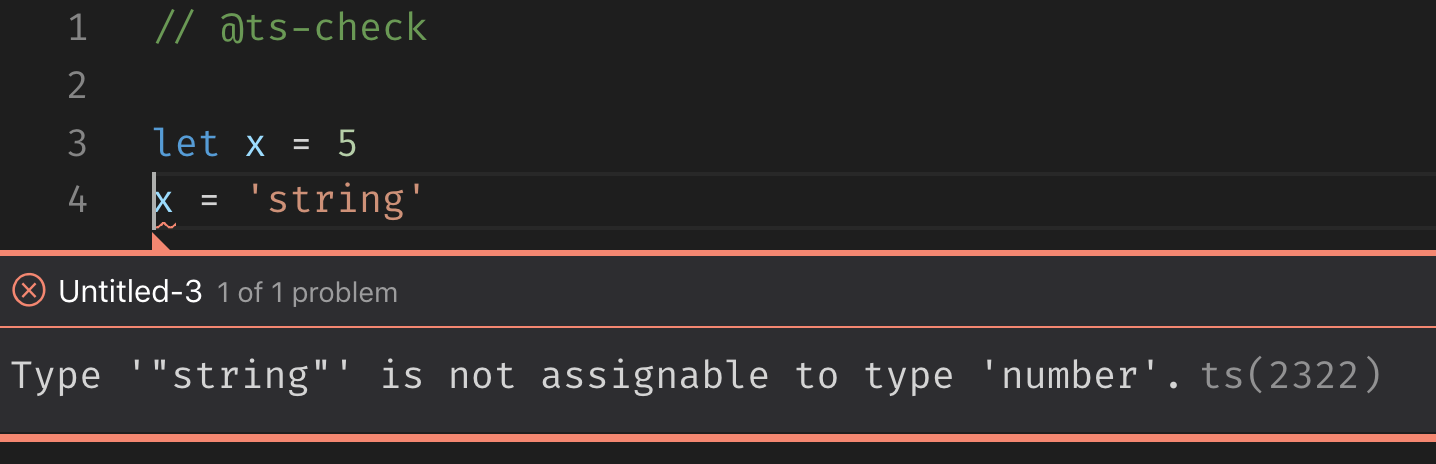
    <div class="x-arch-text x-arch-orig">Quick JavaScript Tip: If you're writing JavaScript in @code, add `// @ts-check` to the top of your file to gain some benefits of TypeScript checking<br /><br />#vscode #javascript #typescript #programming</div>
    <div class="x-arch-text x-arch-trans">JavaScript 小技巧：如果你在 @code 里写 JavaScript，在文件顶部加上 `// @ts-check`，就能获得 TypeScript 类型检查的部分好处<br /><br />#vscode #javascript #typescript #programming</div>
    <div class="x-arch-media">
      <a href="/cdn-media/x/2026-10/1202283933976727553-1.png" target="_blank" rel="noopener"><img class="x-arch-img" src="/cdn-media/x/2026-10/1202283933976727553-1.png" alt="@hashtagcoder 的配图 1/1" loading="lazy" decoding="async" width="1436" height="464" /></a>
    </div>
  </div>
  <div class="x-arch-item">
    <input type="radio" name="xl-1202288785880256512" id="xl-1202288785880256512-zh" class="x-arch-lang-input x-arch-lang-input-zh" checked aria-label="显示译文" /><input type="radio" name="xl-1202288785880256512" id="xl-1202288785880256512-orig" class="x-arch-lang-input x-arch-lang-input-orig" aria-label="显示原文" /><div class="x-arch-head"><img class="x-arch-avatar" src="https://twimg.tweb.xin/twimg/profile_images/1187814172307800064/MhnwJbxw_bigger.jpg" alt="" loading="lazy" referrerpolicy="no-referrer" /><span class="x-arch-kind x-arch-kind-liked" aria-label="赞" title="赞"><svg viewBox="0 0 24 24" fill="none" stroke="currentColor" stroke-width="2.5" stroke-linecap="round" stroke-linejoin="round" aria-hidden="true"><path d="M19 14c1.49-1.46 3-3.21 3-5.5A5.5 5.5 0 0 0 16.5 3c-1.76 0-3 .5-4.5 2-1.5-1.5-2.74-2-4.5-2A5.5 5.5 0 0 0 2 8.5c0 2.3 1.5 4.05 3 5.5l7 7Z" /></svg></span><a class="x-arch-author" href="https://x.com/FlutterDev" target="_blank" rel="nofollow noopener" data-name="Flutter" data-avatar="https://twimg.tweb.xin/twimg/profile_images/1187814172307800064/MhnwJbxw_bigger.jpg">@FlutterDev</a><span class="x-arch-time">02:09</span><span class="x-arch-lang-switch" role="group" aria-label="切换原文/译文"><label for="xl-1202288785880256512-zh" class="x-arch-lang-opt x-arch-lang-zh">译</label><label for="xl-1202288785880256512-orig" class="x-arch-lang-opt x-arch-lang-orig">原</label></span><a class="x-arch-link" href="https://x.com/FlutterDev/status/1202288785880256512" target="_blank" rel="noopener">原推文<svg class="x-arch-ext" viewBox="0 0 24 24" fill="none" stroke="currentColor" stroke-width="2.5" stroke-linecap="round" stroke-linejoin="round" aria-hidden="true"><path d="M7 7h10v10" /><path d="M7 17 17 7" /></svg></a></div>
    <div class="x-arch-text x-arch-orig">It's that time again 👏#WidgetoftheWeek !<br /> <br />Use ToggleButtons to let your users select from a number of related options. Provide a list of widgets you want to use, and customize the look of your buttons.<br /> <br />Watch more → <a href="https://goo.gle/33QtoxD" target="_blank" rel="noopener">https://goo.gle/33QtoxD</a></div>
    <div class="x-arch-text x-arch-trans">又到了这个时候 👏#WidgetoftheWeek ！<br /><br />用 ToggleButtons 让用户在多个相关选项中做选择。提供你想使用的 widget 列表，并自定义按钮外观。<br /><br />观看更多 →</div>
    <video class="x-arch-video" preload="none" playsinline poster="/cdn-media/x/2019-12/1202288785880256512-poster.jpg" src="/cdn-media/x/2026-10/1202288785880256512-video.mp4" width="1280" height="720" data-duration="110" aria-label="@FlutterDev 的视频"></video>
  </div>
  <div class="x-arch-item">
    <input type="radio" name="xl-1202340467834281985" id="xl-1202340467834281985-zh" class="x-arch-lang-input x-arch-lang-input-zh" checked aria-label="显示译文" /><input type="radio" name="xl-1202340467834281985" id="xl-1202340467834281985-orig" class="x-arch-lang-input x-arch-lang-input-orig" aria-label="显示原文" /><div class="x-arch-head"><img class="x-arch-avatar" src="https://twimg.tweb.xin/twimg/profile_images/1101188623930662912/YKlBD7n6_bigger.png" alt="" loading="lazy" referrerpolicy="no-referrer" /><span class="x-arch-kind x-arch-kind-liked" aria-label="赞" title="赞"><svg viewBox="0 0 24 24" fill="none" stroke="currentColor" stroke-width="2.5" stroke-linecap="round" stroke-linejoin="round" aria-hidden="true"><path d="M19 14c1.49-1.46 3-3.21 3-5.5A5.5 5.5 0 0 0 16.5 3c-1.76 0-3 .5-4.5 2-1.5-1.5-2.74-2-4.5-2A5.5 5.5 0 0 0 2 8.5c0 2.3 1.5 4.05 3 5.5l7 7Z" /></svg></span><a class="x-arch-author" href="https://x.com/OpenWc" target="_blank" rel="nofollow noopener" data-name="Open Web Components" data-avatar="https://twimg.tweb.xin/twimg/profile_images/1101188623930662912/YKlBD7n6_bigger.png">@OpenWc</a><span class="x-arch-time">05:34</span><span class="x-arch-lang-switch" role="group" aria-label="切换原文/译文"><label for="xl-1202340467834281985-zh" class="x-arch-lang-opt x-arch-lang-zh">译</label><label for="xl-1202340467834281985-orig" class="x-arch-lang-opt x-arch-lang-orig">原</label></span><a class="x-arch-link" href="https://x.com/OpenWc/status/1202340467834281985" target="_blank" rel="noopener">原推文<svg class="x-arch-ext" viewBox="0 0 24 24" fill="none" stroke="currentColor" stroke-width="2.5" stroke-linecap="round" stroke-linejoin="round" aria-hidden="true"><path d="M7 7h10v10" /><path d="M7 17 17 7" /></svg></a></div>
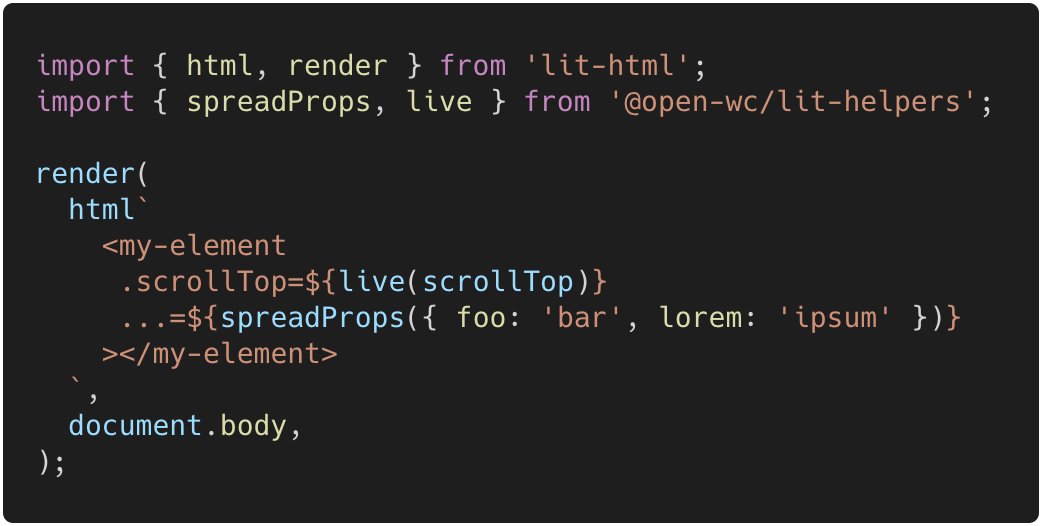
    <div class="x-arch-text x-arch-orig">We created @​open-wc/lit-helpers to centralize useful code snippets floating around in issues, gists and private projects.<br /><br />We started with directives. Check it out at: <a href="https://open-wc.org/developing/lit-helpers.html" target="_blank" rel="noopener">https://open-wc.org/developing/lit-helpers.html</a></div>
    <div class="x-arch-text x-arch-trans">我们创建了 @​open-wc/lit-helpers，把散落在 issue、gist 和私人项目里的实用代码片段集中到了一起。<br /><br />我们先从 directives 做起。在这里查看：</div>
    <div class="x-arch-media">
      <a href="/cdn-media/x/2026-10/1202340467834281985-1.jpg" target="_blank" rel="noopener"><img class="x-arch-img" src="/cdn-media/x/2026-10/1202340467834281985-1.jpg" alt="@OpenWc 的配图 1/1" loading="lazy" decoding="async" width="1042" height="526" /></a>
    </div>
  </div>
  <div class="x-arch-item">
    <input type="radio" name="xl-1202509010559291392" id="xl-1202509010559291392-zh" class="x-arch-lang-input x-arch-lang-input-zh" checked aria-label="显示译文" /><input type="radio" name="xl-1202509010559291392" id="xl-1202509010559291392-orig" class="x-arch-lang-input x-arch-lang-input-orig" aria-label="显示原文" /><div class="x-arch-head"><img class="x-arch-avatar" src="https://twimg.tweb.xin/twimg/profile_images/1108429757883011072/LOFLQI9I_bigger.png" alt="" loading="lazy" referrerpolicy="no-referrer" /><span class="x-arch-kind x-arch-kind-liked" aria-label="赞" title="赞"><svg viewBox="0 0 24 24" fill="none" stroke="currentColor" stroke-width="2.5" stroke-linecap="round" stroke-linejoin="round" aria-hidden="true"><path d="M19 14c1.49-1.46 3-3.21 3-5.5A5.5 5.5 0 0 0 16.5 3c-1.76 0-3 .5-4.5 2-1.5-1.5-2.74-2-4.5-2A5.5 5.5 0 0 0 2 8.5c0 2.3 1.5 4.05 3 5.5l7 7Z" /></svg></span><a class="x-arch-author" href="https://x.com/colinmlee" target="_blank" rel="nofollow noopener" data-name="Colin Lee supports #BLM 🇺🇦" data-avatar="https://twimg.tweb.xin/twimg/profile_images/1108429757883011072/LOFLQI9I_bigger.png">@colinmlee</a><span class="x-arch-time">16:44</span><span class="x-arch-lang-switch" role="group" aria-label="切换原文/译文"><label for="xl-1202509010559291392-zh" class="x-arch-lang-opt x-arch-lang-zh">译</label><label for="xl-1202509010559291392-orig" class="x-arch-lang-opt x-arch-lang-orig">原</label></span><a class="x-arch-link" href="https://x.com/colinmlee/status/1202509010559291392" target="_blank" rel="noopener">原推文<svg class="x-arch-ext" viewBox="0 0 24 24" fill="none" stroke="currentColor" stroke-width="2.5" stroke-linecap="round" stroke-linejoin="round" aria-hidden="true"><path d="M7 7h10v10" /><path d="M7 17 17 7" /></svg></a></div>
    <div class="x-arch-text x-arch-orig">Announcing improved WebAssembly support for Kotlin at #KotlinConf keynote @abreslav</div>
    <div class="x-arch-text x-arch-trans">在 #KotlinConf 主题演讲上宣布 Kotlin 的 WebAssembly 支持得到改进 @abreslav</div>
    <div class="x-arch-media">
      <a href="/cdn-media/x/2026-10/1202509010559291392-1.jpg" target="_blank" rel="noopener"><img class="x-arch-img" src="/cdn-media/x/2026-10/1202509010559291392-1.jpg" alt="@colinmlee 的配图 1/1" loading="lazy" decoding="async" width="2048" height="1536" /></a>
    </div>
  </div>
</div>