---
title: "X 归档 2022-07-10"
date: "2022-07-10"
tags:
  - x-archive
  - frontend
  - design
  - media
---

<div class="x-arch-meta">2 条动态 · 图 1 · 视频 1</div>
<div class="x-arch-day">
  <div class="x-arch-item">
    <input type="radio" name="xl-1545837995047243779" id="xl-1545837995047243779-zh" class="x-arch-lang-input x-arch-lang-input-zh" checked aria-label="显示译文" /><input type="radio" name="xl-1545837995047243779" id="xl-1545837995047243779-orig" class="x-arch-lang-input x-arch-lang-input-orig" aria-label="显示原文" /><div class="x-arch-head"><img class="x-arch-avatar" src="https://twimg.tweb.xin/twimg/profile_images/1465780299380502537/pptBYF44_bigger.jpg" alt="" loading="lazy" referrerpolicy="no-referrer" /><span class="x-arch-kind x-arch-kind-liked" aria-label="赞" title="赞"><svg viewBox="0 0 24 24" fill="none" stroke="currentColor" stroke-width="2.5" stroke-linecap="round" stroke-linejoin="round" aria-hidden="true"><path d="M19 14c1.49-1.46 3-3.21 3-5.5A5.5 5.5 0 0 0 16.5 3c-1.76 0-3 .5-4.5 2-1.5-1.5-2.74-2-4.5-2A5.5 5.5 0 0 0 2 8.5c0 2.3 1.5 4.05 3 5.5l7 7Z" /></svg></span><a class="x-arch-author" href="https://x.com/stefanjudis" target="_blank" rel="nofollow noopener" data-name="Stefan Judis" data-avatar="https://twimg.tweb.xin/twimg/profile_images/1465780299380502537/pptBYF44_bigger.jpg">@stefanjudis</a><span class="x-arch-time">02:31</span><span class="x-arch-lang-switch" role="group" aria-label="切换原文/译文"><label for="xl-1545837995047243779-zh" class="x-arch-lang-opt x-arch-lang-zh">译</label><label for="xl-1545837995047243779-orig" class="x-arch-lang-opt x-arch-lang-orig">原</label></span><a class="x-arch-link" href="https://x.com/stefanjudis/status/1545837995047243779" target="_blank" rel="noopener">原推文<svg class="x-arch-ext" viewBox="0 0 24 24" fill="none" stroke="currentColor" stroke-width="2.5" stroke-linecap="round" stroke-linejoin="round" aria-hidden="true"><path d="M7 7h10v10" /><path d="M7 17 17 7" /></svg></a></div>
    <div class="x-arch-text x-arch-orig">Quick CSS tip.🙈<br /><br />If you use `clamp` with `calc` for things like fluid typography, you can drop the `calc`.<br /><br />It's baked in! 💪<br /><br />1️⃣ font-size: clamp(1rem, calc(5vw + 1rem), 5rem);<br />2️⃣ font-size: clamp(1rem, 5vw + 1rem, 5rem);<br /><br />Video alt: Example showing that you can drop `calc`.</div>
    <div class="x-arch-text x-arch-trans">CSS 快速小贴士。🙈<br /><br />如果你在流式排版这类场景中把 `clamp` 和 `calc` 搭配使用，其实可以把 `calc` 省掉。<br /><br />它是内置的！💪<br /><br />1️⃣ font-size: clamp(1rem, calc(5vw + 1rem), 5rem);<br />2️⃣ font-size: clamp(1rem, 5vw + 1rem, 5rem);<br /><br />视频描述：演示可以省掉 `calc` 的例子。</div>
    <video class="x-arch-video" preload="none" playsinline poster="/cdn-media/x/2022-07/1545837995047243779-poster.jpg" src="/cdn-media/x/2026-10/1545837995047243779-video.mp4" width="1766" height="720" data-duration="20" aria-label="@stefanjudis 的视频"></video>
  </div>
  <div class="x-arch-item">
    <input type="radio" name="xl-1546139706580238342" id="xl-1546139706580238342-zh" class="x-arch-lang-input x-arch-lang-input-zh" checked aria-label="显示译文" /><input type="radio" name="xl-1546139706580238342" id="xl-1546139706580238342-orig" class="x-arch-lang-input x-arch-lang-input-orig" aria-label="显示原文" /><div class="x-arch-head"><img class="x-arch-avatar" src="https://twimg.tweb.xin/twimg/profile_images/619677584805208064/RwwbnNpi_bigger.jpg" alt="" loading="lazy" referrerpolicy="no-referrer" /><span class="x-arch-kind x-arch-kind-liked" aria-label="赞" title="赞"><svg viewBox="0 0 24 24" fill="none" stroke="currentColor" stroke-width="2.5" stroke-linecap="round" stroke-linejoin="round" aria-hidden="true"><path d="M19 14c1.49-1.46 3-3.21 3-5.5A5.5 5.5 0 0 0 16.5 3c-1.76 0-3 .5-4.5 2-1.5-1.5-2.74-2-4.5-2A5.5 5.5 0 0 0 2 8.5c0 2.3 1.5 4.05 3 5.5l7 7Z" /></svg></span><a class="x-arch-author" href="https://x.com/DavidKPiano" target="_blank" rel="nofollow noopener" data-name="David K 🎹" data-avatar="https://twimg.tweb.xin/twimg/profile_images/619677584805208064/RwwbnNpi_bigger.jpg">@DavidKPiano</a><span class="x-arch-time">22:30</span><span class="x-arch-lang-switch" role="group" aria-label="切换原文/译文"><label for="xl-1546139706580238342-zh" class="x-arch-lang-opt x-arch-lang-zh">译</label><label for="xl-1546139706580238342-orig" class="x-arch-lang-opt x-arch-lang-orig">原</label></span><a class="x-arch-link" href="https://x.com/DavidKPiano/status/1546139706580238342" target="_blank" rel="noopener">原推文<svg class="x-arch-ext" viewBox="0 0 24 24" fill="none" stroke="currentColor" stroke-width="2.5" stroke-linecap="round" stroke-linejoin="round" aria-hidden="true"><path d="M7 7h10v10" /><path d="M7 17 17 7" /></svg></a></div>
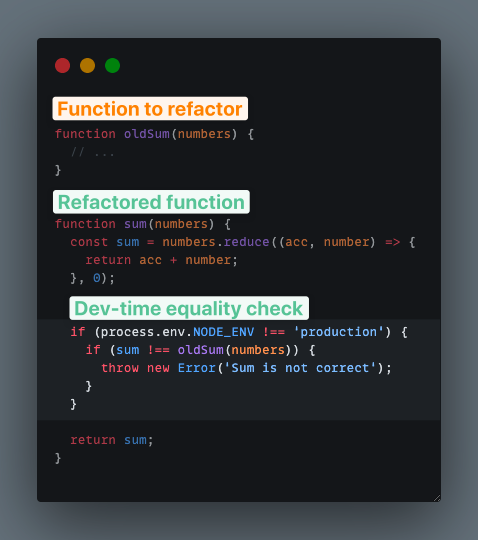
    <div class="x-arch-text x-arch-orig">One of my favorite quick refactoring techniques is to keep the old function/method around and assert ✅ that the outputs are the same in development.<br /><br />This lets you validate refactors before writing tests.<br /><br />I use this with the Strangler Fig pattern: <a href="https://docs.microsoft.com/en-us/azure/architecture/patterns/strangler-fig" target="_blank" rel="noopener">https://docs.microsoft.com/en-us/azure/architecture/patterns/strangler-fig</a></div>
    <div class="x-arch-text x-arch-trans">我最喜欢的快速重构技巧之一：把旧的函数/方法保留在旁边，并在开发环境中断言 ✅ 两者的输出一致。<br /><br />这让你在写测试之前就能验证重构。<br /><br />我会把它与绞杀者模式（Strangler Fig pattern）搭配使用：<a href="https://docs.microsoft.com/en-us/azure/architecture/patterns/strangler-fig" target="_blank" rel="noopener">https://docs.microsoft.com/en-us/azure/architecture/patterns/strangler-fig</a></div>
    <div class="x-arch-media">
      <a href="/cdn-media/x/2026-10/1546139706580238342-1.png" target="_blank" rel="noopener"><img class="x-arch-img" src="/cdn-media/x/2026-10/1546139706580238342-1.png" alt="@DavidKPiano 的配图 1/1" loading="lazy" decoding="async" width="478" height="540" /></a>
    </div>
  </div>
</div>