---
title: "X 归档 2025-11-04"
date: "2025-11-04"
tags:
  - x-archive
  - frontend
---

<div class="x-arch-meta">2 条动态 · 图 2 · 视频 0</div>
<div class="x-arch-day">
  <div class="x-arch-item">
    <input type="radio" name="xl-1985648223583883335" id="xl-1985648223583883335-zh" class="x-arch-lang-input x-arch-lang-input-zh" checked aria-label="显示译文" /><input type="radio" name="xl-1985648223583883335" id="xl-1985648223583883335-orig" class="x-arch-lang-input x-arch-lang-input-orig" aria-label="显示原文" /><div class="x-arch-head"><img class="x-arch-avatar" src="https://twimg.tweb.xin/twimg/profile_images/1660876795347111937/EIo6fIr4_bigger.jpg" alt="" loading="lazy" referrerpolicy="no-referrer" /><span class="x-arch-kind x-arch-kind-liked" aria-label="赞" title="赞"><svg viewBox="0 0 24 24" fill="none" stroke="currentColor" stroke-width="2.5" stroke-linecap="round" stroke-linejoin="round" aria-hidden="true"><path d="M19 14c1.49-1.46 3-3.21 3-5.5A5.5 5.5 0 0 0 16.5 3c-1.76 0-3 .5-4.5 2-1.5-1.5-2.74-2-4.5-2A5.5 5.5 0 0 0 2 8.5c0 2.3 1.5 4.05 3 5.5l7 7Z" /></svg></span><a class="x-arch-author" href="https://x.com/GitHub_Daily" target="_blank" rel="nofollow noopener" data-name="GitHubDaily" data-avatar="https://twimg.tweb.xin/twimg/profile_images/1660876795347111937/EIo6fIr4_bigger.jpg">@GitHub_Daily</a><span class="x-arch-time">18:00</span><span class="x-arch-lang-switch" role="group" aria-label="切换原文/译文"><label for="xl-1985648223583883335-zh" class="x-arch-lang-opt x-arch-lang-zh">译</label><label for="xl-1985648223583883335-orig" class="x-arch-lang-opt x-arch-lang-orig">原</label></span><a class="x-arch-link" href="https://x.com/GitHub_Daily/status/1985648223583883335" target="_blank" rel="noopener">原推文<svg class="x-arch-ext" viewBox="0 0 24 24" fill="none" stroke="currentColor" stroke-width="2.5" stroke-linecap="round" stroke-linejoin="round" aria-hidden="true"><path d="M7 7h10v10" /><path d="M7 17 17 7" /></svg></a></div>
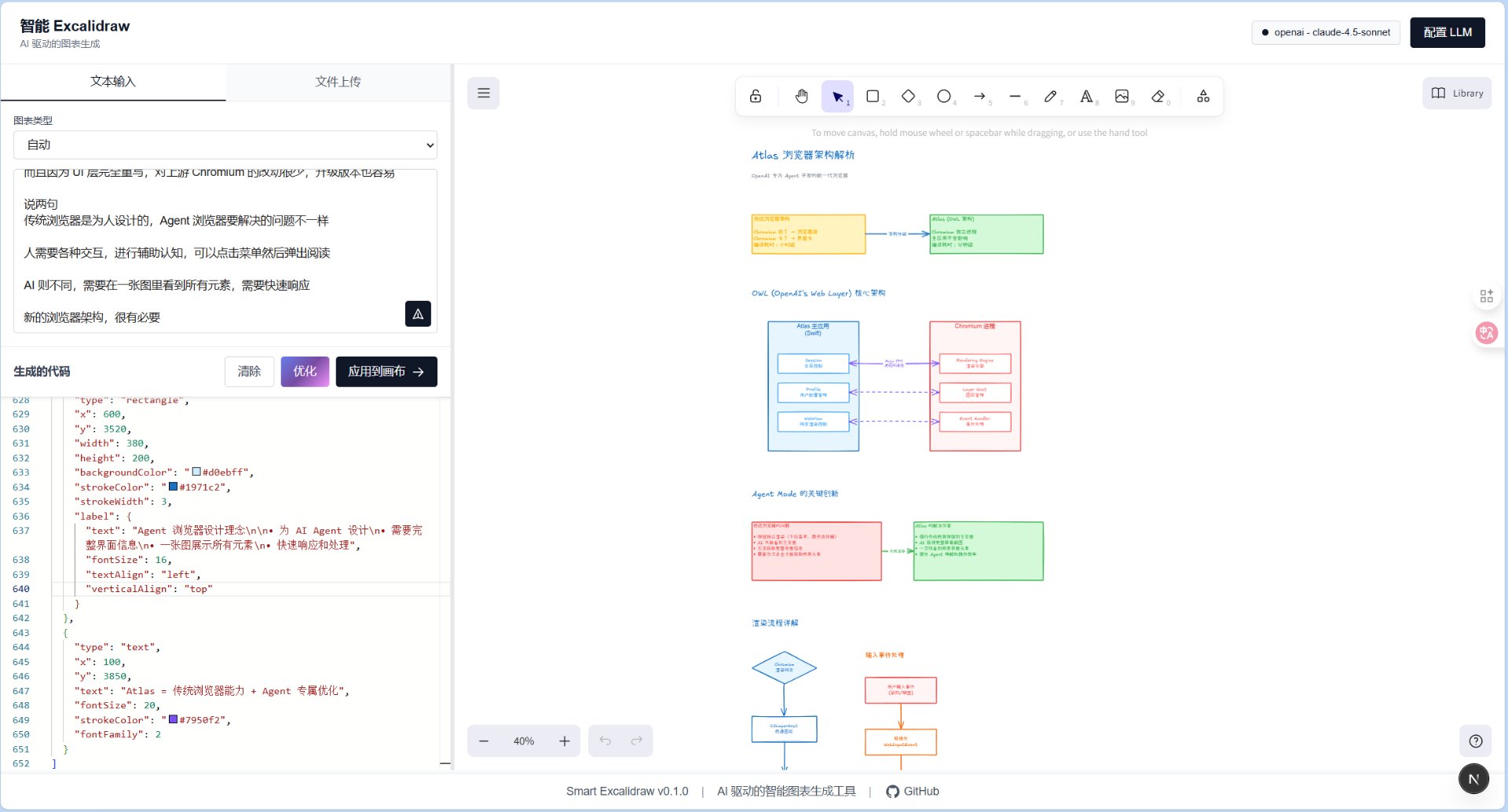
    <div class="x-arch-text x-arch-orig">在写技术文档或梳理业务逻辑时，为了让大家更好地直观了解项目，通常会画各种流程图、架构图，但颇为耗时。<br /><br />这时候，找到了 Smart Excalidraw 这款开源工具，允许我们用自然语言就能快速生成专业级、结构清晰的图表。…</div>
    <div class="x-arch-text x-arch-trans">在写技术文档或梳理业务逻辑时，为了让大家更好地直观了解项目，通常会画各种流程图、架构图，但颇为耗时。<br /><br />这时候，找到了 Smart Excalidraw 这款开源工具，允许我们用自然语言就能快速生成专业级、结构清晰的图表。…</div>
    <div class="x-arch-media">
      <a href="/cdn-media/x/2026-10/1985648223583883335-1.jpg" target="_blank" rel="noopener"><img class="x-arch-img" src="/cdn-media/x/2026-10/1985648223583883335-1.jpg" alt="@GitHub_Daily 的配图 1/1" loading="lazy" decoding="async" width="1920" height="1034" /></a>
    </div>
  </div>
  <div class="x-arch-item">
    <input type="radio" name="xl-1985702267920793781" id="xl-1985702267920793781-zh" class="x-arch-lang-input x-arch-lang-input-zh" checked aria-label="显示译文" /><input type="radio" name="xl-1985702267920793781" id="xl-1985702267920793781-orig" class="x-arch-lang-input x-arch-lang-input-orig" aria-label="显示原文" /><div class="x-arch-head"><img class="x-arch-avatar" src="https://twimg.tweb.xin/twimg/profile_images/725179208528322560/TPjU7qop_bigger.jpg" alt="" loading="lazy" referrerpolicy="no-referrer" /><span class="x-arch-kind x-arch-kind-liked" aria-label="赞" title="赞"><svg viewBox="0 0 24 24" fill="none" stroke="currentColor" stroke-width="2.5" stroke-linecap="round" stroke-linejoin="round" aria-hidden="true"><path d="M19 14c1.49-1.46 3-3.21 3-5.5A5.5 5.5 0 0 0 16.5 3c-1.76 0-3 .5-4.5 2-1.5-1.5-2.74-2-4.5-2A5.5 5.5 0 0 0 2 8.5c0 2.3 1.5 4.05 3 5.5l7 7Z" /></svg></span><a class="x-arch-author" href="https://x.com/vikingmute" target="_blank" rel="nofollow noopener" data-name="Viking" data-avatar="https://twimg.tweb.xin/twimg/profile_images/725179208528322560/TPjU7qop_bigger.jpg">@vikingmute</a><span class="x-arch-time">21:34</span><span class="x-arch-lang-switch" role="group" aria-label="切换原文/译文"><label for="xl-1985702267920793781-zh" class="x-arch-lang-opt x-arch-lang-zh">译</label><label for="xl-1985702267920793781-orig" class="x-arch-lang-opt x-arch-lang-orig">原</label></span><a class="x-arch-link" href="https://x.com/vikingmute/status/1985702267920793781" target="_blank" rel="noopener">原推文<svg class="x-arch-ext" viewBox="0 0 24 24" fill="none" stroke="currentColor" stroke-width="2.5" stroke-linecap="round" stroke-linejoin="round" aria-hidden="true"><path d="M7 7h10v10" /><path d="M7 17 17 7" /></svg></a></div>
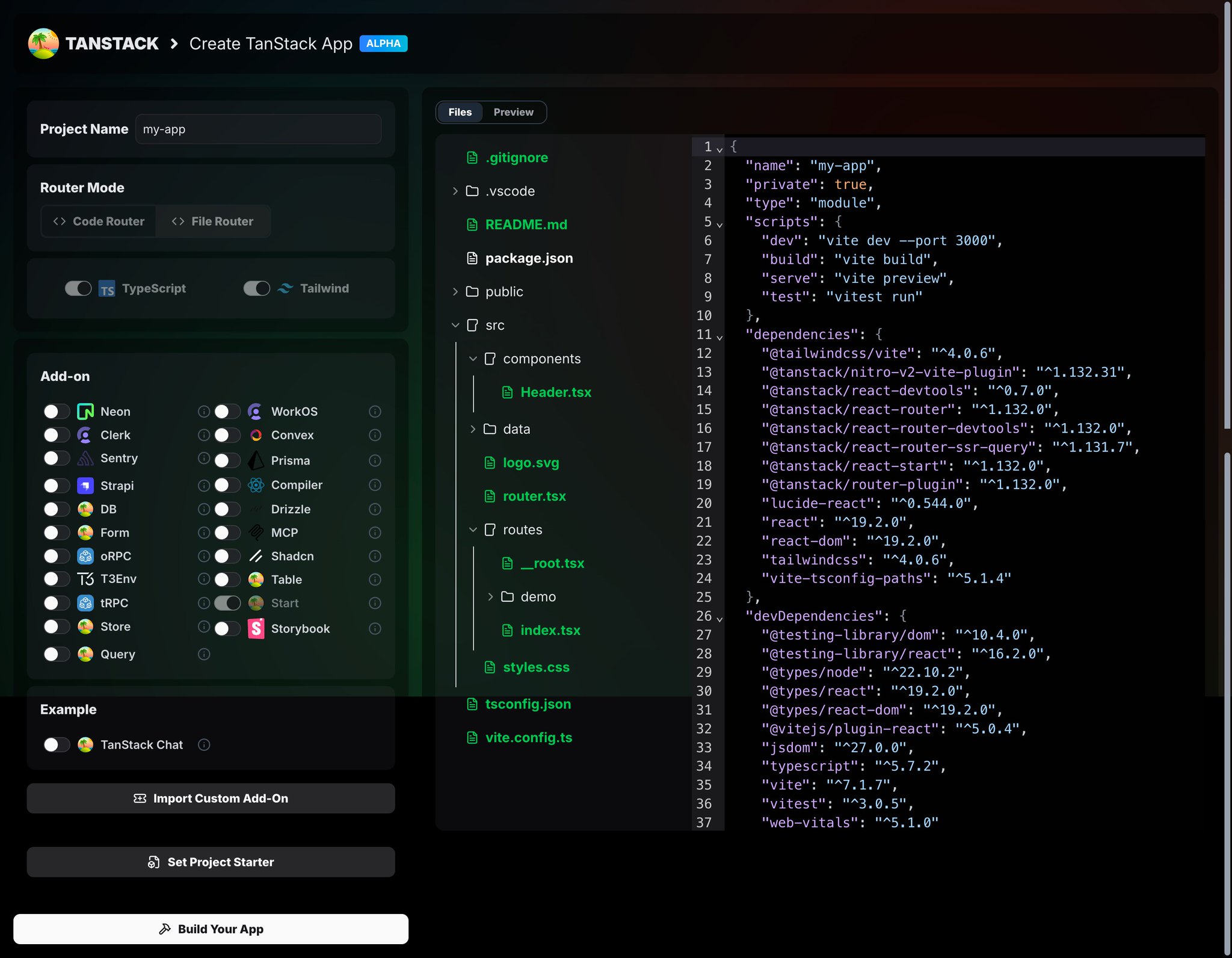
    <div class="x-arch-text x-arch-orig">现代 React 项目用 Tanstack Start 记住这个命令就行：<br />npm create @tanstack/start@latest --ui<br /><br />会在 localhost:8080 打开一个图形界面：你可以自由的选择 Toolchain， Add-on 等等，右边还可以看文件结构甚至还可以 Preview。<br /><br />很强大～</div>
    <div class="x-arch-text x-arch-trans">现代 React 项目用 Tanstack Start 记住这个命令就行：<br />npm create @tanstack/start@latest --ui<br /><br />会在 localhost:8080 打开一个图形界面：你可以自由的选择 Toolchain， Add-on 等等，右边还可以看文件结构甚至还可以 Preview。<br /><br />很强大～</div>
    <div class="x-arch-media">
      <a href="/cdn-media/x/2026-10/1985702267920793781-1.jpg" target="_blank" rel="noopener"><img class="x-arch-img" src="/cdn-media/x/2026-10/1985702267920793781-1.jpg" alt="@vikingmute 的配图 1/1" loading="lazy" decoding="async" width="2048" height="1592" /></a>
    </div>
  </div>
</div>