---
title: "X 日报：2026-10-11"
date: "2026-10-11"
tags:
  - event
  - signals
  - x
---

<div class="x-arch-meta">11 条动态 · 图 5 · 视频 7</div>
<div class="x-arch-day">
  <div class="x-arch-item">
    <div class="x-arch-head"><img class="x-arch-avatar" src="https://twimg.tweb.xin/twimg/profile_images/704145500581171200/pcYt3Jja_bigger.jpg" alt="" loading="lazy" referrerpolicy="no-referrer" /><span class="x-arch-kind x-arch-kind-liked" aria-label="赞" title="赞"><svg viewBox="0 0 24 24" fill="none" stroke="currentColor" stroke-width="2.5" stroke-linecap="round" stroke-linejoin="round" aria-hidden="true"><path d="M19 14c1.49-1.46 3-3.21 3-5.5A5.5 5.5 0 0 0 16.5 3c-1.76 0-3 .5-4.5 2-1.5-1.5-2.74-2-4.5-2A5.5 5.5 0 0 0 2 8.5c0 2.3 1.5 4.05 3 5.5l7 7Z" /></svg></span><a class="x-arch-author" href="https://x.com/william_bao" target="_blank" rel="nofollow noopener" data-name="William" data-avatar="https://twimg.tweb.xin/twimg/profile_images/704145500581171200/pcYt3Jja_bigger.jpg">@william_bao</a><span class="x-arch-time">21:55</span><a class="x-arch-link" href="https://x.com/william_bao/status/2108557062359941589" target="_blank" rel="noopener">原推文<svg class="x-arch-ext" viewBox="0 0 24 24" fill="none" stroke="currentColor" stroke-width="2.5" stroke-linecap="round" stroke-linejoin="round" aria-hidden="true"><path d="M7 7h10v10" /><path d="M7 17 17 7" /></svg></a></div>
    <div class="x-arch-text">用 deepseek v4 flash 花了半天时间把手上的 dji pocket3协议破解了下。再写了一个 cli 工具，专门用来拍摄，预览，控制云台等。后续拍摄视频可以直接电脑上控制这些摄像头和产品了。前几天还把另一个桌面拍摄摄像头，以及一个RGB 补光灯也破解了协议，都用电脑统一控制。 真是一个疯狂的时代啊...</div>
    <video class="x-arch-video" preload="none" playsinline poster="/cdn-media/x/2026-10/2108557062359941589-poster.jpg" src="/cdn-media/x/2026-10/2108557062359941589-video.mp4" width="2160" height="3840" data-duration="32" aria-label="@william_bao 的视频"></video>
  </div>
  <div class="x-arch-item">
    <input type="radio" name="xl-2108847656424583307" id="xl-2108847656424583307-zh" class="x-arch-lang-input x-arch-lang-input-zh" checked aria-label="显示译文" /><input type="radio" name="xl-2108847656424583307" id="xl-2108847656424583307-orig" class="x-arch-lang-input x-arch-lang-input-orig" aria-label="显示原文" /><div class="x-arch-head"><img class="x-arch-avatar" src="https://twimg.tweb.xin/twimg/profile_images/1342417825483300864/Vz4ChOFG_bigger.jpg" alt="" loading="lazy" referrerpolicy="no-referrer" /><span class="x-arch-kind x-arch-kind-liked" aria-label="赞" title="赞"><svg viewBox="0 0 24 24" fill="none" stroke="currentColor" stroke-width="2.5" stroke-linecap="round" stroke-linejoin="round" aria-hidden="true"><path d="M19 14c1.49-1.46 3-3.21 3-5.5A5.5 5.5 0 0 0 16.5 3c-1.76 0-3 .5-4.5 2-1.5-1.5-2.74-2-4.5-2A5.5 5.5 0 0 0 2 8.5c0 2.3 1.5 4.05 3 5.5l7 7Z" /></svg></span><a class="x-arch-author" href="https://x.com/jarredsumner" target="_blank" rel="nofollow noopener" data-name="Jarred Sumner" data-avatar="https://twimg.tweb.xin/twimg/profile_images/1342417825483300864/Vz4ChOFG_bigger.jpg">@jarredsumner</a><span class="x-arch-time">17:10</span><span class="x-arch-lang-switch" role="group" aria-label="切换原文/译文"><label for="xl-2108847656424583307-zh" class="x-arch-lang-opt x-arch-lang-zh">译</label><label for="xl-2108847656424583307-orig" class="x-arch-lang-opt x-arch-lang-orig">原</label></span><a class="x-arch-link" href="https://x.com/jarredsumner/status/2108847656424583307" target="_blank" rel="noopener">原推文<svg class="x-arch-ext" viewBox="0 0 24 24" fill="none" stroke="currentColor" stroke-width="2.5" stroke-linecap="round" stroke-linejoin="round" aria-hidden="true"><path d="M7 7h10v10" /><path d="M7 17 17 7" /></svg></a></div>
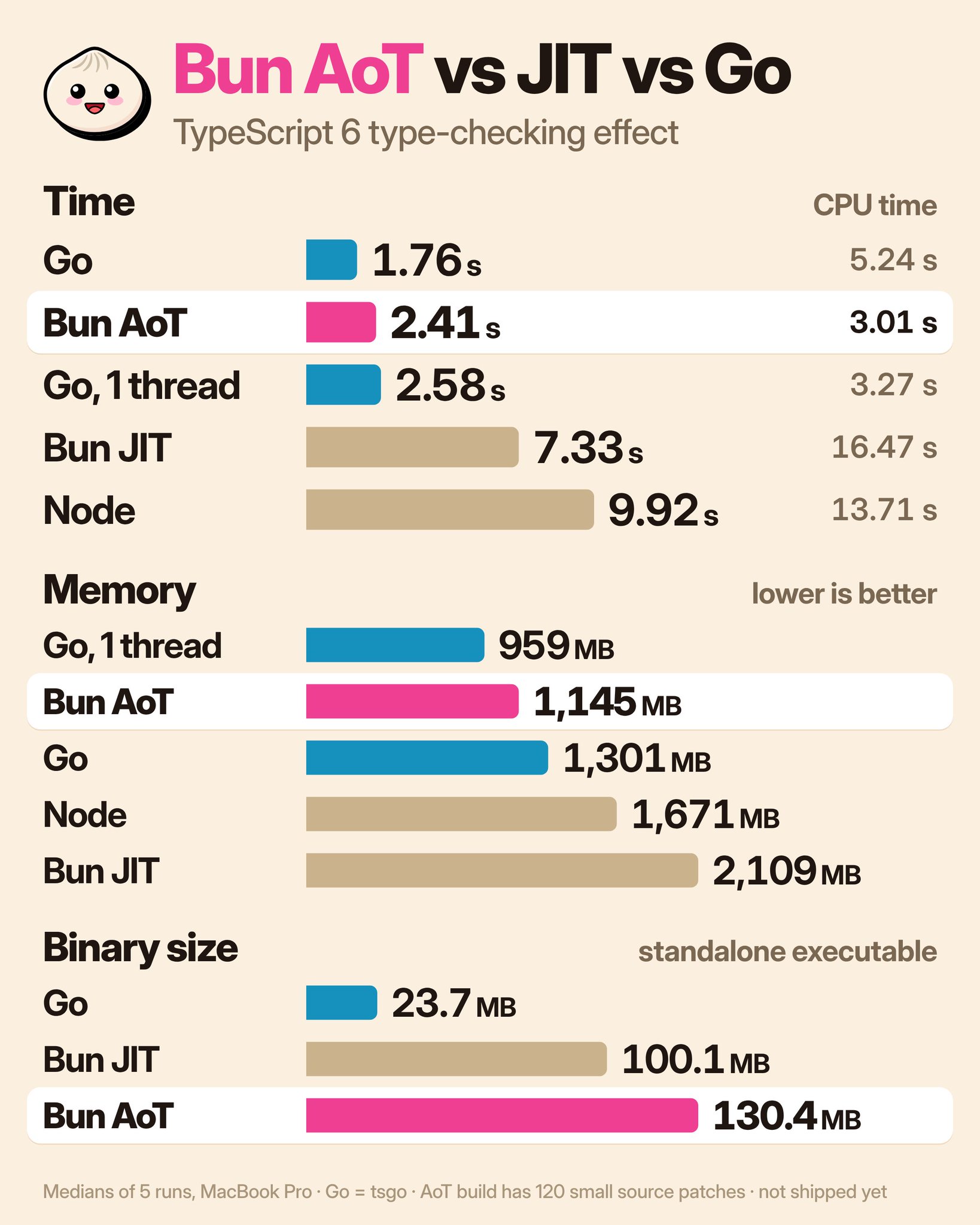
    <div class="x-arch-text x-arch-orig">Bun AoT is starting to get good<br /><br />TypeScript 6 built with Bun AoT typechecks Effect slightly faster than TypeScript 7 when single-threaded.</div>
    <div class="x-arch-text x-arch-trans">Bun AoT 开始上路了<br /><br />用 Bun AoT 构建的 TypeScript 6 在单线程下对 Effect 的类型检查比 TypeScript 7 还快。</div>
    <div class="x-arch-media">
      <a href="/cdn-media/x/2026-10/2108847656424583307-1.jpg" target="_blank" rel="noopener"><img class="x-arch-img" src="/cdn-media/x/2026-10/2108847656424583307-1.jpg" alt="@jarredsumner 的配图 1/1" loading="lazy" decoding="async" width="1638" height="2048" /></a>
    </div>
  </div>
  <div class="x-arch-item">
    <input type="radio" name="xl-2108852592247779527" id="xl-2108852592247779527-zh" class="x-arch-lang-input x-arch-lang-input-zh" checked aria-label="显示译文" /><input type="radio" name="xl-2108852592247779527" id="xl-2108852592247779527-orig" class="x-arch-lang-input x-arch-lang-input-orig" aria-label="显示原文" /><div class="x-arch-head"><img class="x-arch-avatar" src="https://twimg.tweb.xin/twimg/profile_images/2112231529124597760/iBMCSwKl_bigger.jpg" alt="" loading="lazy" referrerpolicy="no-referrer" /><span class="x-arch-kind x-arch-kind-liked" aria-label="赞" title="赞"><svg viewBox="0 0 24 24" fill="none" stroke="currentColor" stroke-width="2.5" stroke-linecap="round" stroke-linejoin="round" aria-hidden="true"><path d="M19 14c1.49-1.46 3-3.21 3-5.5A5.5 5.5 0 0 0 16.5 3c-1.76 0-3 .5-4.5 2-1.5-1.5-2.74-2-4.5-2A5.5 5.5 0 0 0 2 8.5c0 2.3 1.5 4.05 3 5.5l7 7Z" /></svg></span><a class="x-arch-author" href="https://x.com/WasimShips" target="_blank" rel="nofollow noopener" data-name="Wasim" data-avatar="https://twimg.tweb.xin/twimg/profile_images/2112231529124597760/iBMCSwKl_bigger.jpg">@WasimShips</a><span class="x-arch-time">17:30</span><span class="x-arch-lang-switch" role="group" aria-label="切换原文/译文"><label for="xl-2108852592247779527-zh" class="x-arch-lang-opt x-arch-lang-zh">译</label><label for="xl-2108852592247779527-orig" class="x-arch-lang-opt x-arch-lang-orig">原</label></span><a class="x-arch-link" href="https://x.com/WasimShips/status/2108852592247779527" target="_blank" rel="noopener">原推文<svg class="x-arch-ext" viewBox="0 0 24 24" fill="none" stroke="currentColor" stroke-width="2.5" stroke-linecap="round" stroke-linejoin="round" aria-hidden="true"><path d="M7 7h10v10" /><path d="M7 17 17 7" /></svg></a></div>
    <div class="x-arch-text x-arch-orig">5 component libraries for making your next UI feel more polished. Save these ↓<br /><br />- <br />https://<br />useplanes.co<br />- <br />https://<br />obsidianui.dev<br />- <br />https://<br />paceui.com<br />- <br />https://<br />vantaui.com<br />- <br />https://<br />spaceui.one<br /><br />Which component library should I add next?</div>
    <div class="x-arch-text x-arch-trans">5 个组件库，让你的下一个 UI 感觉更加精致。保存这些 ↓<br /><br />- <br />https://<br />useplanes.co<br />- <br />https://<br />obsidianui.dev<br />- <br />https://<br />paceui.com<br />- <br />https://<br />vantaui.com<br />- <br />https://<br />spaceui.one<br /><br />下一个我应该添加哪个组件库？</div>
    <video class="x-arch-video" preload="none" playsinline poster="/cdn-media/x/2026-10/2108852592247779527-poster.jpg" src="/cdn-media/x/2026-10/2108852592247779527-video.mp4" width="1346" height="720" data-duration="12" aria-label="@WasimShips 的视频"></video>
  </div>
  <div class="x-arch-item">
    <input type="radio" name="xl-2108855541812646004" id="xl-2108855541812646004-zh" class="x-arch-lang-input x-arch-lang-input-zh" checked aria-label="显示译文" /><input type="radio" name="xl-2108855541812646004" id="xl-2108855541812646004-orig" class="x-arch-lang-input x-arch-lang-input-orig" aria-label="显示原文" /><div class="x-arch-head"><img class="x-arch-avatar" src="https://twimg.tweb.xin/twimg/profile_images/2084970342263685120/rnqwys1u_bigger.jpg" alt="" loading="lazy" referrerpolicy="no-referrer" /><span class="x-arch-kind x-arch-kind-liked" aria-label="赞" title="赞"><svg viewBox="0 0 24 24" fill="none" stroke="currentColor" stroke-width="2.5" stroke-linecap="round" stroke-linejoin="round" aria-hidden="true"><path d="M19 14c1.49-1.46 3-3.21 3-5.5A5.5 5.5 0 0 0 16.5 3c-1.76 0-3 .5-4.5 2-1.5-1.5-2.74-2-4.5-2A5.5 5.5 0 0 0 2 8.5c0 2.3 1.5 4.05 3 5.5l7 7Z" /></svg></span><a class="x-arch-author" href="https://x.com/shadcnlabs" target="_blank" rel="nofollow noopener" data-name="Shadcn Labs" data-avatar="https://twimg.tweb.xin/twimg/profile_images/2084970342263685120/rnqwys1u_bigger.jpg">@shadcnlabs</a><span class="x-arch-time">17:41</span><span class="x-arch-lang-switch" role="group" aria-label="切换原文/译文"><label for="xl-2108855541812646004-zh" class="x-arch-lang-opt x-arch-lang-zh">译</label><label for="xl-2108855541812646004-orig" class="x-arch-lang-opt x-arch-lang-orig">原</label></span><a class="x-arch-link" href="https://x.com/shadcnlabs/status/2108855541812646004" target="_blank" rel="noopener">原推文<svg class="x-arch-ext" viewBox="0 0 24 24" fill="none" stroke="currentColor" stroke-width="2.5" stroke-linecap="round" stroke-linejoin="round" aria-hidden="true"><path d="M7 7h10v10" /><path d="M7 17 17 7" /></svg></a></div>
    <div class="x-arch-text x-arch-orig">holy shit this is so cool wtf: <a href="https://www.mdxcn.dev/" target="_blank" rel="noopener">https://www.mdxcn.dev/</a></div>
    <div class="x-arch-text x-arch-trans">我去这也太酷了：<a href="https://www.mdxcn.dev/" target="_blank" rel="noopener">https://www.mdxcn.dev/</a></div>
    <video class="x-arch-video" preload="none" playsinline poster="/cdn-media/x/2026-10/2108855541812646004-poster.jpg" src="/cdn-media/x/2026-10/2108855541812646004-video.mp4" width="1280" height="720" data-duration="54" aria-label="@shadcnlabs 的视频"></video>
  </div>
  <div class="x-arch-item">
    <input type="radio" name="xl-2108864148658356375" id="xl-2108864148658356375-zh" class="x-arch-lang-input x-arch-lang-input-zh" checked aria-label="显示译文" /><input type="radio" name="xl-2108864148658356375" id="xl-2108864148658356375-orig" class="x-arch-lang-input x-arch-lang-input-orig" aria-label="显示原文" /><div class="x-arch-head"><img class="x-arch-avatar" src="https://twimg.tweb.xin/twimg/profile_images/1631677511779098632/q6S9D86C_bigger.jpg" alt="" loading="lazy" referrerpolicy="no-referrer" /><span class="x-arch-kind x-arch-kind-liked" aria-label="赞" title="赞"><svg viewBox="0 0 24 24" fill="none" stroke="currentColor" stroke-width="2.5" stroke-linecap="round" stroke-linejoin="round" aria-hidden="true"><path d="M19 14c1.49-1.46 3-3.21 3-5.5A5.5 5.5 0 0 0 16.5 3c-1.76 0-3 .5-4.5 2-1.5-1.5-2.74-2-4.5-2A5.5 5.5 0 0 0 2 8.5c0 2.3 1.5 4.05 3 5.5l7 7Z" /></svg></span><a class="x-arch-author" href="https://x.com/PixiJS" target="_blank" rel="nofollow noopener" data-name="PixiJS" data-avatar="https://twimg.tweb.xin/twimg/profile_images/1631677511779098632/q6S9D86C_bigger.jpg">@PixiJS</a><span class="x-arch-time">18:16</span><span class="x-arch-lang-switch" role="group" aria-label="切换原文/译文"><label for="xl-2108864148658356375-zh" class="x-arch-lang-opt x-arch-lang-zh">译</label><label for="xl-2108864148658356375-orig" class="x-arch-lang-opt x-arch-lang-orig">原</label></span><a class="x-arch-link" href="https://x.com/PixiJS/status/2108864148658356375" target="_blank" rel="noopener">原推文<svg class="x-arch-ext" viewBox="0 0 24 24" fill="none" stroke="currentColor" stroke-width="2.5" stroke-linecap="round" stroke-linejoin="round" aria-hidden="true"><path d="M7 7h10v10" /><path d="M7 17 17 7" /></svg></a></div>
    <div class="x-arch-text x-arch-orig">We put a lot of work into making 2D and 3D effects work seamlessly together. So cool to see it in action 👀</div>
    <div class="x-arch-text x-arch-trans">我们花了很多功夫让 2D 和 3D 效果无缝协同。看到实际跑起来太酷了 👀</div>
    <video class="x-arch-video" preload="none" playsinline poster="/cdn-media/x/2026-10/2108864148658356375-poster.jpg" src="/cdn-media/x/2026-10/2108864148658356375-video.mp4" width="1280" height="720" data-duration="14" aria-label="@PixiJS 的视频"></video>
  </div>
  <div class="x-arch-item">
    <div class="x-arch-head"><img class="x-arch-avatar" src="https://twimg.tweb.xin/twimg/profile_images/1865771523463954432/cSwn54mJ_bigger.jpg" alt="" loading="lazy" referrerpolicy="no-referrer" /><span class="x-arch-kind x-arch-kind-liked" aria-label="赞" title="赞"><svg viewBox="0 0 24 24" fill="none" stroke="currentColor" stroke-width="2.5" stroke-linecap="round" stroke-linejoin="round" aria-hidden="true"><path d="M19 14c1.49-1.46 3-3.21 3-5.5A5.5 5.5 0 0 0 16.5 3c-1.76 0-3 .5-4.5 2-1.5-1.5-2.74-2-4.5-2A5.5 5.5 0 0 0 2 8.5c0 2.3 1.5 4.05 3 5.5l7 7Z" /></svg></span><a class="x-arch-author" href="https://x.com/bkdgiffug" target="_blank" rel="nofollow noopener" data-name="lumxss" data-avatar="https://twimg.tweb.xin/twimg/profile_images/1865771523463954432/cSwn54mJ_bigger.jpg">@bkdgiffug</a><span class="x-arch-time">19:42</span><a class="x-arch-link" href="https://x.com/bkdgiffug/status/2108885756467089542" target="_blank" rel="noopener">原推文<svg class="x-arch-ext" viewBox="0 0 24 24" fill="none" stroke="currentColor" stroke-width="2.5" stroke-linecap="round" stroke-linejoin="round" aria-hidden="true"><path d="M7 7h10v10" /><path d="M7 17 17 7" /></svg></a></div>
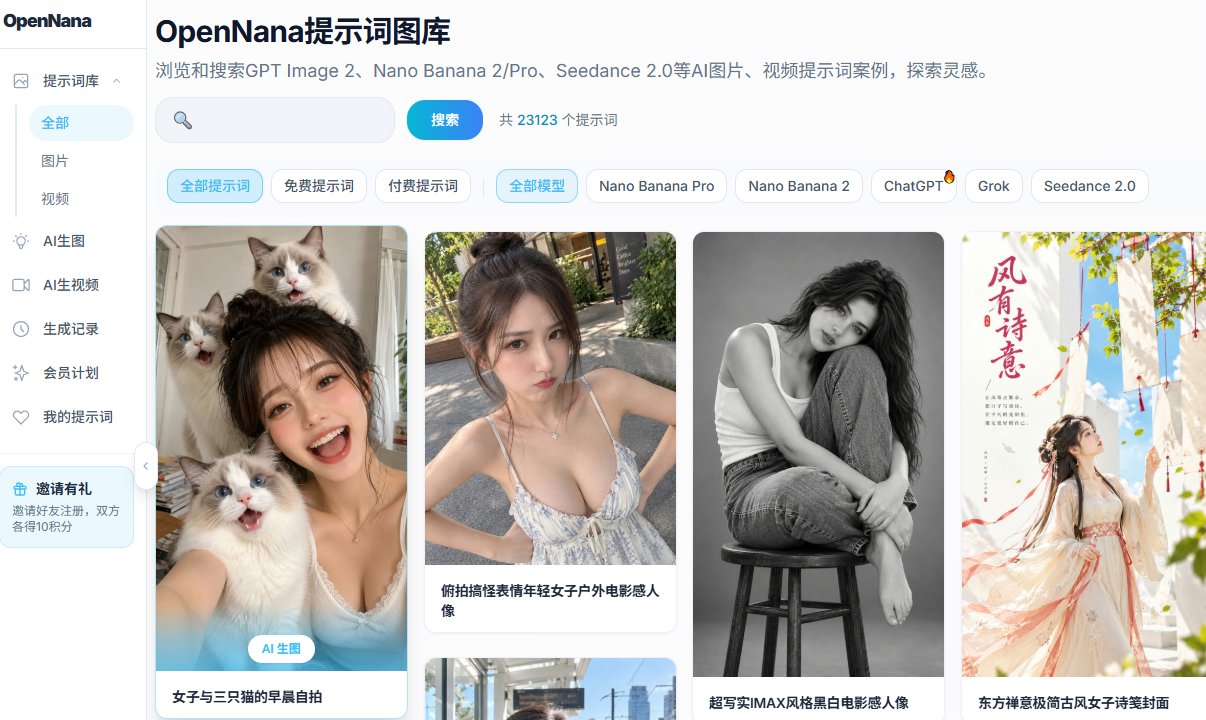
    <div class="x-arch-text">还在为写提示词没灵感发愁？可以逛逛 OpenNana 提示词图库。<br /><br />据介绍，网站已经收录 19,888 条提示词，适合找创作思路、参考提示词写法，给 AI 绘图和内容创作找点灵感。<br /><br />不用每次都从零开始，先找案例，再按自己的需求修改。<br />🔗 <br />https://<br />opennana.com</div>
    <div class="x-arch-media">
      <a href="/cdn-media/x/2026-10/2108885756467089542-1.jpg" target="_blank" rel="noopener"><img class="x-arch-img" src="/cdn-media/x/2026-10/2108885756467089542-1.jpg" alt="@bkdgiffug 的配图 1/1" loading="lazy" decoding="async" width="1206" height="720" /></a>
    </div>
  </div>
  <div class="x-arch-item">
    <input type="radio" name="xl-2108935225334014402" id="xl-2108935225334014402-zh" class="x-arch-lang-input x-arch-lang-input-zh" checked aria-label="显示译文" /><input type="radio" name="xl-2108935225334014402" id="xl-2108935225334014402-orig" class="x-arch-lang-input x-arch-lang-input-orig" aria-label="显示原文" /><div class="x-arch-head"><img class="x-arch-avatar" src="https://twimg.tweb.xin/twimg/profile_images/2122739480096329729/tYFWBSKq_bigger.jpg" alt="" loading="lazy" referrerpolicy="no-referrer" /><span class="x-arch-kind x-arch-kind-liked" aria-label="赞" title="赞"><svg viewBox="0 0 24 24" fill="none" stroke="currentColor" stroke-width="2.5" stroke-linecap="round" stroke-linejoin="round" aria-hidden="true"><path d="M19 14c1.49-1.46 3-3.21 3-5.5A5.5 5.5 0 0 0 16.5 3c-1.76 0-3 .5-4.5 2-1.5-1.5-2.74-2-4.5-2A5.5 5.5 0 0 0 2 8.5c0 2.3 1.5 4.05 3 5.5l7 7Z" /></svg></span><a class="x-arch-author" href="https://x.com/ryanvogel" target="_blank" rel="nofollow noopener" data-name="vogel" data-avatar="https://twimg.tweb.xin/twimg/profile_images/2122739480096329729/tYFWBSKq_bigger.jpg">@ryanvogel</a><span class="x-arch-time">22:58</span><span class="x-arch-lang-switch" role="group" aria-label="切换原文/译文"><label for="xl-2108935225334014402-zh" class="x-arch-lang-opt x-arch-lang-zh">译</label><label for="xl-2108935225334014402-orig" class="x-arch-lang-opt x-arch-lang-orig">原</label></span><a class="x-arch-link" href="https://x.com/ryanvogel/status/2108935225334014402" target="_blank" rel="noopener">原推文<svg class="x-arch-ext" viewBox="0 0 24 24" fill="none" stroke="currentColor" stroke-width="2.5" stroke-linecap="round" stroke-linejoin="round" aria-hidden="true"><path d="M7 7h10v10" /><path d="M7 17 17 7" /></svg></a></div>
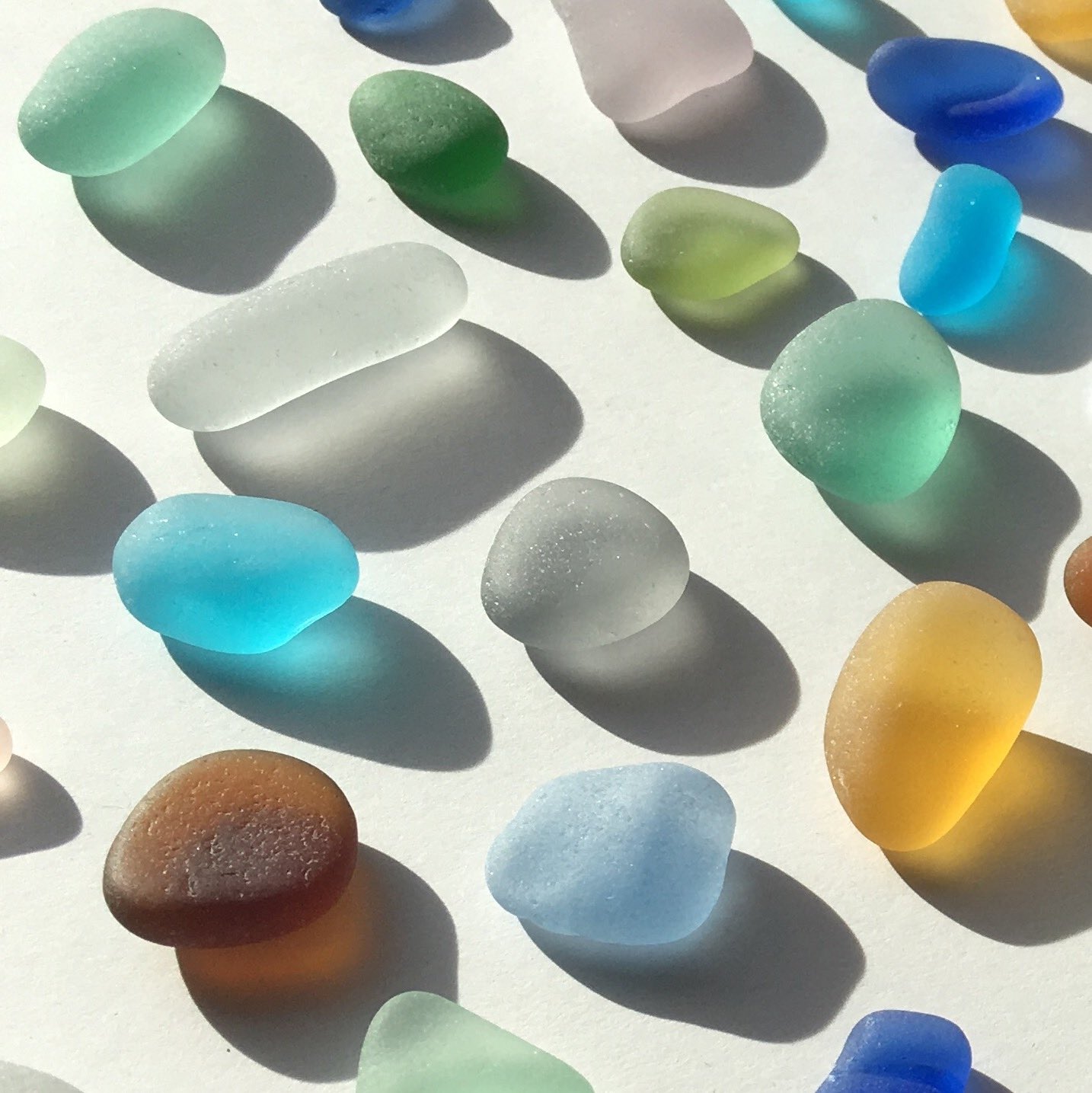
    <div class="x-arch-text x-arch-orig">Introducing: Google Glassea</div>
    <div class="x-arch-text x-arch-trans">发布：Google Glassea</div>
    <div class="x-arch-quote"><input type="radio" name="xq-2108697919129883087" id="xq-2108697919129883087-zh" class="x-arch-lang-input x-arch-lang-input-zh" checked aria-label="显示引用译文" /><input type="radio" name="xq-2108697919129883087" id="xq-2108697919129883087-orig" class="x-arch-lang-input x-arch-lang-input-orig" aria-label="显示引用原文" /><div class="x-arch-quote-head"><span class="x-arch-quote-label">引用</span><a class="x-arch-quote-author" href="https://x.com/SLKVinyl" target="_blank" rel="nofollow noopener">@SLKVinyl</a><span class="x-arch-quote-name">SLK15</span><span class="x-arch-lang-switch" role="group" aria-label="切换引用原文/译文"><label for="xq-2108697919129883087-zh" class="x-arch-lang-opt x-arch-lang-zh">译</label><label for="xq-2108697919129883087-orig" class="x-arch-lang-opt x-arch-lang-orig">原</label></span><a class="x-arch-quote-link" href="https://x.com/SLKVinyl/status/2108697919129883087" target="_blank" rel="noopener">原帖</a></div><div class="x-arch-quote-text x-arch-quote-orig">I think Google could find success in making sea glass the next UI material for Material Design 4</div><div class="x-arch-quote-text x-arch-quote-trans">我觉得 Google 可以尝试把海玻璃（sea glass）做成 Material Design 4 的下一个 UI 材质，可能会成功</div></div>
    <div class="x-arch-media">
      <a href="/cdn-media/x/2026-10/2108935225334014402-1.jpg" target="_blank" rel="noopener"><img class="x-arch-img" src="/cdn-media/x/2026-10/2108935225334014402-1.jpg" alt="@ryanvogel 的配图 1/1" loading="lazy" decoding="async" width="1434" height="1435" /></a>
    </div>
    <video class="x-arch-video" preload="none" playsinline poster="/cdn-media/x/2026-10/2108935225334014402-poster.jpg" src="/cdn-media/x/2026-10/2108935225334014402-video.mp4" width="1280" height="720" data-duration="36" aria-label="@ryanvogel 的视频"></video>
  </div>
  <div class="x-arch-item">
    <div class="x-arch-head"><img class="x-arch-avatar" src="https://twimg.tweb.xin/twimg/profile_images/2073483311520063489/Wz-2nK7A_bigger.jpg" alt="" loading="lazy" referrerpolicy="no-referrer" /><span class="x-arch-kind x-arch-kind-liked" aria-label="赞" title="赞"><svg viewBox="0 0 24 24" fill="none" stroke="currentColor" stroke-width="2.5" stroke-linecap="round" stroke-linejoin="round" aria-hidden="true"><path d="M19 14c1.49-1.46 3-3.21 3-5.5A5.5 5.5 0 0 0 16.5 3c-1.76 0-3 .5-4.5 2-1.5-1.5-2.74-2-4.5-2A5.5 5.5 0 0 0 2 8.5c0 2.3 1.5 4.05 3 5.5l7 7Z" /></svg></span><a class="x-arch-author" href="https://x.com/unixzii" target="_blank" rel="nofollow noopener" data-name="Cyandev" data-avatar="https://twimg.tweb.xin/twimg/profile_images/2073483311520063489/Wz-2nK7A_bigger.jpg">@unixzii</a><span class="x-arch-time">23:37</span><a class="x-arch-link" href="https://x.com/unixzii/status/2108945032380362973" target="_blank" rel="noopener">原推文<svg class="x-arch-ext" viewBox="0 0 24 24" fill="none" stroke="currentColor" stroke-width="2.5" stroke-linecap="round" stroke-linejoin="round" aria-hidden="true"><path d="M7 7h10v10" /><path d="M7 17 17 7" /></svg></a></div>
    <div class="x-arch-text">开发了一个工具来让我们摆脱笨重的 Device Hub。现在无需创建任何模拟器设备，也不用等待 boot 过程，随时打开任何模拟器包。所有 iOS apps 都以 Mac 窗口呈现，可以同 app 多开。底层通过自己构造的一套虚拟 iOS 环境实现，理论上可以接管一切系统服务，后续也会持续带来诸如 MCP 等一系列提效功能。</div>
    <video class="x-arch-video" preload="none" playsinline poster="/cdn-media/x/2026-10/2108945032380362973-poster.jpg" src="/cdn-media/x/2026-10/2108945032380362973.m3u8" width="888" height="720" data-duration="86" aria-label="@unixzii 的视频"></video>
  </div>
  <div class="x-arch-item">
    <div class="x-arch-head"><img class="x-arch-avatar" src="https://twimg.tweb.xin/twimg/profile_images/1865771523463954432/cSwn54mJ_bigger.jpg" alt="" loading="lazy" referrerpolicy="no-referrer" /><span class="x-arch-kind x-arch-kind-liked" aria-label="赞" title="赞"><svg viewBox="0 0 24 24" fill="none" stroke="currentColor" stroke-width="2.5" stroke-linecap="round" stroke-linejoin="round" aria-hidden="true"><path d="M19 14c1.49-1.46 3-3.21 3-5.5A5.5 5.5 0 0 0 16.5 3c-1.76 0-3 .5-4.5 2-1.5-1.5-2.74-2-4.5-2A5.5 5.5 0 0 0 2 8.5c0 2.3 1.5 4.05 3 5.5l7 7Z" /></svg></span><a class="x-arch-author" href="https://x.com/bkdgiffug" target="_blank" rel="nofollow noopener" data-name="lumxss" data-avatar="https://twimg.tweb.xin/twimg/profile_images/1865771523463954432/cSwn54mJ_bigger.jpg">@bkdgiffug</a><span class="x-arch-time">03:04</span><a class="x-arch-link" href="https://x.com/bkdgiffug/status/2108996989639880965" target="_blank" rel="noopener">原推文<svg class="x-arch-ext" viewBox="0 0 24 24" fill="none" stroke="currentColor" stroke-width="2.5" stroke-linecap="round" stroke-linejoin="round" aria-hidden="true"><path d="M7 7h10v10" /><path d="M7 17 17 7" /></svg></a></div>
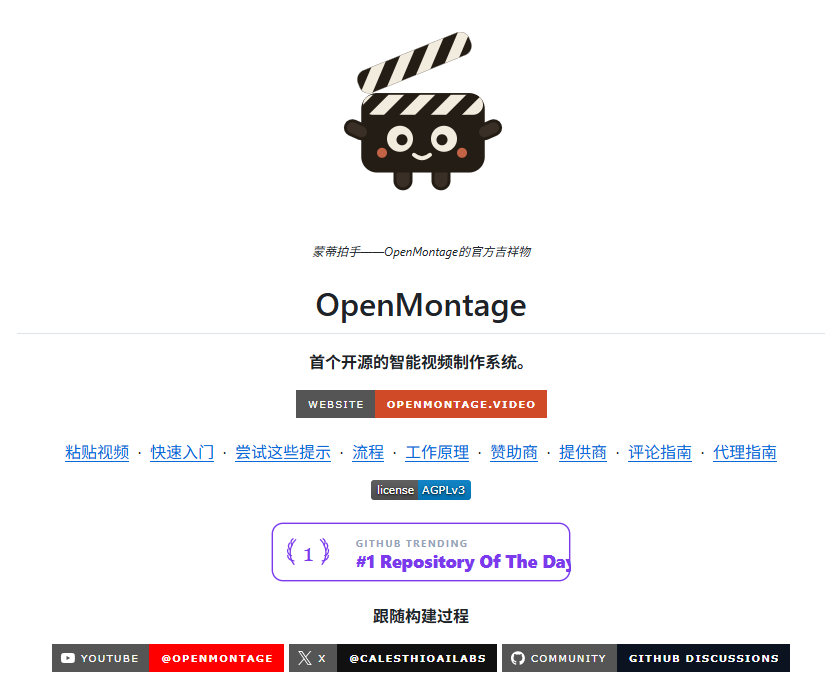
    <div class="x-arch-text">说真的，AI 视频制作这条赛道，我快跟不上了。<br /><br />刚刷到一个叫 OpenMontage 的开源项目，GitHub 当天热榜已经冲到第一。它不是帮你剪，是压根不用你动手——丢一句人话进去，脚本、素材、配音、字幕、成片全给你跑完。</div>
    <div class="x-arch-media">
      <a href="/cdn-media/x/2026-10/2108996989639880965-1.png" target="_blank" rel="noopener"><img class="x-arch-img" src="/cdn-media/x/2026-10/2108996989639880965-1.png" alt="@bkdgiffug 的配图 1/1" loading="lazy" decoding="async" width="831" height="696" /></a>
    </div>
  </div>
  <div class="x-arch-item">
    <div class="x-arch-head"><img class="x-arch-avatar" src="https://twimg.tweb.xin/twimg/profile_images/1772530812078239744/aPK5wde3_bigger.jpg" alt="" loading="lazy" referrerpolicy="no-referrer" /><span class="x-arch-kind x-arch-kind-liked" aria-label="赞" title="赞"><svg viewBox="0 0 24 24" fill="none" stroke="currentColor" stroke-width="2.5" stroke-linecap="round" stroke-linejoin="round" aria-hidden="true"><path d="M19 14c1.49-1.46 3-3.21 3-5.5A5.5 5.5 0 0 0 16.5 3c-1.76 0-3 .5-4.5 2-1.5-1.5-2.74-2-4.5-2A5.5 5.5 0 0 0 2 8.5c0 2.3 1.5 4.05 3 5.5l7 7Z" /></svg></span><a class="x-arch-author" href="https://x.com/pengchujin" target="_blank" rel="nofollow noopener" data-name="酱紫表" data-avatar="https://twimg.tweb.xin/twimg/profile_images/1772530812078239744/aPK5wde3_bigger.jpg">@pengchujin</a><span class="x-arch-time">14:52</span><a class="x-arch-link" href="https://x.com/pengchujin/status/2109175308045980016" target="_blank" rel="noopener">原推文<svg class="x-arch-ext" viewBox="0 0 24 24" fill="none" stroke="currentColor" stroke-width="2.5" stroke-linecap="round" stroke-linejoin="round" aria-hidden="true"><path d="M7 7h10v10" /><path d="M7 17 17 7" /></svg></a></div>
    <div class="x-arch-text">给苹果开发的推荐个 Skill 叫 App Store Connect CLI 简称 asc，能快速方便的通过 cli 提交发布 App 和 TestFlight 搭配 Codex 或 Claude 非常好用。之前我让 Codex 操作浏览器发布，实在太傻了。官网：<br />https://<br />asccli.sh</div>
    <div class="x-arch-media">
      <a href="/cdn-media/x/2026-10/2109175308045980016-1.jpg" target="_blank" rel="noopener"><img class="x-arch-img" src="/cdn-media/x/2026-10/2109175308045980016-1.jpg" alt="@pengchujin 的配图 1/1" loading="lazy" decoding="async" width="2048" height="1167" /></a>
    </div>
  </div>
  <div class="x-arch-item">
    <input type="radio" name="xl-2109182449179836579" id="xl-2109182449179836579-zh" class="x-arch-lang-input x-arch-lang-input-zh" checked aria-label="显示译文" /><input type="radio" name="xl-2109182449179836579" id="xl-2109182449179836579-orig" class="x-arch-lang-input x-arch-lang-input-orig" aria-label="显示原文" /><div class="x-arch-head"><img class="x-arch-avatar" src="https://twimg.tweb.xin/twimg/profile_images/1098613826709348353/_9_0Nd2X_bigger.png" alt="" loading="lazy" referrerpolicy="no-referrer" /><span class="x-arch-kind x-arch-kind-liked" aria-label="赞" title="赞"><svg viewBox="0 0 24 24" fill="none" stroke="currentColor" stroke-width="2.5" stroke-linecap="round" stroke-linejoin="round" aria-hidden="true"><path d="M19 14c1.49-1.46 3-3.21 3-5.5A5.5 5.5 0 0 0 16.5 3c-1.76 0-3 .5-4.5 2-1.5-1.5-2.74-2-4.5-2A5.5 5.5 0 0 0 2 8.5c0 2.3 1.5 4.05 3 5.5l7 7Z" /></svg></span><a class="x-arch-author" href="https://x.com/MengTo" target="_blank" rel="nofollow noopener" data-name="Meng To" data-avatar="https://twimg.tweb.xin/twimg/profile_images/1098613826709348353/_9_0Nd2X_bigger.png">@MengTo</a><span class="x-arch-time">15:20</span><span class="x-arch-lang-switch" role="group" aria-label="切换原文/译文"><label for="xl-2109182449179836579-zh" class="x-arch-lang-opt x-arch-lang-zh">译</label><label for="xl-2109182449179836579-orig" class="x-arch-lang-opt x-arch-lang-orig">原</label></span><a class="x-arch-link" href="https://x.com/MengTo/status/2109182449179836579" target="_blank" rel="noopener">原推文<svg class="x-arch-ext" viewBox="0 0 24 24" fill="none" stroke="currentColor" stroke-width="2.5" stroke-linecap="round" stroke-linejoin="round" aria-hidden="true"><path d="M7 7h10v10" /><path d="M7 17 17 7" /></svg></a></div>
    <div class="x-arch-text x-arch-orig">Such a good skill for visual explainers. All SVG and animated.<br /><br />Prompt I used:<br /><br /><br />https://<br />github.com/wheresryan22/a<br />natomy<br />… install skill<br /><br />/anatomy Explain how Seedream 5.0 is able to split an image into layers and what cool things you can produce with it. Do that in a single HTML file. <br /><br />Change the camera/zoom in for scene 1 to 5 to explain more clearly.</div>
    <div class="x-arch-text x-arch-trans">这样的视觉讲解技能真棒。全是 SVG 和动画效果。<br /><br />我使用的提示词：<br /><br /><br />https://<br />github.com/wheresryan22/a<br />natomy<br />… 安装技能<br /><br />/anatomy 解释 Seedream 5.0 如何将图像拆分成图层，以及你可以用它制作出哪些酷炫的东西。用单个 HTML 文件来做。<br /><br />将场景 1 到 5 的相机/缩放进行调整，以便更清晰地解释。</div>
    <div class="x-arch-quote"><input type="radio" name="xq-2108948624004526516" id="xq-2108948624004526516-zh" class="x-arch-lang-input x-arch-lang-input-zh" checked aria-label="显示引用译文" /><input type="radio" name="xq-2108948624004526516" id="xq-2108948624004526516-orig" class="x-arch-lang-input x-arch-lang-input-orig" aria-label="显示引用原文" /><div class="x-arch-quote-head"><span class="x-arch-quote-label">引用</span><a class="x-arch-quote-author" href="https://x.com/wheresryan22" target="_blank" rel="nofollow noopener">@wheresryan22</a><span class="x-arch-quote-name">R</span><span class="x-arch-lang-switch" role="group" aria-label="切换引用原文/译文"><label for="xq-2108948624004526516-zh" class="x-arch-lang-opt x-arch-lang-zh">译</label><label for="xq-2108948624004526516-orig" class="x-arch-lang-opt x-arch-lang-orig">原</label></span><a class="x-arch-quote-link" href="https://x.com/wheresryan22/status/2108948624004526516" target="_blank" rel="noopener">原帖</a></div><div class="x-arch-quote-text x-arch-quote-orig">Introducing Anatomy<br /><br />Describe a machine in one line. Claude brings it to life.<br /><br />- Interactive isometric wireframes you can rotate, inspect and explore<br />- WebGL shaders for fire, water, plasma and more<br />- Real 3D motion, with individual parts that rotate and move<br /><br />Install it as an</div><div class="x-arch-quote-text x-arch-quote-trans">介绍 Anatomy<br /><br />用一句话描述一台机器。Claude 把它变成现实。<br /><br />- 可旋转、检视与探索的交互式等轴测线框<br />- 用于火焰、水、等离子体等的 WebGL 着色器<br />- 真实 3D 运动，每个零件都能旋转和移动<br /><br />把它安装为</div></div>
    <video class="x-arch-video" preload="none" playsinline poster="/cdn-media/x/2026-10/2109182449179836579-poster.jpg" src="/cdn-media/x/2026-10/2109182449179836579-video.mp4" width="960" height="720" data-duration="21" aria-label="@MengTo 的视频"></video>
  </div>
</div>