---
title: "X 归档 2026-10-15"
date: "2026-10-15"
tags:
  - x-archive
  - ai
  - frontend
  - rust
---

<div class="x-arch-meta">14 条动态 · 图 8 · 视频 9</div>
<div class="x-arch-day">
  <div class="x-arch-item">
    <input type="radio" name="xl-2110410655165779985" id="xl-2110410655165779985-zh" class="x-arch-lang-input x-arch-lang-input-zh" checked aria-label="显示译文" /><input type="radio" name="xl-2110410655165779985" id="xl-2110410655165779985-orig" class="x-arch-lang-input x-arch-lang-input-orig" aria-label="显示原文" /><div class="x-arch-head"><img class="x-arch-avatar" src="https://twimg.tweb.xin/twimg/profile_images/1593304942210478080/TUYae5z7_bigger.jpg" alt="" loading="lazy" referrerpolicy="no-referrer" /><span class="x-arch-kind x-arch-kind-liked" aria-label="赞" title="赞"><svg viewBox="0 0 24 24" fill="none" stroke="currentColor" stroke-width="2.5" stroke-linecap="round" stroke-linejoin="round" aria-hidden="true"><path d="M19 14c1.49-1.46 3-3.21 3-5.5A5.5 5.5 0 0 0 16.5 3c-1.76 0-3 .5-4.5 2-1.5-1.5-2.74-2-4.5-2A5.5 5.5 0 0 0 2 8.5c0 2.3 1.5 4.05 3 5.5l7 7Z" /></svg></span><a class="x-arch-author" href="https://x.com/shadcn" target="_blank" rel="nofollow noopener" data-name="shadcn" data-avatar="https://twimg.tweb.xin/twimg/profile_images/1593304942210478080/TUYae5z7_bigger.jpg">@shadcn</a><span class="x-arch-time">00:41</span><span class="x-arch-lang-switch" role="group" aria-label="切换原文/译文"><label for="xl-2110410655165779985-zh" class="x-arch-lang-opt x-arch-lang-zh">译</label><label for="xl-2110410655165779985-orig" class="x-arch-lang-opt x-arch-lang-orig">原</label></span><a class="x-arch-link" href="https://x.com/shadcn/status/2110410655165779985" target="_blank" rel="noopener">原推文<svg class="x-arch-ext" viewBox="0 0 24 24" fill="none" stroke="currentColor" stroke-width="2.5" stroke-linecap="round" stroke-linejoin="round" aria-hidden="true"><path d="M7 7h10v10" /><path d="M7 17 17 7" /></svg></a></div>
    <div class="x-arch-text x-arch-orig">I just published Trace, a new component for agent activity. It's one abstraction for reasoning, tool calls, queues, chain of thought, subagents...etc<br /><br />Also in this release: Code Block and AI Elements.<br /><br /><a href="https://ui.shadcn.com/docs/changelog/2026-10-ai-elements" target="_blank" rel="noopener">https://ui.shadcn.com/docs/changelog/2026-10-ai-elements</a></div>
    <div class="x-arch-text x-arch-trans">刚发布了 Trace，一个展示 agent 活动的新组件。它把推理、工具调用、队列、思维链、子代理……抽象成了一层。<br /><br />本次发布还包括：Code Block 和 AI Elements。<br /><br /><a href="https://ui.shadcn.com/docs/changelog/2026-10-ai-elements" target="_blank" rel="noopener">https://ui.shadcn.com/docs/changelog/2026-10-ai-elements</a></div>
    <video class="x-arch-video" preload="none" playsinline poster="/cdn-media/x/2026-10/2110410655165779985-poster.jpg" src="/cdn-media/x/2026-10/2110410655165779985-video.mp4" width="970" height="720" data-duration="17" aria-label="@shadcn 的视频"></video>
  </div>
  <div class="x-arch-item">
    <input type="radio" name="xl-2110456607297749099" id="xl-2110456607297749099-zh" class="x-arch-lang-input x-arch-lang-input-zh" checked aria-label="显示译文" /><input type="radio" name="xl-2110456607297749099" id="xl-2110456607297749099-orig" class="x-arch-lang-input x-arch-lang-input-orig" aria-label="显示原文" /><div class="x-arch-head"><img class="x-arch-avatar" src="https://twimg.tweb.xin/twimg/profile_images/2121427573401907200/5f2WhymL_bigger.jpg" alt="" loading="lazy" referrerpolicy="no-referrer" /><span class="x-arch-kind x-arch-kind-liked" aria-label="赞" title="赞"><svg viewBox="0 0 24 24" fill="none" stroke="currentColor" stroke-width="2.5" stroke-linecap="round" stroke-linejoin="round" aria-hidden="true"><path d="M19 14c1.49-1.46 3-3.21 3-5.5A5.5 5.5 0 0 0 16.5 3c-1.76 0-3 .5-4.5 2-1.5-1.5-2.74-2-4.5-2A5.5 5.5 0 0 0 2 8.5c0 2.3 1.5 4.05 3 5.5l7 7Z" /></svg></span><a class="x-arch-author" href="https://x.com/lucasmarkes__" target="_blank" rel="nofollow noopener" data-name="Lucas" data-avatar="https://twimg.tweb.xin/twimg/profile_images/2121427573401907200/5f2WhymL_bigger.jpg">@lucasmarkes__</a><span class="x-arch-time">03:44</span><span class="x-arch-lang-switch" role="group" aria-label="切换原文/译文"><label for="xl-2110456607297749099-zh" class="x-arch-lang-opt x-arch-lang-zh">译</label><label for="xl-2110456607297749099-orig" class="x-arch-lang-opt x-arch-lang-orig">原</label></span><a class="x-arch-link" href="https://x.com/lucasmarkes__/status/2110456607297749099" target="_blank" rel="noopener">原推文<svg class="x-arch-ext" viewBox="0 0 24 24" fill="none" stroke="currentColor" stroke-width="2.5" stroke-linecap="round" stroke-linejoin="round" aria-hidden="true"><path d="M7 7h10v10" /><path d="M7 17 17 7" /></svg></a></div>
    <div class="x-arch-text x-arch-orig">/hairline-adopt is out now!<br /><br />bring the svg you already have, it comes back as a figure.</div>
    <div class="x-arch-text x-arch-trans">/hairline-adopt 现已推出！<br /><br />把你已有的 SVG 丢进来，它会变回一个 figure 图形。</div>
    <video class="x-arch-video" preload="none" playsinline poster="/cdn-media/x/2026-10/2110456607297749099-poster.jpg" src="/cdn-media/x/2026-10/2110456607297749099-video.mp4" width="1280" height="720" data-duration="20" aria-label="@lucasmarkes__ 的视频"></video>
  </div>
  <div class="x-arch-item">
    <input type="radio" name="xl-2110456607977152564" id="xl-2110456607977152564-zh" class="x-arch-lang-input x-arch-lang-input-zh" checked aria-label="显示译文" /><input type="radio" name="xl-2110456607977152564" id="xl-2110456607977152564-orig" class="x-arch-lang-input x-arch-lang-input-orig" aria-label="显示原文" /><div class="x-arch-head"><img class="x-arch-avatar" src="https://twimg.tweb.xin/twimg/profile_images/2121427573401907200/5f2WhymL_bigger.jpg" alt="" loading="lazy" referrerpolicy="no-referrer" /><span class="x-arch-kind x-arch-kind-liked" aria-label="赞" title="赞"><svg viewBox="0 0 24 24" fill="none" stroke="currentColor" stroke-width="2.5" stroke-linecap="round" stroke-linejoin="round" aria-hidden="true"><path d="M19 14c1.49-1.46 3-3.21 3-5.5A5.5 5.5 0 0 0 16.5 3c-1.76 0-3 .5-4.5 2-1.5-1.5-2.74-2-4.5-2A5.5 5.5 0 0 0 2 8.5c0 2.3 1.5 4.05 3 5.5l7 7Z" /></svg></span><a class="x-arch-author" href="https://x.com/lucasmarkes__" target="_blank" rel="nofollow noopener" data-name="Lucas" data-avatar="https://twimg.tweb.xin/twimg/profile_images/2121427573401907200/5f2WhymL_bigger.jpg">@lucasmarkes__</a><span class="x-arch-time">03:44</span><span class="x-arch-lang-switch" role="group" aria-label="切换原文/译文"><label for="xl-2110456607977152564-zh" class="x-arch-lang-opt x-arch-lang-zh">译</label><label for="xl-2110456607977152564-orig" class="x-arch-lang-opt x-arch-lang-orig">原</label></span><a class="x-arch-link" href="https://x.com/lucasmarkes__/status/2110456607977152564" target="_blank" rel="noopener">原推文<svg class="x-arch-ext" viewBox="0 0 24 24" fill="none" stroke="currentColor" stroke-width="2.5" stroke-linecap="round" stroke-linejoin="round" aria-hidden="true"><path d="M7 7h10v10" /><path d="M7 17 17 7" /></svg></a></div>
    <div class="x-arch-text x-arch-orig">npx skills add lucasmarkes/hairline<br /><br />→ <a href="https://hairline.lucasmarkes.com/skills" target="_blank" rel="noopener">https://hairline.lucasmarkes.com/skills</a></div>
    <div class="x-arch-text x-arch-trans">npx skills add lucasmarkes/hairline<br /><br />→ <a href="https://hairline.lucasmarkes.com/skills" target="_blank" rel="noopener">https://hairline.lucasmarkes.com/skills</a></div>
  </div>
  <div class="x-arch-item">
    <div class="x-arch-head"><img class="x-arch-avatar" src="https://twimg.tweb.xin/twimg/profile_images/768239262/HaskellIcon_bigger.jpg" alt="" loading="lazy" referrerpolicy="no-referrer" /><span class="x-arch-kind x-arch-kind-liked" aria-label="赞" title="赞"><svg viewBox="0 0 24 24" fill="none" stroke="currentColor" stroke-width="2.5" stroke-linecap="round" stroke-linejoin="round" aria-hidden="true"><path d="M19 14c1.49-1.46 3-3.21 3-5.5A5.5 5.5 0 0 0 16.5 3c-1.76 0-3 .5-4.5 2-1.5-1.5-2.74-2-4.5-2A5.5 5.5 0 0 0 2 8.5c0 2.3 1.5 4.05 3 5.5l7 7Z" /></svg></span><a class="x-arch-author" href="https://x.com/manateelazycat" target="_blank" rel="nofollow noopener" data-name="Andy Stewart" data-avatar="https://twimg.tweb.xin/twimg/profile_images/768239262/HaskellIcon_bigger.jpg">@manateelazycat</a><span class="x-arch-time">09:15</span><a class="x-arch-link" href="https://x.com/manateelazycat/status/2110539989218107644" target="_blank" rel="noopener">原推文<svg class="x-arch-ext" viewBox="0 0 24 24" fill="none" stroke="currentColor" stroke-width="2.5" stroke-linecap="round" stroke-linejoin="round" aria-hidden="true"><path d="M7 7h10v10" /><path d="M7 17 17 7" /></svg></a></div>
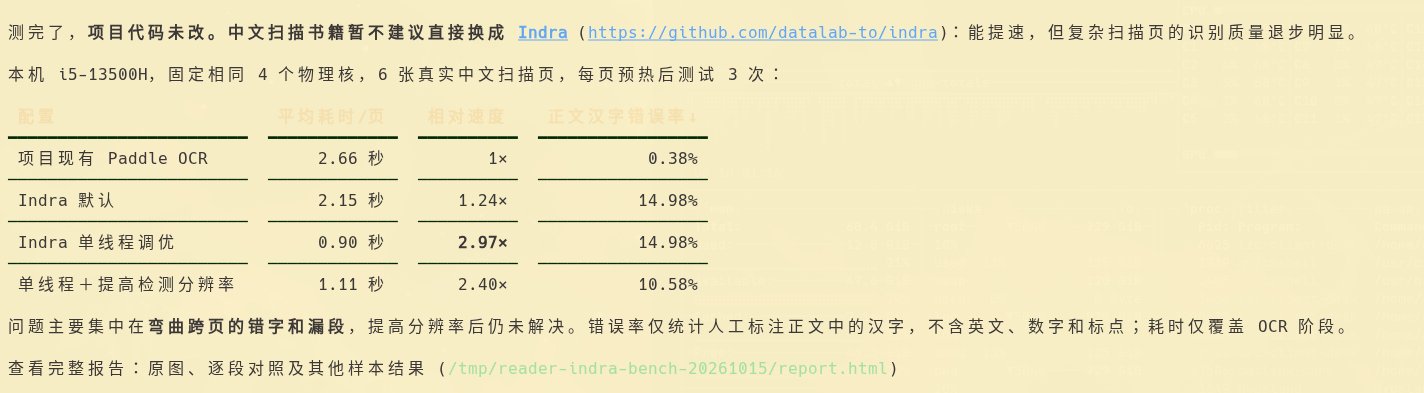
    <div class="x-arch-text">Indra OCR 到底能否替代 Paddle OCR ?<br /><br />这几天发布的 Indra OCR 号称比 Paddle OCR v6 快11倍，我实际测试了， Indra OCR 默认只快 1.24 倍，我给 Indra 深度优化后， 速度只快 2.97 倍，并没有官方生成的11倍，AI分析后， Indra OCR 快 11 倍是 32 个线程叠加的数据</div>
    <div class="x-arch-media">
      <a href="/cdn-media/x/2026-10/2110539989218107644-1.jpg" target="_blank" rel="noopener"><img class="x-arch-img" src="/cdn-media/x/2026-10/2110539989218107644-1.jpg" alt="@manateelazycat 的配图 1/1" loading="lazy" decoding="async" width="1424" height="393" /></a>
    </div>
  </div>
  <div class="x-arch-item">
    <input type="radio" name="xl-2110557373651931267" id="xl-2110557373651931267-zh" class="x-arch-lang-input x-arch-lang-input-zh" checked aria-label="显示译文" /><input type="radio" name="xl-2110557373651931267" id="xl-2110557373651931267-orig" class="x-arch-lang-input x-arch-lang-input-orig" aria-label="显示原文" /><div class="x-arch-head"><img class="x-arch-avatar" src="https://twimg.tweb.xin/twimg/profile_images/1769736308866613249/ddCXmG6-_bigger.jpg" alt="" loading="lazy" referrerpolicy="no-referrer" /><span class="x-arch-kind x-arch-kind-liked" aria-label="赞" title="赞"><svg viewBox="0 0 24 24" fill="none" stroke="currentColor" stroke-width="2.5" stroke-linecap="round" stroke-linejoin="round" aria-hidden="true"><path d="M19 14c1.49-1.46 3-3.21 3-5.5A5.5 5.5 0 0 0 16.5 3c-1.76 0-3 .5-4.5 2-1.5-1.5-2.74-2-4.5-2A5.5 5.5 0 0 0 2 8.5c0 2.3 1.5 4.05 3 5.5l7 7Z" /></svg></span><a class="x-arch-author" href="https://x.com/_chenglou" target="_blank" rel="nofollow noopener" data-name="Cheng Lou" data-avatar="https://twimg.tweb.xin/twimg/profile_images/1769736308866613249/ddCXmG6-_bigger.jpg">@_chenglou</a><span class="x-arch-time">10:24</span><span class="x-arch-lang-switch" role="group" aria-label="切换原文/译文"><label for="xl-2110557373651931267-zh" class="x-arch-lang-opt x-arch-lang-zh">译</label><label for="xl-2110557373651931267-orig" class="x-arch-lang-opt x-arch-lang-orig">原</label></span><a class="x-arch-link" href="https://x.com/_chenglou/status/2110557373651931267" target="_blank" rel="noopener">原推文<svg class="x-arch-ext" viewBox="0 0 24 24" fill="none" stroke="currentColor" stroke-width="2.5" stroke-linecap="round" stroke-linejoin="round" aria-hidden="true"><path d="M7 7h10v10" /><path d="M7 17 17 7" /></svg></a></div>
    <div class="x-arch-text x-arch-orig">My dear friends, I’d like to show you my latest toy project<br /><br />Introducing Handwired: turn your regular JavaScript code into a neural net!<br />- no training<br />- exact outputs vs the JS program<br />- fully differentiable<br /><br />All runnable in a browser, without GPU</div>
    <div class="x-arch-text x-arch-trans">亲爱的朋友们，给你们看看我最新的玩具项目<br /><br />介绍 Handwired：把你普通的 JavaScript 代码变成一个神经网络！<br />- 无需训练<br />- 输出与 JS 程序完全一致<br />- 完全可微分<br /><br />全部可在浏览器里运行，不需要 GPU</div>
    <video class="x-arch-video" preload="none" playsinline poster="/cdn-media/x/2026-10/2110557373651931267-poster.jpg" src="/cdn-media/x/2026-10/2110557373651931267.m3u8" width="1920" height="1080" data-duration="8" aria-label="@_chenglou 的视频"></video>
  </div>
  <div class="x-arch-item">
    <div class="x-arch-head"><img class="x-arch-avatar" src="https://twimg.tweb.xin/twimg/profile_images/1906323582759874560/6Elwf5WN_bigger.jpg" alt="" loading="lazy" referrerpolicy="no-referrer" /><span class="x-arch-kind x-arch-kind-liked" aria-label="赞" title="赞"><svg viewBox="0 0 24 24" fill="none" stroke="currentColor" stroke-width="2.5" stroke-linecap="round" stroke-linejoin="round" aria-hidden="true"><path d="M19 14c1.49-1.46 3-3.21 3-5.5A5.5 5.5 0 0 0 16.5 3c-1.76 0-3 .5-4.5 2-1.5-1.5-2.74-2-4.5-2A5.5 5.5 0 0 0 2 8.5c0 2.3 1.5 4.05 3 5.5l7 7Z" /></svg></span><a class="x-arch-author" href="https://x.com/LinearUncle" target="_blank" rel="nofollow noopener" data-name="LinearUncle" data-avatar="https://twimg.tweb.xin/twimg/profile_images/1906323582759874560/6Elwf5WN_bigger.jpg">@LinearUncle</a><span class="x-arch-time">11:35</span><a class="x-arch-link" href="https://x.com/LinearUncle/status/2110575194758946835" target="_blank" rel="noopener">原推文<svg class="x-arch-ext" viewBox="0 0 24 24" fill="none" stroke="currentColor" stroke-width="2.5" stroke-linecap="round" stroke-linejoin="round" aria-hidden="true"><path d="M7 7h10v10" /><path d="M7 17 17 7" /></svg></a></div>
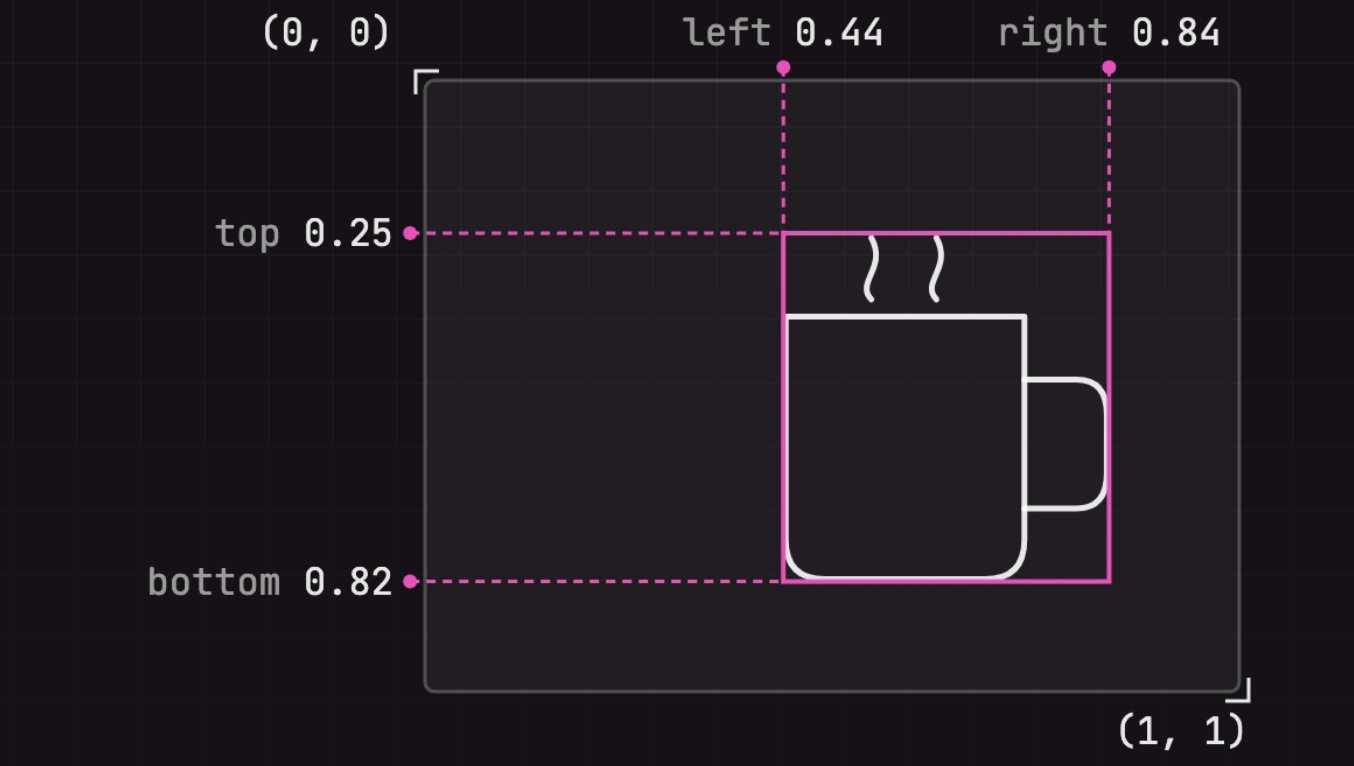
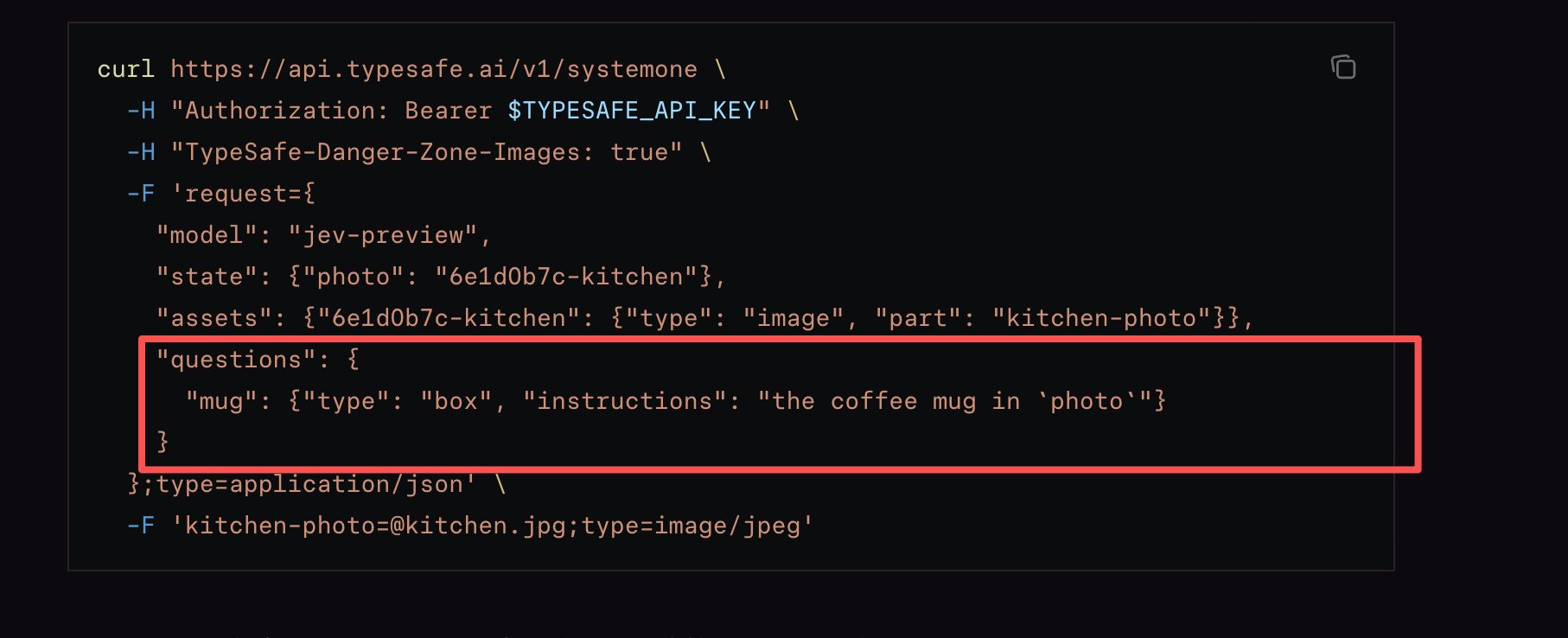
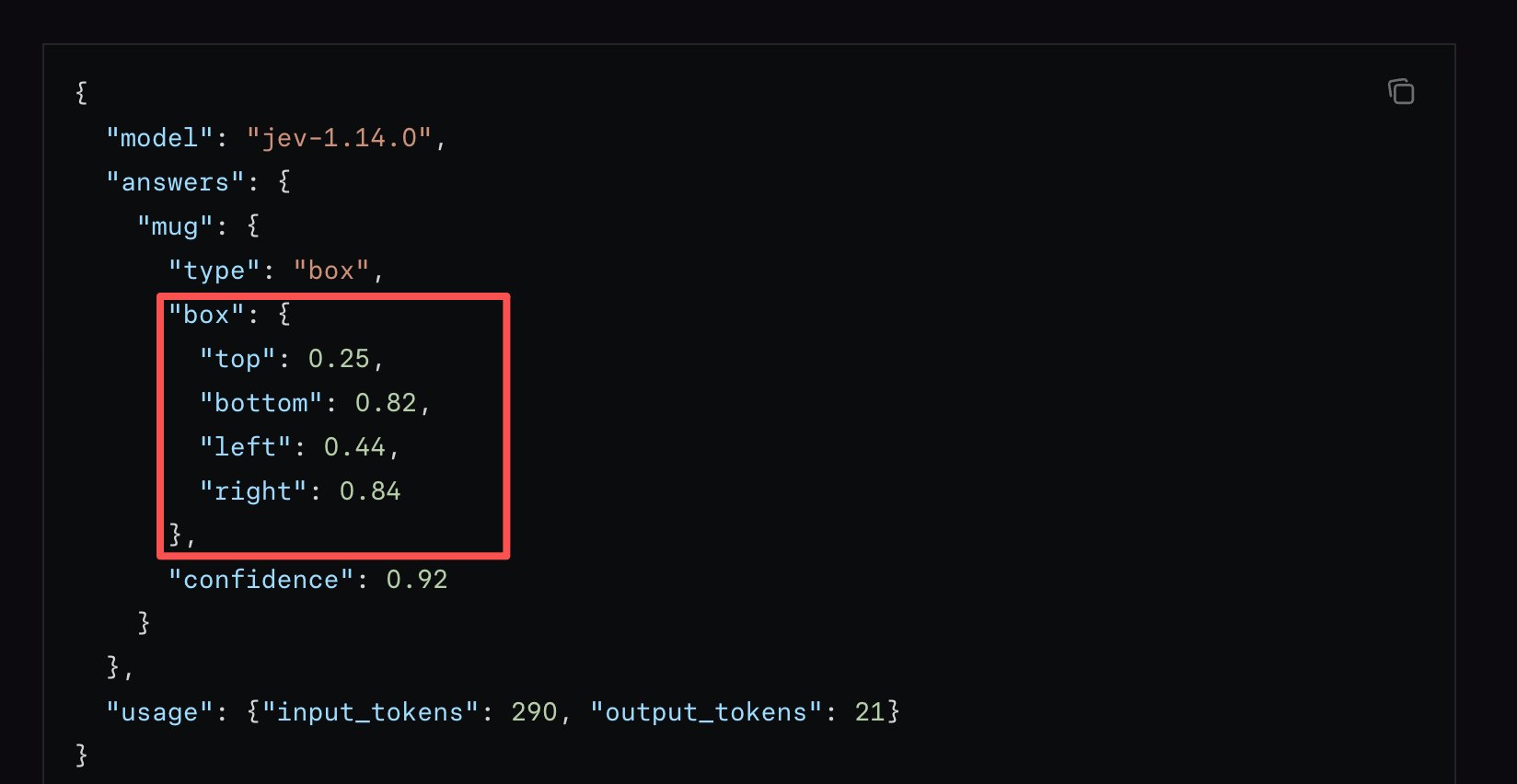
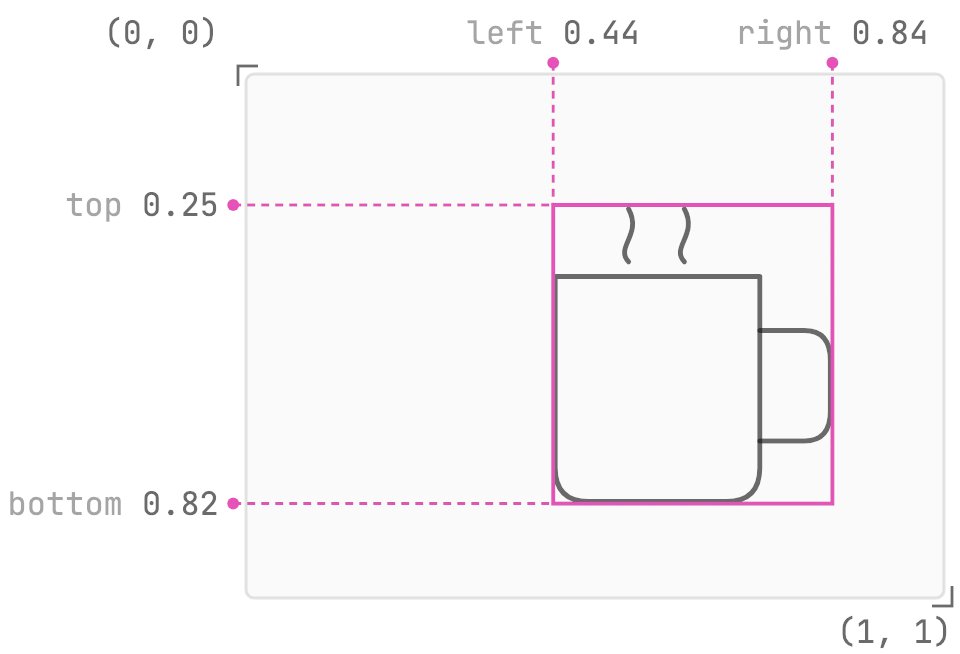
    <div class="x-arch-text">Jev 拿到钱后，开始猛卷了！<br /><br />新版能看图，上下文扩大 4 倍。我觉得最重要的是新增的 box 类型问题：直接告诉你物体在图里的位置和大小。<br /><br />比如问：「咖啡杯在哪里？」会返回上下左右的坐标。<br /><br />做 Computer Use 时，即使没有可用的元素树，也能靠截图返回所有UI 元素坐标，再快速点击！</div>
    <div class="x-arch-quote"><input type="radio" name="xq-2110536690037391732" id="xq-2110536690037391732-zh" class="x-arch-lang-input x-arch-lang-input-zh" checked aria-label="显示引用译文" /><input type="radio" name="xq-2110536690037391732" id="xq-2110536690037391732-orig" class="x-arch-lang-input x-arch-lang-input-orig" aria-label="显示引用原文" /><div class="x-arch-quote-head"><span class="x-arch-quote-label">引用</span><a class="x-arch-quote-author" href="https://x.com/typesafeai" target="_blank" rel="nofollow noopener">@typesafeai</a><span class="x-arch-quote-name">TypeSafe AI</span><span class="x-arch-lang-switch" role="group" aria-label="切换引用原文/译文"><label for="xq-2110536690037391732-zh" class="x-arch-lang-opt x-arch-lang-zh">译</label><label for="xq-2110536690037391732-orig" class="x-arch-lang-opt x-arch-lang-orig">原</label></span><a class="x-arch-quote-link" href="https://x.com/typesafeai/status/2110536690037391732" target="_blank" rel="noopener">原帖</a></div><div class="x-arch-quote-text x-arch-quote-orig">we meant it when we said machine-native types go far, far beyond just decisions, and were very careful about how we defined System One models.<br /><br />introducing the bounding box primitive to Jev 1.14, for locating at the speed of Jev.<br /><br />deets in the docs: <a href="https://docs.typesafe.ai/go/box" target="_blank" rel="noopener">https://docs.typesafe.ai/go/box</a></div><div class="x-arch-quote-text x-arch-quote-trans">我们说机器原生类型远不止决策，是认真的，而且我们非常谨慎地定义了 System One 模型。<br /><br />为 Jev 1.14 引入 bounding box 原语，以 Jev 的速度进行定位。<br /><br />细节见文档：<a href="https://docs.typesafe.ai/go/box" target="_blank" rel="noopener">https://docs.typesafe.ai/go/box</a></div></div>
    <div class="x-arch-media">
      <a href="/cdn-media/x/2026-10/2110575194758946835-1.jpg" target="_blank" rel="noopener"><img class="x-arch-img" src="/cdn-media/x/2026-10/2110575194758946835-1.jpg" alt="@LinearUncle 的配图 1/4" loading="lazy" decoding="async" width="1354" height="766" /></a>
      <a href="/cdn-media/x/2026-10/2110575194758946835-2.jpg" target="_blank" rel="noopener"><img class="x-arch-img" src="/cdn-media/x/2026-10/2110575194758946835-2.jpg" alt="@LinearUncle 的配图 2/4" loading="lazy" decoding="async" width="1814" height="738" /></a>
      <a href="/cdn-media/x/2026-10/2110575194758946835-3.jpg" target="_blank" rel="noopener"><img class="x-arch-img" src="/cdn-media/x/2026-10/2110575194758946835-3.jpg" alt="@LinearUncle 的配图 3/4" loading="lazy" decoding="async" width="1648" height="852" /></a>
      <a href="/cdn-media/x/2026-10/2110575194758946835-4.jpg" target="_blank" rel="noopener"><img class="x-arch-img" src="/cdn-media/x/2026-10/2110575194758946835-4.jpg" alt="@LinearUncle 的配图 4/4" loading="lazy" decoding="async" width="960" height="654" /></a>
    </div>
  </div>
  <div class="x-arch-item">
    <div class="x-arch-head"><img class="x-arch-avatar" src="https://twimg.tweb.xin/twimg/profile_images/1660876795347111937/EIo6fIr4_bigger.jpg" alt="" loading="lazy" referrerpolicy="no-referrer" /><span class="x-arch-kind x-arch-kind-liked" aria-label="赞" title="赞"><svg viewBox="0 0 24 24" fill="none" stroke="currentColor" stroke-width="2.5" stroke-linecap="round" stroke-linejoin="round" aria-hidden="true"><path d="M19 14c1.49-1.46 3-3.21 3-5.5A5.5 5.5 0 0 0 16.5 3c-1.76 0-3 .5-4.5 2-1.5-1.5-2.74-2-4.5-2A5.5 5.5 0 0 0 2 8.5c0 2.3 1.5 4.05 3 5.5l7 7Z" /></svg></span><a class="x-arch-author" href="https://x.com/GitHub_Daily" target="_blank" rel="nofollow noopener" data-name="GitHubDaily" data-avatar="https://twimg.tweb.xin/twimg/profile_images/1660876795347111937/EIo6fIr4_bigger.jpg">@GitHub_Daily</a><span class="x-arch-time">15:30</span><a class="x-arch-link" href="https://x.com/GitHub_Daily/status/2110634283799089421" target="_blank" rel="noopener">原推文<svg class="x-arch-ext" viewBox="0 0 24 24" fill="none" stroke="currentColor" stroke-width="2.5" stroke-linecap="round" stroke-linejoin="round" aria-hidden="true"><path d="M7 7h10v10" /><path d="M7 17 17 7" /></svg></a></div>
    <div class="x-arch-text">3Blue1Brown 那种数学动画是用 Manim 做的，画面是真好看，就是渲染一段视频得等挺久。<br /><br />ManimGX 沿用了 Manim 社区版的 Python 写法，底层换成 Rust 加 GPU 来渲染，原来会写 Manim 的上手没什么门槛。<br /><br />官方测试里，36.2 秒的 1080p60 视频 3.08 秒就渲染完了，比 Manim 社区版快 90 多倍。</div>
    <video class="x-arch-video" preload="none" playsinline poster="/cdn-media/x/2026-10/2110634283799089421-poster.jpg" src="/cdn-media/x/2026-10/2110634283799089421-video.mp4" width="1280" height="720" data-duration="214" aria-label="@GitHub_Daily 的视频"></video>
  </div>
  <div class="x-arch-item">
    <input type="radio" name="xl-2110656515996832231" id="xl-2110656515996832231-zh" class="x-arch-lang-input x-arch-lang-input-zh" checked aria-label="显示译文" /><input type="radio" name="xl-2110656515996832231" id="xl-2110656515996832231-orig" class="x-arch-lang-input x-arch-lang-input-orig" aria-label="显示原文" /><div class="x-arch-head"><img class="x-arch-avatar" src="https://twimg.tweb.xin/twimg/profile_images/2122817143783776257/0VUcNXYh_bigger.jpg" alt="" loading="lazy" referrerpolicy="no-referrer" /><span class="x-arch-kind x-arch-kind-liked" aria-label="赞" title="赞"><svg viewBox="0 0 24 24" fill="none" stroke="currentColor" stroke-width="2.5" stroke-linecap="round" stroke-linejoin="round" aria-hidden="true"><path d="M19 14c1.49-1.46 3-3.21 3-5.5A5.5 5.5 0 0 0 16.5 3c-1.76 0-3 .5-4.5 2-1.5-1.5-2.74-2-4.5-2A5.5 5.5 0 0 0 2 8.5c0 2.3 1.5 4.05 3 5.5l7 7Z" /></svg></span><a class="x-arch-author" href="https://x.com/davidhaz" target="_blank" rel="nofollow noopener" data-name="David Haz" data-avatar="https://twimg.tweb.xin/twimg/profile_images/2122817143783776257/0VUcNXYh_bigger.jpg">@davidhaz</a><span class="x-arch-time">16:58</span><span class="x-arch-lang-switch" role="group" aria-label="切换原文/译文"><label for="xl-2110656515996832231-zh" class="x-arch-lang-opt x-arch-lang-zh">译</label><label for="xl-2110656515996832231-orig" class="x-arch-lang-opt x-arch-lang-orig">原</label></span><a class="x-arch-link" href="https://x.com/davidhaz/status/2110656515996832231" target="_blank" rel="noopener">原推文<svg class="x-arch-ext" viewBox="0 0 24 24" fill="none" stroke="currentColor" stroke-width="2.5" stroke-linecap="round" stroke-linejoin="round" aria-hidden="true"><path d="M7 7h10v10" /><path d="M7 17 17 7" /></svg></a></div>
    <div class="x-arch-text x-arch-orig">Introducing React Bits 2.0<br /><br />The library you know, rebuilt. Components now look sharper, move smoother and start from presets, and our design tools were fully rebuilt from scratch.<br /><br />216 animated React components, free and open source as always.<br /><br /><a href="https://reactbits.dev" target="_blank" rel="noopener">https://reactbits.dev</a></div>
    <div class="x-arch-text x-arch-trans">介绍 React Bits 2.0<br /><br />您熟悉的库，重新构建。组件现在外观更锐利，移动更流畅，并从预设开始，我们的设计工具完全从零重建。<br /><br />216 个动画 React 组件，一如既往地免费和开源。<br /><br /><br />https://<br />reactbits.dev</div>
    <video class="x-arch-video" preload="none" playsinline poster="/cdn-media/x/2026-10/2110656515996832231-poster.jpg" src="/cdn-media/x/2026-10/2110656515996832231-video.mp4" width="1280" height="720" data-duration="38" aria-label="@davidhaz 的视频"></video>
  </div>
  <div class="x-arch-item">
    <div class="x-arch-head"><img class="x-arch-avatar" src="https://twimg.tweb.xin/twimg/profile_images/2083816698608828416/4gkUrQkT_bigger.png" alt="" loading="lazy" referrerpolicy="no-referrer" /><span class="x-arch-kind x-arch-kind-liked" aria-label="赞" title="赞"><svg viewBox="0 0 24 24" fill="none" stroke="currentColor" stroke-width="2.5" stroke-linecap="round" stroke-linejoin="round" aria-hidden="true"><path d="M19 14c1.49-1.46 3-3.21 3-5.5A5.5 5.5 0 0 0 16.5 3c-1.76 0-3 .5-4.5 2-1.5-1.5-2.74-2-4.5-2A5.5 5.5 0 0 0 2 8.5c0 2.3 1.5 4.05 3 5.5l7 7Z" /></svg></span><a class="x-arch-author" href="https://x.com/konghayao" target="_blank" rel="nofollow noopener" data-name="KonghaYao - 江夏尧" data-avatar="https://twimg.tweb.xin/twimg/profile_images/2083816698608828416/4gkUrQkT_bigger.png">@konghayao</a><span class="x-arch-time">18:23</span><a class="x-arch-link" href="https://x.com/konghayao/status/2110677949380985087" target="_blank" rel="noopener">原推文<svg class="x-arch-ext" viewBox="0 0 24 24" fill="none" stroke="currentColor" stroke-width="2.5" stroke-linecap="round" stroke-linejoin="round" aria-hidden="true"><path d="M7 7h10v10" /><path d="M7 17 17 7" /></svg></a></div>
    <div class="x-arch-text">Rust 版本的 Sentry，终于，监控体系快要全了<br /><br /><a href="https://github.com/rustrak/rustrak" target="_blank" rel="noopener">https://github.com/rustrak/rustrak</a></div>
  </div>
  <div class="x-arch-item">
    <div class="x-arch-head"><img class="x-arch-avatar" src="https://twimg.tweb.xin/twimg/profile_images/1667110127651135493/09y0YbZy_bigger.jpg" alt="" loading="lazy" referrerpolicy="no-referrer" /><span class="x-arch-kind x-arch-kind-liked" aria-label="赞" title="赞"><svg viewBox="0 0 24 24" fill="none" stroke="currentColor" stroke-width="2.5" stroke-linecap="round" stroke-linejoin="round" aria-hidden="true"><path d="M19 14c1.49-1.46 3-3.21 3-5.5A5.5 5.5 0 0 0 16.5 3c-1.76 0-3 .5-4.5 2-1.5-1.5-2.74-2-4.5-2A5.5 5.5 0 0 0 2 8.5c0 2.3 1.5 4.05 3 5.5l7 7Z" /></svg></span><a class="x-arch-author" href="https://x.com/yrmkejun" target="_blank" rel="nofollow noopener" data-name="KeJun" data-avatar="https://twimg.tweb.xin/twimg/profile_images/1667110127651135493/09y0YbZy_bigger.jpg">@yrmkejun</a><span class="x-arch-time">19:06</span><a class="x-arch-link" href="https://x.com/yrmkejun/status/2110688848267087993" target="_blank" rel="noopener">原推文<svg class="x-arch-ext" viewBox="0 0 24 24" fill="none" stroke="currentColor" stroke-width="2.5" stroke-linecap="round" stroke-linejoin="round" aria-hidden="true"><path d="M7 7h10v10" /><path d="M7 17 17 7" /></svg></a></div>
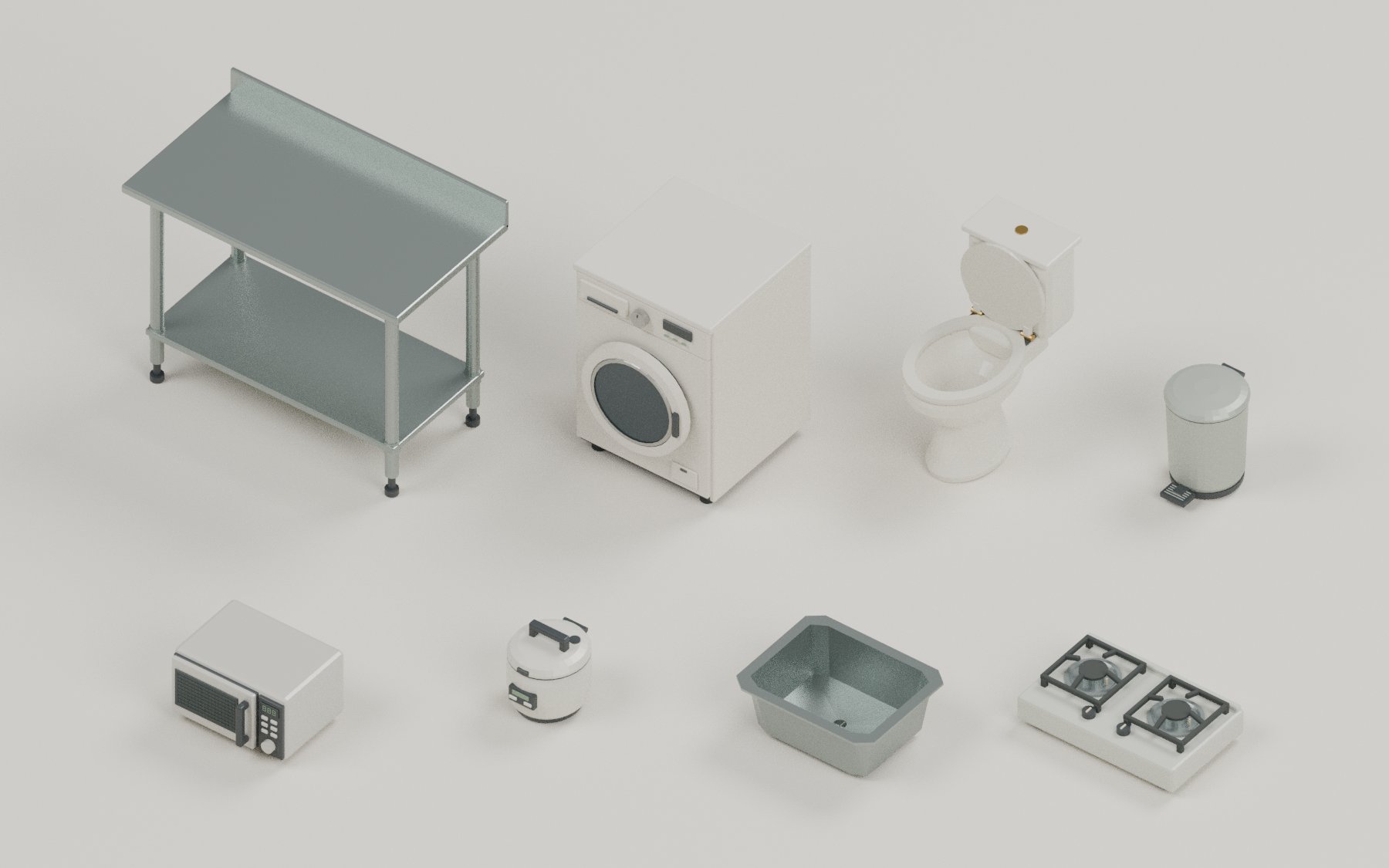
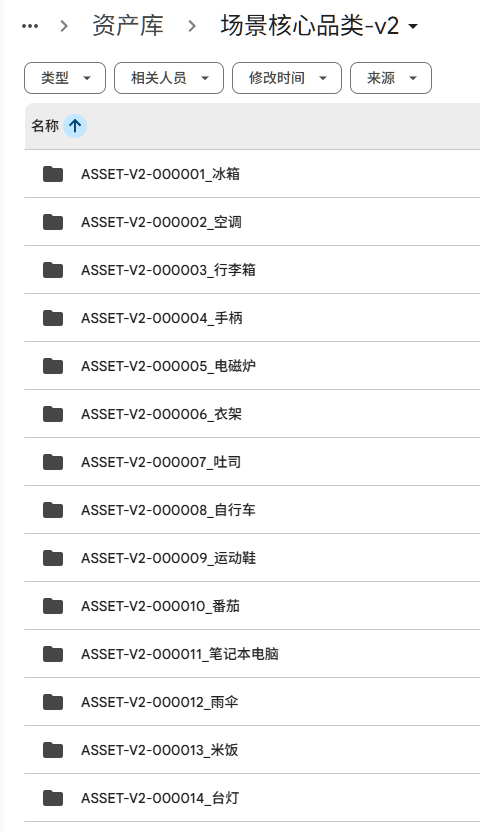
    <div class="x-arch-text">我擦，一觉醒来已经做了 200 多个低多边形3D模型了 <br />0 Token 消耗<br /><br />受 <br />@Fomsky_Wei<br /> 的启发，我直接给设立了 10000 个不同场景不同类目的目标！</div>
    <div class="x-arch-quote"><div class="x-arch-quote-head"><span class="x-arch-quote-label">引用</span><a class="x-arch-quote-author" href="https://x.com/yrmkejun" target="_blank" rel="nofollow noopener">@yrmkejun</a><span class="x-arch-quote-name">KeJun</span><a class="x-arch-quote-link" href="https://x.com/yrmkejun/status/2109892467319300212" target="_blank" rel="noopener">原帖</a></div><div class="x-arch-quote-text">不懂就问，如何最大化利用 GPT Dots？</div></div>
    <div class="x-arch-media">
      <a href="/cdn-media/x/2026-10/2110688848267087993-1.jpg" target="_blank" rel="noopener"><img class="x-arch-img" src="/cdn-media/x/2026-10/2110688848267087993-1.jpg" alt="@yrmkejun 的配图 1/3" loading="lazy" decoding="async" width="1800" height="1125" /></a>
      <a href="/cdn-media/x/2026-10/2110688848267087993-2.png" target="_blank" rel="noopener"><img class="x-arch-img" src="/cdn-media/x/2026-10/2110688848267087993-2.png" alt="@yrmkejun 的配图 2/3" loading="lazy" decoding="async" width="480" height="832" /></a>
      <a href="/cdn-media/x/2026-10/2110688848267087993-3.png" target="_blank" rel="noopener"><img class="x-arch-img" src="/cdn-media/x/2026-10/2110688848267087993-3.png" alt="@yrmkejun 的配图 3/3" loading="lazy" decoding="async" width="606" height="472" /></a>
    </div>
  </div>
  <div class="x-arch-item">
    <div class="x-arch-head"><img class="x-arch-avatar" src="https://twimg.tweb.xin/twimg/profile_images/1988508365274968065/t6BOO_uc_bigger.jpg" alt="" loading="lazy" referrerpolicy="no-referrer" /><span class="x-arch-kind x-arch-kind-liked" aria-label="赞" title="赞"><svg viewBox="0 0 24 24" fill="none" stroke="currentColor" stroke-width="2.5" stroke-linecap="round" stroke-linejoin="round" aria-hidden="true"><path d="M19 14c1.49-1.46 3-3.21 3-5.5A5.5 5.5 0 0 0 16.5 3c-1.76 0-3 .5-4.5 2-1.5-1.5-2.74-2-4.5-2A5.5 5.5 0 0 0 2 8.5c0 2.3 1.5 4.05 3 5.5l7 7Z" /></svg></span><a class="x-arch-author" href="https://x.com/chenchengpro" target="_blank" rel="nofollow noopener" data-name="陈成" data-avatar="https://twimg.tweb.xin/twimg/profile_images/1988508365274968065/t6BOO_uc_bigger.jpg">@chenchengpro</a><span class="x-arch-time">19:47</span><a class="x-arch-link" href="https://x.com/chenchengpro/status/2110699165051453771" target="_blank" rel="noopener">原推文<svg class="x-arch-ext" viewBox="0 0 24 24" fill="none" stroke="currentColor" stroke-width="2.5" stroke-linecap="round" stroke-linejoin="round" aria-hidden="true"><path d="M7 7h10v10" /><path d="M7 17 17 7" /></svg></a></div>
    <div class="x-arch-text">我写了个代码编辑器，叫 Mayoi。<br /><br />现在大家的工作方式变了，已经很少手动改文件。<br /><br />所以，每天大部分需要用到 editor 的场景是：<br />1. 看 diff<br />2. review agent 写的代码<br />3. 打开几个文件确认一下<br />3. 开个终端，起下一个 agent<br /><br />VS Code 和 Cursor 是为以前那种写法造的。Cursor 装完快 1</div>
    <video class="x-arch-video" preload="none" playsinline poster="/cdn-media/x/2026-10/2110699165051453771-poster.jpg" src="/cdn-media/x/2026-10/2110699165051453771-video.mp4" width="1280" height="720" data-duration="30" aria-label="@chenchengpro 的视频"></video>
  </div>
  <div class="x-arch-item">
    <input type="radio" name="xl-2110738519597437387" id="xl-2110738519597437387-zh" class="x-arch-lang-input x-arch-lang-input-zh" checked aria-label="显示译文" /><input type="radio" name="xl-2110738519597437387" id="xl-2110738519597437387-orig" class="x-arch-lang-input x-arch-lang-input-orig" aria-label="显示原文" /><div class="x-arch-head"><img class="x-arch-avatar" src="https://twimg.tweb.xin/twimg/profile_images/2122817143783776257/0VUcNXYh_bigger.jpg" alt="" loading="lazy" referrerpolicy="no-referrer" /><span class="x-arch-kind x-arch-kind-liked" aria-label="赞" title="赞"><svg viewBox="0 0 24 24" fill="none" stroke="currentColor" stroke-width="2.5" stroke-linecap="round" stroke-linejoin="round" aria-hidden="true"><path d="M19 14c1.49-1.46 3-3.21 3-5.5A5.5 5.5 0 0 0 16.5 3c-1.76 0-3 .5-4.5 2-1.5-1.5-2.74-2-4.5-2A5.5 5.5 0 0 0 2 8.5c0 2.3 1.5 4.05 3 5.5l7 7Z" /></svg></span><a class="x-arch-author" href="https://x.com/davidhaz" target="_blank" rel="nofollow noopener" data-name="David Haz" data-avatar="https://twimg.tweb.xin/twimg/profile_images/2122817143783776257/0VUcNXYh_bigger.jpg">@davidhaz</a><span class="x-arch-time">22:24</span><span class="x-arch-lang-switch" role="group" aria-label="切换原文/译文"><label for="xl-2110738519597437387-zh" class="x-arch-lang-opt x-arch-lang-zh">译</label><label for="xl-2110738519597437387-orig" class="x-arch-lang-opt x-arch-lang-orig">原</label></span><a class="x-arch-link" href="https://x.com/davidhaz/status/2110738519597437387" target="_blank" rel="noopener">原推文<svg class="x-arch-ext" viewBox="0 0 24 24" fill="none" stroke="currentColor" stroke-width="2.5" stroke-linecap="round" stroke-linejoin="round" aria-hidden="true"><path d="M7 7h10v10" /><path d="M7 17 17 7" /></svg></a></div>
    <div class="x-arch-text x-arch-orig">This Fluid Glass component got a well deserved update.<br /><br />When you click, it morphs into the next shape. Fluid.<br /><a href="https://reactbits.dev/components/fluid-glass" target="_blank" rel="noopener">https://reactbits.dev/components/fluid-glass</a></div>
    <div class="x-arch-text x-arch-trans">这个 Fluid Glass 组件迎来了一次应得的更新。<br /><br />点击时，它会流变形变成下一个形状。很流体。<br /><a href="https://reactbits.dev/components/fluid-glass" target="_blank" rel="noopener">https://reactbits.dev/components/fluid-glass</a></div>
    <video class="x-arch-video" preload="none" playsinline poster="/cdn-media/x/2026-10/2110738519597437387-poster.jpg" src="/cdn-media/x/2026-10/2110738519597437387.m3u8" width="1154" height="722" data-duration="21" aria-label="@davidhaz 的视频"></video>
  </div>
  <div class="x-arch-item">
    <div class="x-arch-head"><img class="x-arch-avatar" src="https://twimg.tweb.xin/twimg/profile_images/2073483311520063489/Wz-2nK7A_bigger.jpg" alt="" loading="lazy" referrerpolicy="no-referrer" /><span class="x-arch-kind x-arch-kind-liked" aria-label="赞" title="赞"><svg viewBox="0 0 24 24" fill="none" stroke="currentColor" stroke-width="2.5" stroke-linecap="round" stroke-linejoin="round" aria-hidden="true"><path d="M19 14c1.49-1.46 3-3.21 3-5.5A5.5 5.5 0 0 0 16.5 3c-1.76 0-3 .5-4.5 2-1.5-1.5-2.74-2-4.5-2A5.5 5.5 0 0 0 2 8.5c0 2.3 1.5 4.05 3 5.5l7 7Z" /></svg></span><a class="x-arch-author" href="https://x.com/unixzii" target="_blank" rel="nofollow noopener" data-name="Cyandev" data-avatar="https://twimg.tweb.xin/twimg/profile_images/2073483311520063489/Wz-2nK7A_bigger.jpg">@unixzii</a><span class="x-arch-time">23:19</span><a class="x-arch-link" href="https://x.com/unixzii/status/2110752360192770556" target="_blank" rel="noopener">原推文<svg class="x-arch-ext" viewBox="0 0 24 24" fill="none" stroke="currentColor" stroke-width="2.5" stroke-linecap="round" stroke-linejoin="round" aria-hidden="true"><path d="M7 7h10v10" /><path d="M7 17 17 7" /></svg></a></div>
    <div class="x-arch-text">一个很 experimental 的特性，尝试直接用 macOS 的 Core Animation 渲染 UIKit 的 scene。如果你使用 MacBook Pro 的屏幕，就能直接解锁 120 fps 和 HDR 的调试体验。</div>
    <video class="x-arch-video" preload="none" playsinline poster="/cdn-media/x/2026-10/2110752360192770556-poster.jpg" src="/cdn-media/x/2026-10/2110752360192770556-video.mp4" width="1010" height="720" data-duration="31" aria-label="@unixzii 的视频"></video>
  </div>
  <div class="x-arch-item">
    <input type="radio" name="xl-2110761365681873237" id="xl-2110761365681873237-zh" class="x-arch-lang-input x-arch-lang-input-zh" checked aria-label="显示译文" /><input type="radio" name="xl-2110761365681873237" id="xl-2110761365681873237-orig" class="x-arch-lang-input x-arch-lang-input-orig" aria-label="显示原文" /><div class="x-arch-head"><img class="x-arch-avatar" src="https://twimg.tweb.xin/twimg/profile_images/1286621650562228224/TAo9_z5s_bigger.jpg" alt="" loading="lazy" referrerpolicy="no-referrer" /><span class="x-arch-kind x-arch-kind-liked" aria-label="赞" title="赞"><svg viewBox="0 0 24 24" fill="none" stroke="currentColor" stroke-width="2.5" stroke-linecap="round" stroke-linejoin="round" aria-hidden="true"><path d="M19 14c1.49-1.46 3-3.21 3-5.5A5.5 5.5 0 0 0 16.5 3c-1.76 0-3 .5-4.5 2-1.5-1.5-2.74-2-4.5-2A5.5 5.5 0 0 0 2 8.5c0 2.3 1.5 4.05 3 5.5l7 7Z" /></svg></span><a class="x-arch-author" href="https://x.com/Jakubantalik" target="_blank" rel="nofollow noopener" data-name="Jakub Antalik" data-avatar="https://twimg.tweb.xin/twimg/profile_images/1286621650562228224/TAo9_z5s_bigger.jpg">@Jakubantalik</a><span class="x-arch-time">23:55</span><span class="x-arch-lang-switch" role="group" aria-label="切换原文/译文"><label for="xl-2110761365681873237-zh" class="x-arch-lang-opt x-arch-lang-zh">译</label><label for="xl-2110761365681873237-orig" class="x-arch-lang-opt x-arch-lang-orig">原</label></span><a class="x-arch-link" href="https://x.com/Jakubantalik/status/2110761365681873237" target="_blank" rel="noopener">原推文<svg class="x-arch-ext" viewBox="0 0 24 24" fill="none" stroke="currentColor" stroke-width="2.5" stroke-linecap="round" stroke-linejoin="round" aria-hidden="true"><path d="M7 7h10v10" /><path d="M7 17 17 7" /></svg></a></div>
    <div class="x-arch-text x-arch-orig">Metal effect is now available for SwiftUI. As expected, it reacts and bends when a magnet is nearby.<br /><br />Ready to use on <a href="https://libraries.dev" target="_blank" rel="noopener">https://libraries.dev</a></div>
    <div class="x-arch-text x-arch-trans">金属效果现已登陆 SwiftUI。不出所料，磁铁靠近时它会作出反应并弯曲。<br /><br />即取即用：<a href="https://libraries.dev" target="_blank" rel="noopener">https://libraries.dev</a></div>
    <video class="x-arch-video" preload="none" playsinline poster="/cdn-media/x/2026-10/2110761365681873237-poster.jpg" src="/cdn-media/x/2026-10/2110761365681873237-video.mp4" width="1042" height="720" data-duration="12" aria-label="@Jakubantalik 的视频"></video>
  </div>
</div>